Join us at FabCon Atlanta from March 16 - 20, 2026, for the ultimate Fabric, Power BI, AI and SQL community-led event. Save $200 with code FABCOMM.
Register now!The Power BI Data Visualization World Championships is back! It's time to submit your entry. Live now!
In the following table as example :
Table1
| column |
| -1,14 |
| -0,07 |
| 0,67 |
| 1,00 |
| -2,77 |
which format string should be used to get this result:
| column |
| -1,14% |
| -0,07% |
| 0,67% |
| 1,00% |
| -2,77% |
(',' is for decimal number -2,77 =-2.77)
I know there are other ways in tabular to do this but I should do this with Format function.
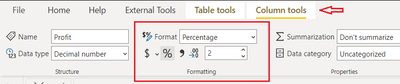
One solution is to change the column to percentage directly from DATA >>Column Tools >> Formatting.
you can also format your column using DAX
Column = FORMAT(DIVIDE(Sheet1[Profit],10000),"percent")
And if you want to convert "," to "." then use the following DAX, and to convert it into percentage use the above steps.
column = SUBSTITUTE(Sheet1[Profit],",",".")
@Anonymous
In our example both numbers have "," Do you need to convert to "," or "."
⭕ Subscribe and learn Power BI from these videos
⚪ Website ⚪ LinkedIn ⚪ PBI User Group
I need to convert to ','(as example shows) . I only wanted to be clear 🙂
@Anonymous
Not quite clear about what you are trying to do but add the following column to convert :
Column = SUBSTITUTE(SUBSTITUTE(Table2[Column1],",","."),"%","") /100
⭕ Subscribe and learn Power BI from these videos
⚪ Website ⚪ LinkedIn ⚪ PBI User Group
@Fowmy I get this:
As I mentioned I want to use Format function with a string of # and 0. I've tested different type of string like "#0,00%" (it's just an example) but don't get what I want.
I am still confused about the what you exactly need. Your locale is different from mine too.
refert to: https://dax.guide/format/
⭕ Subscribe and learn Power BI from these videos
⚪ Website ⚪ LinkedIn ⚪ PBI User Group
The Power BI Data Visualization World Championships is back! It's time to submit your entry.
| User | Count |
|---|---|
| 47 | |
| 45 | |
| 33 | |
| 33 | |
| 30 |
| User | Count |
|---|---|
| 136 | |
| 116 | |
| 58 | |
| 58 | |
| 56 |