Join us at FabCon Atlanta from March 16 - 20, 2026, for the ultimate Fabric, Power BI, AI and SQL community-led event. Save $200 with code FABCOMM.
Register now!Vote for your favorite vizzies from the Power BI Dataviz World Championship submissions. Vote now!
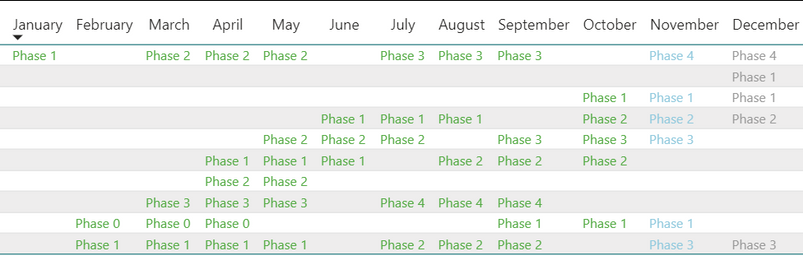
Hi all, I have a table below:
I wanted to know if it's possible in DAX to make the formatting dynamic with the current month. I would like this table to format values green if month has passed, blue if current month, gray if upcoming month and ideally update automatically when a new year starts.
I was thinking something like using the stock data, using an IF() statement and then applying today(), month(), and switch() (for the switching of text colors) might be a way to do it, but im not sure how.
is this possible? Thanks.
Solved! Go to Solution.
Hello @donovan_smith44
You can write a measure to read the month and return the color you want then use that measure to apply formatting to the text.
First the measure:
Formatting =
VAR _Month = MONTH ( LASTDATE ( Dates[Date] ) )
VAR _ThisMonth = MONTH ( TODAY() )
RETURN
SWITCH (
TRUE(),
_Month < _ThisMonth, "#62B153",
_Month = _ThisMonth, "#A2D2E3",
"#A2A2A2"
)
Those are the hex codes for the colors in your screen shot.
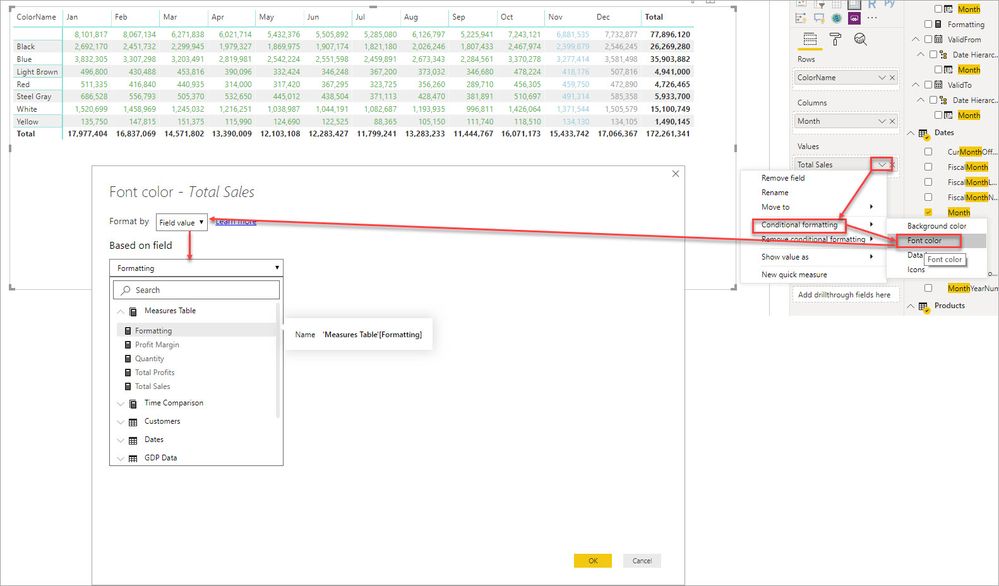
Then we apply the formatting:
@donovan_smith44 you are on right track, just create a measure with colors and then use that in conditional formatting. You can change column name and color as per your requirement.
KPI =
VAR __currentMonthStart = EOMONTH ( TODAY(), -1 ) + 1
VAR __currentMonthEnd = EOMONTH ( TODAY(), 0 )
VAR __month = MAX ( Phase[Month] )
RETURN
SWITCH ( TRUE(),
__month < __currentMonthStart, "Red",
__month >= __currentMonthStart && __month <= __currentMonthEnd, "Blue",
"Green"
)
Subscribe to the @PowerBIHowTo YT channel for an upcoming video on List and Record functions in Power Query!!
Learn Power BI and Fabric - subscribe to our YT channel - Click here: @PowerBIHowTo
If my solution proved useful, I'd be delighted to receive Kudos. When you put effort into asking a question, it's equally thoughtful to acknowledge and give Kudos to the individual who helped you solve the problem. It's a small gesture that shows appreciation and encouragement! ❤
Did I answer your question? Mark my post as a solution. Proud to be a Super User! Appreciate your Kudos 🙂
Feel free to email me with any of your BI needs.
@donovan_smith44 you are on right track, just create a measure with colors and then use that in conditional formatting. You can change column name and color as per your requirement.
KPI =
VAR __currentMonthStart = EOMONTH ( TODAY(), -1 ) + 1
VAR __currentMonthEnd = EOMONTH ( TODAY(), 0 )
VAR __month = MAX ( Phase[Month] )
RETURN
SWITCH ( TRUE(),
__month < __currentMonthStart, "Red",
__month >= __currentMonthStart && __month <= __currentMonthEnd, "Blue",
"Green"
)
Subscribe to the @PowerBIHowTo YT channel for an upcoming video on List and Record functions in Power Query!!
Learn Power BI and Fabric - subscribe to our YT channel - Click here: @PowerBIHowTo
If my solution proved useful, I'd be delighted to receive Kudos. When you put effort into asking a question, it's equally thoughtful to acknowledge and give Kudos to the individual who helped you solve the problem. It's a small gesture that shows appreciation and encouragement! ❤
Did I answer your question? Mark my post as a solution. Proud to be a Super User! Appreciate your Kudos 🙂
Feel free to email me with any of your BI needs.
Thank you so much this is great.
Hello @donovan_smith44
You can write a measure to read the month and return the color you want then use that measure to apply formatting to the text.
First the measure:
Formatting =
VAR _Month = MONTH ( LASTDATE ( Dates[Date] ) )
VAR _ThisMonth = MONTH ( TODAY() )
RETURN
SWITCH (
TRUE(),
_Month < _ThisMonth, "#62B153",
_Month = _ThisMonth, "#A2D2E3",
"#A2A2A2"
)
Those are the hex codes for the colors in your screen shot.
Then we apply the formatting:
Vote for your favorite vizzies from the Power BI World Championship submissions!
If you love stickers, then you will definitely want to check out our Community Sticker Challenge!
Check out the January 2026 Power BI update to learn about new features.
| User | Count |
|---|---|
| 64 | |
| 56 | |
| 43 | |
| 20 | |
| 17 |
| User | Count |
|---|---|
| 123 | |
| 108 | |
| 44 | |
| 32 | |
| 24 |