cancel
Showing results for 
Search instead for 
Did you mean: 

Next up in the FabCon + SQLCon recap series: The roadmap for Microsoft SQL and Maximizing Developer experiences in Fabric. All sessions are available on-demand after the live show. Register now

Reply
than689
Helper I
Helper I

Format Matrix Grand Total like Row

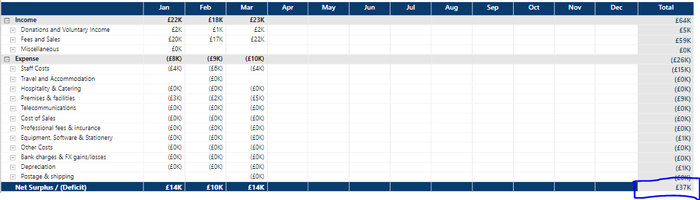
How can I format the final grand total value like the rest of the row (dark blue, white text)? Is PBI Matrix missing this ability? It seems like it should be a basic function.


than689_0-1713865413351.png

Data filtered & context hidden for security reasons

1 ACCEPTED SOLUTION
OwenAuger
Super User
Super User

@than689 

Interesting, it indeed seems harder than it should be to format that specific cell, because it is treated as part of the "Column grand total".

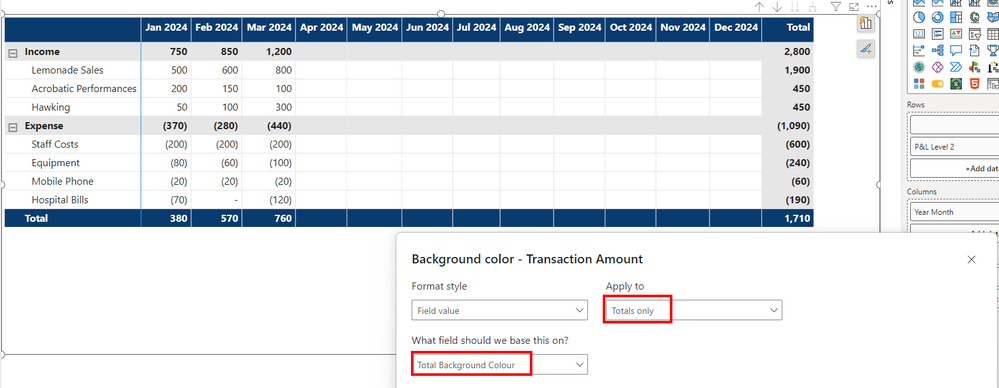
I could only get it working by coming up with some awkward conditional formatting measures and applying them to Totals only:

Total Background Colour = 
IF ( 
    NOT ISINSCOPE ( Account[P&L Level 1] ),
    "#0a3b6f"
)
Total Font Colour = 
IF ( 
    NOT ISINSCOPE ( Account[P&L Level 1] ),
    "#ffffff"
)

OwenAuger_0-1713868591100.png


PBIX attached.

Does this work for you?


Update: I saw @Uzi2019 's post just appear - so there may be a simpler way.


Regards


Owen Auger
Did I answer your question? Mark my post as a solution!
Blog
LinkedIn

View solution in original post

5 REPLIES 5
OwenAuger
Super User
Super User

@than689 

Interesting, it indeed seems harder than it should be to format that specific cell, because it is treated as part of the "Column grand total".

I could only get it working by coming up with some awkward conditional formatting measures and applying them to Totals only:

Total Background Colour = 
IF ( 
    NOT ISINSCOPE ( Account[P&L Level 1] ),
    "#0a3b6f"
)
Total Font Colour = 
IF ( 
    NOT ISINSCOPE ( Account[P&L Level 1] ),
    "#ffffff"
)

OwenAuger_0-1713868591100.png


PBIX attached.

Does this work for you?


Update: I saw @Uzi2019 's post just appear - so there may be a simpler way.


Regards


Owen Auger
Did I answer your question? Mark my post as a solution!
Blog
LinkedIn

Thanks - you've certainly managed it! I have a feeling this might be the only way to do this currently...

Hi @than689 

Check the below solution for simpler way.


Don't forget to give thumbs up and accept this as a solution if it helped you!!!
Uzi2019
Super User
Super User

Hi @than689 
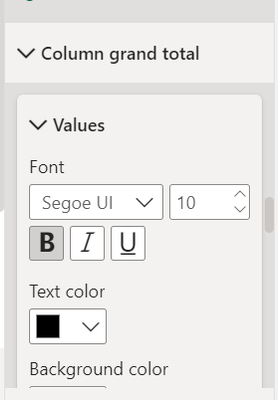
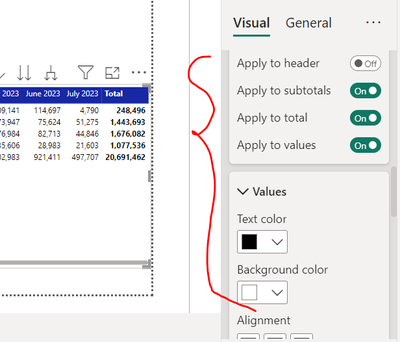
There is option on column Grand total 

Uzi2019_0-1713867905974.png


You can put same formatting as you have chosen  color for values of table.

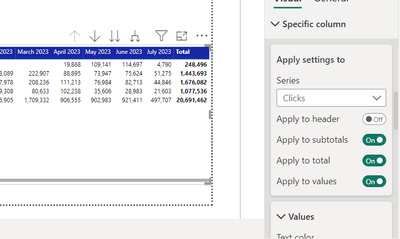
Or you can select specific column formatting option

Uzi2019_1-1713868110748.png


where you can set all values/ header/ total color and background same.

Uzi2019_2-1713868183876.png


I hope I answered your question!


Don't forget to give thumbs up and accept this as a solution if it helped you!!!

Thanks, unfortunately I don't think this solves the requirement to format only the final value (20,691,462 in your example)

Helpful resources

Announcements
New to Fabric survey Carousel

New to Fabric Survey

If you have recently started exploring Fabric, we'd love to hear how it's going. Your feedback can help with product improvements.

Power BI DataViz World Championships carousel

Power BI DataViz World Championships - June 2026

A new Power BI DataViz World Championship is coming this June! Don't miss out on submitting your entry.

Join our Fabric User Panel

Join our Fabric User Panel

Share feedback directly with Fabric product managers, participate in targeted research studies and influence the Fabric roadmap.

March Power BI Update Carousel

Power BI Community Update - March 2026

Check out the March 2026 Power BI update to learn about new features.