This is best Fabric, Power BI, SQL and AI community event. How do we know? The last event sold out! Save €200 with code FABCMTY200.
Register nowA new Data Days event is coming soon! This time we’re going bigger than ever. Fabric, Power BI, SQL, AI and more. Don't miss out.
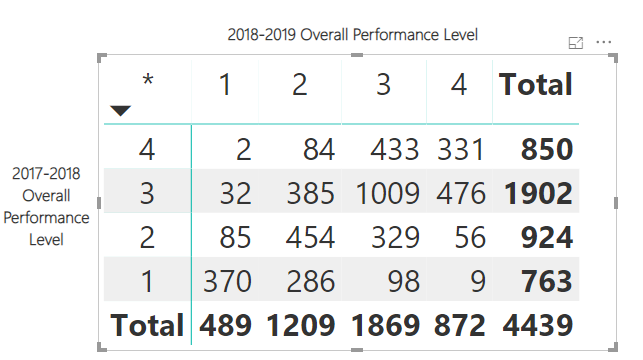
Is it possible to conditionally format a cell in a matrix if the column and row header data are the same. For example, in the below matrix, I want to highlight the cells where the row and the column intersect, so where the 2018-2019 Peformance Level equals the 2017-2018 Performance Level, I want to highlight that cell.
Solved! Go to Solution.
Hi @Anonymous ,
Don't know how you have your model setup but assuming that the 2018-2019 Peformance Level and 2017-2018 Performance Level are two different columns do the following:
ConditionalFormating = IF(MAX(Table[2018-2019 Peformance Level ]) = MAX(Table[017-2018 Performance Level]); 1; 0)
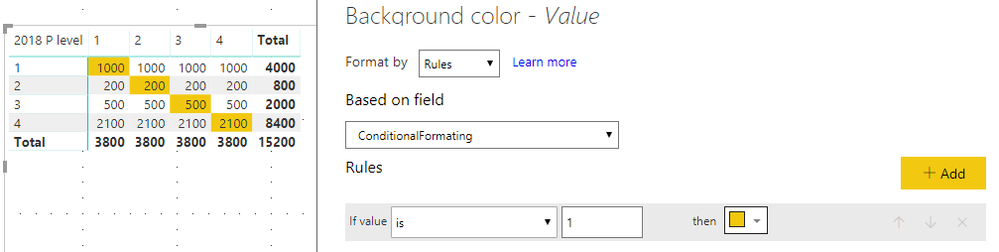
Should return below result:
Regards,
MFelix
Regards
Miguel Félix
Proud to be a Super User!
Check out my blog: Power BI em PortuguêsHi @Anonymous ,
Don't know how you have your model setup but assuming that the 2018-2019 Peformance Level and 2017-2018 Performance Level are two different columns do the following:
ConditionalFormating = IF(MAX(Table[2018-2019 Peformance Level ]) = MAX(Table[017-2018 Performance Level]); 1; 0)
Should return below result:
Regards,
MFelix
Regards
Miguel Félix
Proud to be a Super User!
Check out my blog: Power BI em PortuguêsThank you. That worked perfectly!
Sign up to receive a private message when registration opens and key events begin.
If you have recently started exploring Fabric, we'd love to hear how it's going. Your feedback can help with product improvements.
| User | Count |
|---|---|
| 33 | |
| 25 | |
| 23 | |
| 20 | |
| 15 |
| User | Count |
|---|---|
| 64 | |
| 41 | |
| 27 | |
| 22 | |
| 22 |