cancel
Showing results for 
Search instead for 
Did you mean: 

Get Fabric Certified for FREE during Fabric Data Days. Don't miss your chance! Request now

Reply
ovetteabejuela
Impactful Individual

Format([Date],"mmm-yyyy") not working???

Hi,


Yes, I was expecting for that command to work but why is it returning the mm/dd/yyyy format instead of the mmm-yyyy for example instead of showing Jan-2017, it's still sowing me the original format which is 01/01/2017.


It's weird.... any ideas?

1 ACCEPTED SOLUTION
Greg_Deckler
Community Champion
Community Champion

Hmm, that's odd. It is working for me. Are you sure you have a Date field and not a text field? If it is a text field, you will get the behavior you are descr


Follow on LinkedIn
@ me in replies or I'll lose your thread!!!
Instead of a Kudo, please vote for this idea
Become an expert!: Enterprise DNA
External Tools: MSHGQM
YouTube Channel!: Microsoft Hates Greg
Latest book!:
DAX For Humans

DAX is easy, CALCULATE makes DAX hard...

View solution in original post

3 REPLIES 3
v-huizhn-msft
Microsoft Employee
Microsoft Employee

Hi @ovetteabejuela,

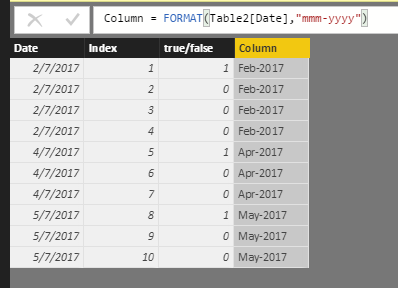
Have you resolved your issue? I test and it works fine as follows.

1.PNG

Do you mind share your .pbix file for check where the issue comes from?

Best Regards,
Angelia

@v-huizhn-msft yes it does work, the problem as pointed out by @Greg_Deckler is that the source was still in text form, that is why no matter how I convert it to another format it doesn;t follow because the first parameter only accepts a Date-type data.

Greg_Deckler
Community Champion
Community Champion

Hmm, that's odd. It is working for me. Are you sure you have a Date field and not a text field? If it is a text field, you will get the behavior you are descr


Follow on LinkedIn
@ me in replies or I'll lose your thread!!!
Instead of a Kudo, please vote for this idea
Become an expert!: Enterprise DNA
External Tools: MSHGQM
YouTube Channel!: Microsoft Hates Greg
Latest book!:
DAX For Humans

DAX is easy, CALCULATE makes DAX hard...

Helpful resources

Announcements
November Power BI Update Carousel

Power BI Monthly Update - November 2025

Check out the November 2025 Power BI update to learn about new features.

Fabric Data Days Carousel

Fabric Data Days

Advance your Data & AI career with 50 days of live learning, contests, hands-on challenges, study groups & certifications and more!

FabCon Atlanta 2026 carousel

FabCon Atlanta 2026

Join us at FabCon Atlanta, March 16-20, for the ultimate Fabric, Power BI, AI and SQL community-led event. Save $200 with code FABCOMM.

Top Solution Authors
Top Kudoed Authors