Join us at FabCon Atlanta from March 16 - 20, 2026, for the ultimate Fabric, Power BI, AI and SQL community-led event. Save $200 with code FABCOMM.
Register now!The Power BI Data Visualization World Championships is back! Get ahead of the game and start preparing now! Learn more
Hi,
Yes, I was expecting for that command to work but why is it returning the mm/dd/yyyy format instead of the mmm-yyyy for example instead of showing Jan-2017, it's still sowing me the original format which is 01/01/2017.
It's weird.... any ideas?
Solved! Go to Solution.
Hmm, that's odd. It is working for me. Are you sure you have a Date field and not a text field? If it is a text field, you will get the behavior you are descr
Hi @ovetteabejuela,
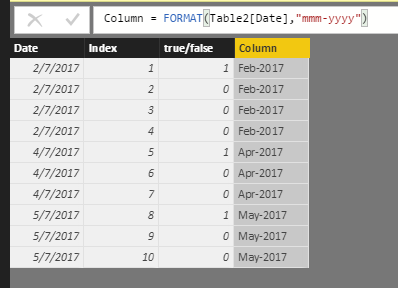
Have you resolved your issue? I test and it works fine as follows.
Do you mind share your .pbix file for check where the issue comes from?
Best Regards,
Angelia
@v-huizhn-msft yes it does work, the problem as pointed out by @Greg_Deckler is that the source was still in text form, that is why no matter how I convert it to another format it doesn;t follow because the first parameter only accepts a Date-type data.
Hmm, that's odd. It is working for me. Are you sure you have a Date field and not a text field? If it is a text field, you will get the behavior you are descr
The Power BI Data Visualization World Championships is back! Get ahead of the game and start preparing now!
| User | Count |
|---|---|
| 41 | |
| 38 | |
| 36 | |
| 31 | |
| 28 |
| User | Count |
|---|---|
| 128 | |
| 88 | |
| 79 | |
| 68 | |
| 63 |