Join us at FabCon Atlanta from March 16 - 20, 2026, for the ultimate Fabric, Power BI, AI and SQL community-led event. Save $200 with code FABCOMM.
Register now!The Power BI Data Visualization World Championships is back! Get ahead of the game and start preparing now! Learn more
Hi,
Yes, I was expecting for that command to work but why is it returning the mm/dd/yyyy format instead of the mmm-yyyy for example instead of showing Jan-2017, it's still sowing me the original format which is 01/01/2017.
It's weird.... any ideas?
Solved! Go to Solution.
Hmm, that's odd. It is working for me. Are you sure you have a Date field and not a text field? If it is a text field, you will get the behavior you are descr
Hi @ovetteabejuela,
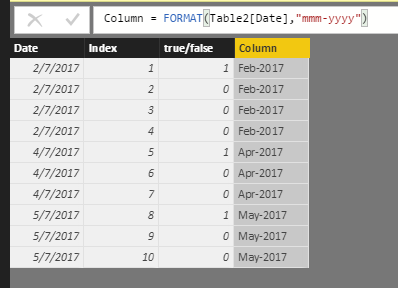
Have you resolved your issue? I test and it works fine as follows.
Do you mind share your .pbix file for check where the issue comes from?
Best Regards,
Angelia
@v-huizhn-msft yes it does work, the problem as pointed out by @Greg_Deckler is that the source was still in text form, that is why no matter how I convert it to another format it doesn;t follow because the first parameter only accepts a Date-type data.
Hmm, that's odd. It is working for me. Are you sure you have a Date field and not a text field? If it is a text field, you will get the behavior you are descr
The Power BI Data Visualization World Championships is back! Get ahead of the game and start preparing now!
Check out the November 2025 Power BI update to learn about new features.
| User | Count |
|---|---|
| 59 | |
| 43 | |
| 42 | |
| 23 | |
| 17 |
| User | Count |
|---|---|
| 190 | |
| 122 | |
| 96 | |
| 66 | |
| 47 |