Join us at FabCon Atlanta from March 16 - 20, 2026, for the ultimate Fabric, Power BI, AI and SQL community-led event. Save $200 with code FABCOMM.
Register now!Vote for your favorite vizzies from the Power BI Dataviz World Championship submissions. Vote now!
Hello,
I have seen a similar post, but it did not quite help for my circumstance. I would like to see if a value is appropriately formatted. For example if a claim number is supposed to be 9 digits long have a dash then be followed by 4 digits.
Examples:
857639237-8473
382838388-3928
383832838-3939
If the claim number is in the correct format as listed above I would like it to return a "Y", if not then a "X".
Any help would be greatly appreciated.
Thanks
Solved! Go to Solution.
Hi @Anonymous
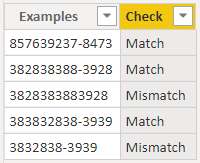
I created for you this code which you can paste in a new calculated column to check whether the value is in the correct format
Check =
VAR _1=IF(ISERROR(CONVERT(LEFT('Table'[Examples],9),INTEGER)),"FALSE","TRUE")
VAR _2=IF(MID('Table'[Examples],10,1)="-","TRUE","FALSE")
VAR _3=IF(ISERROR(CONVERT(RIGHT('Table'[Examples],4),INTEGER)),"FALSE","TRUE")
Return
IF(AND(AND(_1="TRUE",_2="TRUE"),_3="TRUE"),"Match","Mismatch")
Did it work ? Mark it as a solution to help spreading knowledge.
A kudos would be appreciated 👍
Hi @Anonymous
I created for you this code which you can paste in a new calculated column to check whether the value is in the correct format
Check =
VAR _1=IF(ISERROR(CONVERT(LEFT('Table'[Examples],9),INTEGER)),"FALSE","TRUE")
VAR _2=IF(MID('Table'[Examples],10,1)="-","TRUE","FALSE")
VAR _3=IF(ISERROR(CONVERT(RIGHT('Table'[Examples],4),INTEGER)),"FALSE","TRUE")
Return
IF(AND(AND(_1="TRUE",_2="TRUE"),_3="TRUE"),"Match","Mismatch")
Did it work ? Mark it as a solution to help spreading knowledge.
A kudos would be appreciated 👍
Worked perfectly, thank you!
You are welcome @Anonymous 👍
Vote for your favorite vizzies from the Power BI World Championship submissions!
If you love stickers, then you will definitely want to check out our Community Sticker Challenge!
Check out the January 2026 Power BI update to learn about new features.
| User | Count |
|---|---|
| 55 | |
| 53 | |
| 40 | |
| 17 | |
| 16 |
| User | Count |
|---|---|
| 123 | |
| 108 | |
| 44 | |
| 32 | |
| 26 |