Don't miss your chance to take exam DP-600 or DP-700 on us!
Request nowLearn from the best! Meet the four finalists headed to the FINALS of the Power BI Dataviz World Championships! Register now
Hello,
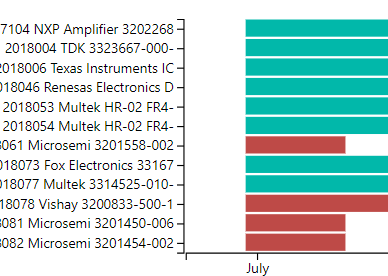
Is there any way to edit or add line breaks to my y-axis? The screenshot displays how it looks like now, but I would like the numbers and words to be on separate lines.
For example, rather than "7104 NXP Amp..." I'd like it to look like
"7104
NXP Amp..."
Thank you
So, one trick is to use a matrix and use Data Bars for your bars. Then you can achieve the effect that you want. Otherwise, the Y-Axis formatting leaves a little to be desired compared to X-Axis formatting that allows you to get that effect.
Share feedback directly with Fabric product managers, participate in targeted research studies and influence the Fabric roadmap.
Check out the February 2026 Power BI update to learn about new features.
| User | Count |
|---|---|
| 51 | |
| 40 | |
| 37 | |
| 14 | |
| 14 |
| User | Count |
|---|---|
| 85 | |
| 69 | |
| 38 | |
| 29 | |
| 27 |