cancel
Showing results for 
Search instead for 
Did you mean: 

Get Fabric Certified for FREE during Fabric Data Days. Don't miss your chance! Request now

Reply
samanthamirae
Resolver I
Resolver I

Format Axis

Hello,


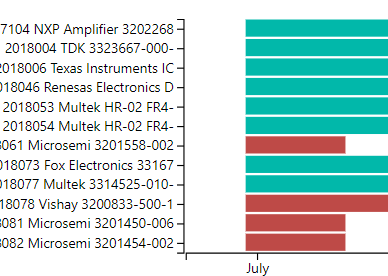
Is there any way to edit or add line breaks to my y-axis? The screenshot displays how it looks like now, but I would like the numbers and words to be on separate lines.

For example, rather than "7104 NXP Amp..." I'd like it to look like

"7104

NXP Amp..."


Thank you

screenshot.PNG

1 REPLY 1
Greg_Deckler
Community Champion
Community Champion

So, one trick is to use a matrix and use Data Bars for your bars. Then you can achieve the effect that you want. Otherwise, the Y-Axis formatting leaves a little to be desired compared to X-Axis formatting that allows you to get that effect.


Follow on LinkedIn
@ me in replies or I'll lose your thread!!!
Instead of a Kudo, please vote for this idea
Become an expert!: Enterprise DNA
External Tools: MSHGQM
YouTube Channel!: Microsoft Hates Greg
Latest book!:
DAX For Humans

DAX is easy, CALCULATE makes DAX hard...

Helpful resources

Announcements
November Power BI Update Carousel

Power BI Monthly Update - November 2025

Check out the November 2025 Power BI update to learn about new features.

Fabric Data Days Carousel

Fabric Data Days

Advance your Data & AI career with 50 days of live learning, contests, hands-on challenges, study groups & certifications and more!

FabCon Atlanta 2026 carousel

FabCon Atlanta 2026

Join us at FabCon Atlanta, March 16-20, for the ultimate Fabric, Power BI, AI and SQL community-led event. Save $200 with code FABCOMM.

Top Solution Authors
Top Kudoed Authors