cancel
Showing results for 
Search instead for 
Did you mean: 

The Power BI Data Visualization World Championships is back! It's time to submit your entry. Live now!

Reply
victoriashenton
Frequent Visitor

Forecasting

Hi Everyone!


I am new to Power BI and was hoping someone could help me.


I have 3 lines on a line chart. Scheduled, deployed and to be completed. 

I would like the red line to stop at the date bin 09 Jun. How would I do this? The scheduled and to be completed I would like to stay the same.
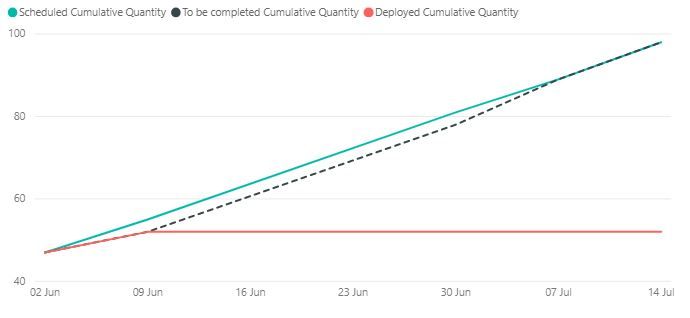
GraphGraph


Deployed Cumulative Quantity =
CALCULATE (
SUM ( Deployed[Count]),
FILTER (
ALL ( 'Dates'[Date (bins)] ),
'Dates'[Date (bins)] <= MAX('Dates'[Date (bins)])
)
)
 
Scheduled Cumulative Quantity =
CALCULATE (
SUM ( Scheduled[Count]),
FILTER (
ALL ( 'Dates'[Date (bins)] ),
'Dates'[Date (bins)] <= MAX ( 'Dates'[Date (bins)] )
)
)
 
To be completed Cumulative Quantity =
CALCULATE (
SUM ( 'To be Completed'[Count]),
FILTER (
ALL ( 'Dates'[Date (bins)] ),
'Dates'[Date (bins)] <= MAX ( 'Dates'[Date (bins)] )
)
)


1 ACCEPTED SOLUTION
TeigeGao
Solution Sage
Solution Sage

Hi @victoriashenton ,

In your scenario, we can add the 'Dates'[Date (bins)] <= MAX('Dates'[Date (bins)] && 'Dates'[Date (bins)] <= DATE (2019,6,9)

Best Regards,

Teige

View solution in original post

1 REPLY 1
TeigeGao
Solution Sage
Solution Sage

Hi @victoriashenton ,

In your scenario, we can add the 'Dates'[Date (bins)] <= MAX('Dates'[Date (bins)] && 'Dates'[Date (bins)] <= DATE (2019,6,9)

Best Regards,

Teige

Helpful resources

Announcements
FabCon Atlanta 2026 carousel

FabCon Atlanta 2026

Join us at FabCon Atlanta, March 16-20, for the ultimate Fabric, Power BI, AI and SQL community-led event. Save $200 with code FABCOMM.