cancel
Showing results for 
Search instead for 
Did you mean: 

The Power BI Data Visualization World Championships is back! It's time to submit your entry. Live now!

Reply
victoriashenton
Frequent Visitor

Forecasting

Hi Everyone!


I am new to Power BI and was hoping someone could help me.


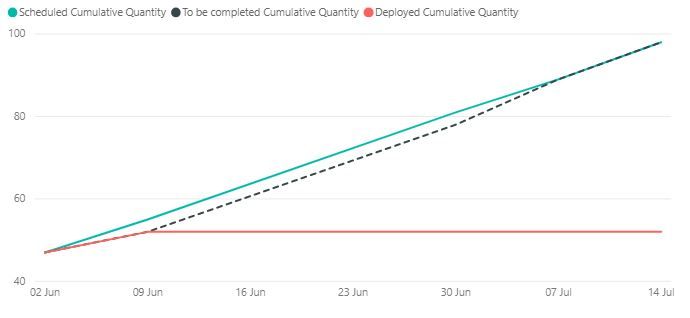
I have 3 lines on a line chart. Scheduled, deployed and to be completed. 

I would like the red line to stop at the date bin 09 Jun. How would I do this? The scheduled and to be completed I would like to stay the same.

GraphGraph


Deployed Cumulative Quantity =
CALCULATE (
SUM ( Deployed[Count]),
FILTER (
ALL ( 'Dates'[Date (bins)] ),
'Dates'[Date (bins)] <= MAX('Dates'[Date (bins)])
)
)
 
Scheduled Cumulative Quantity =
CALCULATE (
SUM ( Scheduled[Count]),
FILTER (
ALL ( 'Dates'[Date (bins)] ),
'Dates'[Date (bins)] <= MAX ( 'Dates'[Date (bins)] )
)
)
 
To be completed Cumulative Quantity =
CALCULATE (
SUM ( 'To be Completed'[Count]),
FILTER (
ALL ( 'Dates'[Date (bins)] ),
'Dates'[Date (bins)] <= MAX ( 'Dates'[Date (bins)] )
)
)


1 ACCEPTED SOLUTION
TeigeGao
Solution Sage
Solution Sage

Hi @victoriashenton ,

In your scenario, we can add the 'Dates'[Date (bins)] <= MAX('Dates'[Date (bins)] && 'Dates'[Date (bins)] <= DATE (2019,6,9)

Best Regards,

Teige

View solution in original post

1 REPLY 1
TeigeGao
Solution Sage
Solution Sage

Hi @victoriashenton ,

In your scenario, we can add the 'Dates'[Date (bins)] <= MAX('Dates'[Date (bins)] && 'Dates'[Date (bins)] <= DATE (2019,6,9)

Best Regards,

Teige

Helpful resources

Announcements
Power BI DataViz World Championships

Power BI Dataviz World Championships

The Power BI Data Visualization World Championships is back! It's time to submit your entry.

December 2025 Power BI Update Carousel

Power BI Monthly Update - December 2025

Check out the December 2025 Power BI Holiday Recap!

FabCon Atlanta 2026 carousel

FabCon Atlanta 2026

Join us at FabCon Atlanta, March 16-20, for the ultimate Fabric, Power BI, AI and SQL community-led event. Save $200 with code FABCOMM.