Get certified for free when you join Fabric Data Days 2026 and dive into Fabric, Power BI, SQL, AI, and other essential data skills.
Join nowData Days is here! Join us now for 60+ days of learning, challenges, and connection. Learn more
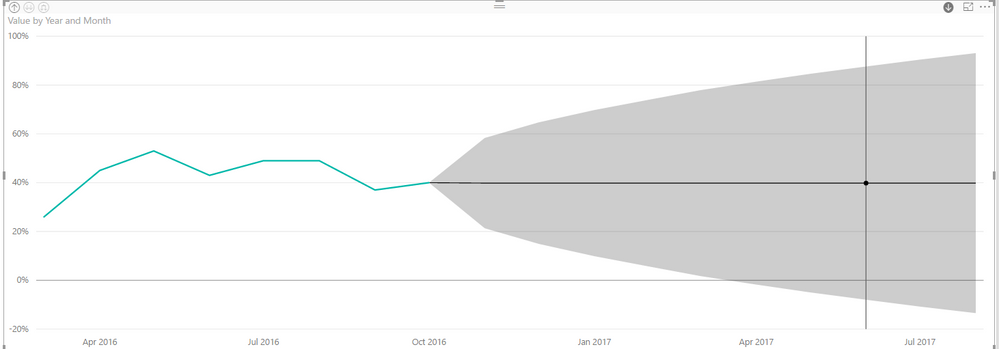
So I have the July 2017 update and I'm trying to do some forecasting on a simple line graph. I have dates on my x-axis (1st of every month in date format) and a count value. So far, so good. I can see the Forecasting option on the Analytics tab and the graph looks very pretty, even if I haven't a clue what it actually tells me ....
Then I switch my x-axis to CATEGORICAL (so it shows me actual dates and not just years) and BOOM - the forecasting vanishes. Completely. WHY? Why on earth should it matter how I choose to display my dates?
Debbie
Solved! Go to Solution.
Thanks, @Anonymous I've got it working. But as I said, I had to do everything in a very specific order! It's flaky, but I'm sure it will settle down in future releases ...
Debbie
So ... to get it to work, I had to do things in a *very* specific order - otherwise the Forecasting option doesn't even show up!
If I mess with my x-axis *before* I set the forecast, the forecast option doesn't appear at all - even if I set it all back to default.
Debbie
That's the functionality as I understand it. You have to have a date axis and it has to be continuous.
My date axis is continuous - it's just the display I'm trying to set. I want my months to be visible on the x-axis as well as the years.
Debbie
Hi @Anonymous,
>>My date axis is continuous - it's just the display I'm trying to set. I want my months to be visible on the x-axis as well as the years.
So you want to show month year at the x-axis, right ?
If this is a case, you can refer to below steps:
1. Switch date column to hierarchy mode and only keep year and month.
2. Turn on the drill down mode, double click on one point to drill down.
Regards,
Xiaoxin Sheng
Thanks, @Anonymous I've got it working. But as I said, I had to do everything in a very specific order! It's flaky, but I'm sure it will settle down in future releases ...
Debbie
Don't miss out on Data Days, June 15 through August 7. Learn Fabric, Power BI, SQL, AI and more.
Check out the May 2026 Power BI update to learn about new features.
| User | Count |
|---|---|
| 22 | |
| 21 | |
| 20 | |
| 17 | |
| 13 |
| User | Count |
|---|---|
| 58 | |
| 50 | |
| 37 | |
| 29 | |
| 24 |