cancel
Showing results for 
Search instead for 
Did you mean: 

Next up in the FabCon + SQLCon recap series: The roadmap for Microsoft SQL and Maximizing Developer experiences in Fabric. All sessions are available on-demand after the live show. Register now

Reply
petrenkw
New Member

Forecasting Feature | Displaying Visuals Using a Different Time Series Category than the Model

Hi,


Is it possible to model a forecast based on 1 time series category (days), but display the forecast visuals in another time series category (months) to essentially summarize a forecast? (using the time series days, in my case, yields the most accurate model)


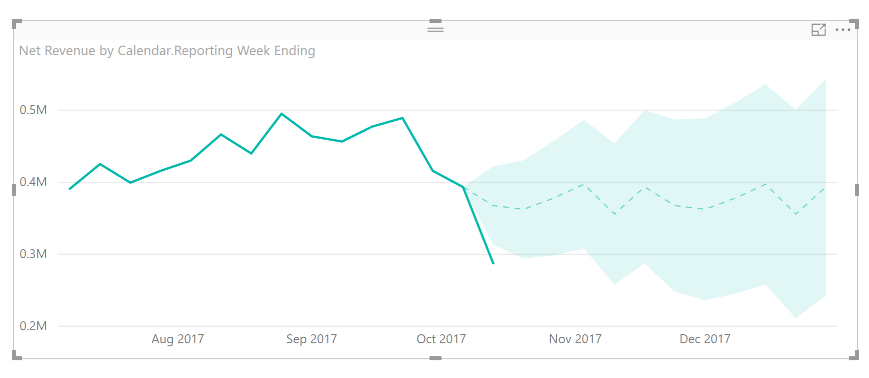
In the example below, I'm forecasting revenue for the remainder of the year based on the fiscal reporting week. Instead of displaying the trends by week, I'd like to display them by month to give our partners a summary of the forecast.


My current chart is below


pBI forecast.PNG


But I'd like to reformat it to something that looks like the following:


adjusted pBI forecast.PNG


Perhaps there's a way I can do this already? 


I appreciate the help!

1 ACCEPTED SOLUTION
v-sihou-msft
Microsoft Employee
Microsoft Employee


@petrenkw


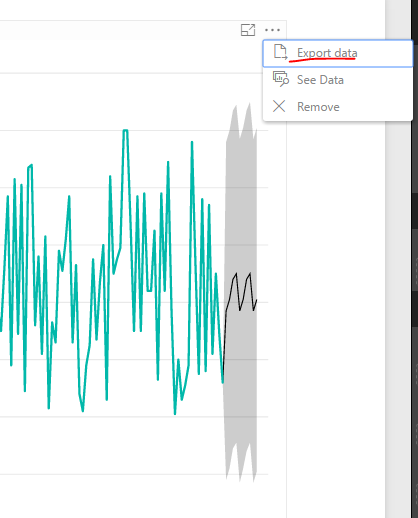
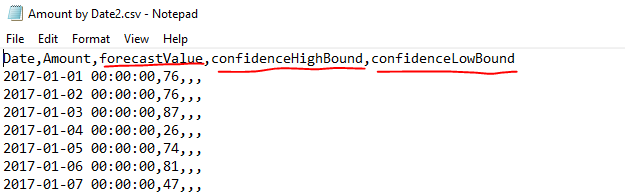
It's not supported to directly get the data within Power BI Desktop. But you can export data to CSV file from the chart visual. It will keep the ForecastValue. 


111.PNG


123.PNG


Then you can import this CSV into Power BI Desktop, and join it into your existing table. 


Regards,

View solution in original post

1 REPLY 1
v-sihou-msft
Microsoft Employee
Microsoft Employee


@petrenkw


It's not supported to directly get the data within Power BI Desktop. But you can export data to CSV file from the chart visual. It will keep the ForecastValue. 


111.PNG


123.PNG


Then you can import this CSV into Power BI Desktop, and join it into your existing table. 


Regards,

Helpful resources

Announcements
New to Fabric survey Carousel

New to Fabric Survey

If you have recently started exploring Fabric, we'd love to hear how it's going. Your feedback can help with product improvements.

Power BI DataViz World Championships carousel

Power BI DataViz World Championships - June 2026

A new Power BI DataViz World Championship is coming this June! Don't miss out on submitting your entry.

Join our Fabric User Panel

Join our Fabric User Panel

Share feedback directly with Fabric product managers, participate in targeted research studies and influence the Fabric roadmap.

March Power BI Update Carousel

Power BI Community Update - March 2026

Check out the March 2026 Power BI update to learn about new features.