cancel
Showing results for 
Search instead for 
Did you mean: 

July 7 - July 17 | Round 2 of the Power BI Dataviz World Championships. Don't miss your chance! Learn more

Reply
Anonymous
Not applicable

Forecasting DAX

Hi, can someone help me with creating the DAX in PowerBI for this function - "FORECAST.ETS" that is used in Excel: https://www.excelfunctions.net/excel-forecast-ets-function.html


Thanks!

8 REPLIES 8
edhans
Community Champion
Community Champion

Have you seen this article?


Did I answer your question? Mark my post as a solution!
Did my answers help arrive at a solution? Give it a kudos by clicking the Thumbs Up!

DAX is for Analysis. Power Query is for Data Modeling


Proud to be a Super User!

MCSA: BI Reporting
Anonymous
Not applicable

Sorry, I am lost. So what are you directing me to do?

edhans
Community Champion
Community Champion

Click on a link about forecasting in Power BI. There is no Forecast.ETS function, but it does have some forecast capabilities, as described in that article.


Did I answer your question? Mark my post as a solution!
Did my answers help arrive at a solution? Give it a kudos by clicking the Thumbs Up!

DAX is for Analysis. Power Query is for Data Modeling


Proud to be a Super User!

MCSA: BI Reporting
Anonymous
Not applicable

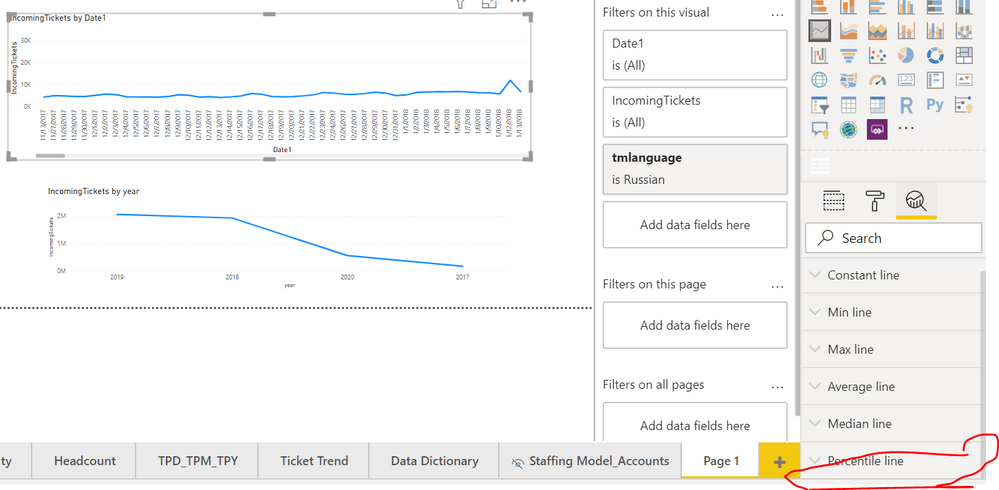
I don't even see the Forecast option anymore. Any idea why?Capture.PNG

Hi @Anonymous ,


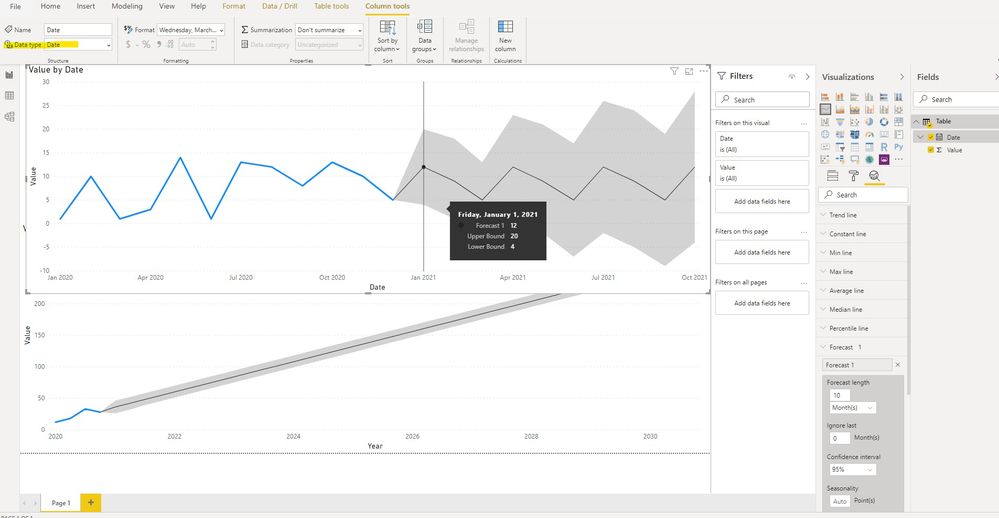
Could you please check the type of "Date1" Column? Based on my test, it can works with the date type:


4.jpg


By the way, PBIX file as attached.


Best regards,


Community Support Team _ Dong Li
If this post helps, then please consider Accept it as the solution to help the other members find it more quickly.
Anonymous
Not applicable

Hi, sorry, I missed this. So I got it to work, but this Forecast feature in PBI is extremely limited 😞 For instance, line chart looks great with Date as axis, and Values in y-axis. But, if I want to slice the forecast values by another field, e.g. City, the forecast values disappear and line chart goes back to just showing actuals. Sad.

Anonymous
Not applicable

It seems that this applies to say a line graph with Year as axis. So if I want t use Date or Month then the Forecast option won't show up in the Analytics pane option 😞

Anonymous
Not applicable

Got it. Thanks. I didn't see the link but see it now. Will go through it.

Helpful resources

Announcements
FabCon and SQLCon Barcelona 2026

FabCon & SQLCon – Barcelona 2026

Join us in Barcelona for FabCon and SQLCon, the Fabric, Power BI, SQL, and AI community event. Save €200 with code FABCMTY200.

60 days of Data Days Carousel

Data Days 2026

Join Fabric Data Days 2026: 60 days of free live/on-demand sessions, challenges, study groups, and certification opportunities.

Power BI DataViz World Championships carousel

Power BI DataViz World Championships - June 2026

A new Power BI DataViz World Championship is coming this June! Don't miss out on submitting your entry.