cancel
Showing results for 
Search instead for 
Did you mean: 

The Power BI Data Visualization World Championships is back! Get ahead of the game and start preparing now! Learn more

Reply
Gaurav_Lakhotia
Helper III
Helper III

Forecast Calculation

Hello all, I need your help in calculating the forward forecast for sales. I have monthly sales data.
Here is the equation for forecast calculation,
Forecast = SalesLY * CIValue * rValue

SalesLY = Last year same month sales

CIValue = we have this column in the growth projection table

rValue = sum of current year 3 months/sum of last year 3 months
Let's say we are in Aug2019, the sum of August 2020, July 2020 & June 2020 divided by the sum of August 2019, July 2019 & June 2019.

We have to calculate the forecast for a year from the current month. Let's say we are in August 2020 then it should calculate forecast till August 2021.


Here is the file with the sample data Forecast Test.


Thanks

1 ACCEPTED SOLUTION
v-yalanwu-msft
Community Support
Community Support

Hi, @Gaurav_Lakhotia ;

You mentioned that sum of current year 3 months is sum of sales? if so , you could create a measure as follows:

1.create SalesLY measure.

SaleLY = CALCULATE(SUM('Sales'[Sales]),FILTER(ALL('Sales'),[Year]+1=MAX('Growth Projection'[Year])&&[Month]=MAX('Growth Projection'[Month])))

2.create rValue measure.

rValue =
VAR _currentq =
    CALCULATE (
        SUM ( 'Sales'[Sales] ),
        FILTER (
            ALL ( 'Sales' ),
            [Year] = MAX ( 'Growth Projection'[Year] )
                && QUARTER ( [Date] ) = QUARTER ( MAX ( 'Growth Projection'[date] ) )  ))
VAR _lastq =
    CALCULATE (
        SUM ( 'Sales'[Sales] ),
        FILTER (
            ALL ( 'Sales' ),
            [Year] + 1
                = MAX ( 'Growth Projection'[Year] )
                && QUARTER ( [Date] ) = QUARTER ( MAX ( 'Growth Projection'[date] ) )))
RETURN  DIVIDE ( _currentq, _lastq )

3.create Forecast measure.

Forecast = [SaleLY]*SUM([CIValue])*[rValue]

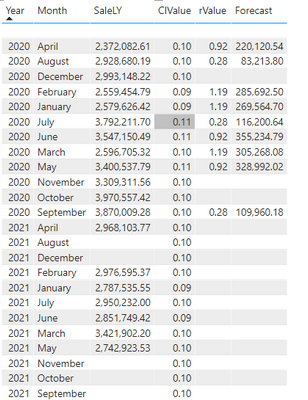
 The final output is shown below:

vyalanwumsft_0-1630551943207.png

Best Regards,
Community Support Team_ Yalan Wu
If this post helps, then please consider Accept it as the solution to help the other members find it more quickly.

View solution in original post

2 REPLIES 2
v-yalanwu-msft
Community Support
Community Support

Hi, @Gaurav_Lakhotia ;

You mentioned that sum of current year 3 months is sum of sales? if so , you could create a measure as follows:

1.create SalesLY measure.

SaleLY = CALCULATE(SUM('Sales'[Sales]),FILTER(ALL('Sales'),[Year]+1=MAX('Growth Projection'[Year])&&[Month]=MAX('Growth Projection'[Month])))

2.create rValue measure.

rValue =
VAR _currentq =
    CALCULATE (
        SUM ( 'Sales'[Sales] ),
        FILTER (
            ALL ( 'Sales' ),
            [Year] = MAX ( 'Growth Projection'[Year] )
                && QUARTER ( [Date] ) = QUARTER ( MAX ( 'Growth Projection'[date] ) )  ))
VAR _lastq =
    CALCULATE (
        SUM ( 'Sales'[Sales] ),
        FILTER (
            ALL ( 'Sales' ),
            [Year] + 1
                = MAX ( 'Growth Projection'[Year] )
                && QUARTER ( [Date] ) = QUARTER ( MAX ( 'Growth Projection'[date] ) )))
RETURN  DIVIDE ( _currentq, _lastq )

3.create Forecast measure.

Forecast = [SaleLY]*SUM([CIValue])*[rValue]

 The final output is shown below:

vyalanwumsft_0-1630551943207.png

Best Regards,
Community Support Team_ Yalan Wu
If this post helps, then please consider Accept it as the solution to help the other members find it more quickly.

Hi @v-yalanwu-msft, It works. Thank you so much for the solution!!

Helpful resources

Announcements
Power BI DataViz World Championships

Power BI Dataviz World Championships

The Power BI Data Visualization World Championships is back! Get ahead of the game and start preparing now!

December 2025 Power BI Update Carousel

Power BI Monthly Update - December 2025

Check out the December 2025 Power BI Holiday Recap!

FabCon Atlanta 2026 carousel

FabCon Atlanta 2026

Join us at FabCon Atlanta, March 16-20, for the ultimate Fabric, Power BI, AI and SQL community-led event. Save $200 with code FABCOMM.