Join us at FabCon Atlanta from March 16 - 20, 2026, for the ultimate Fabric, Power BI, AI and SQL community-led event. Save $200 with code FABCOMM.
Register now!The Power BI Data Visualization World Championships is back! Get ahead of the game and start preparing now! Learn more
Hi Gurus,
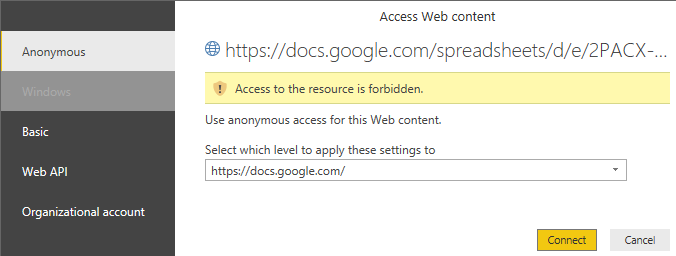
Recently getting this error.
Already tried republishing sheets, removing access and putting it back. Still not working. My account works with other sheets.
Any help will be appreciated.
Thanks,
Paul
Solved! Go to Solution.
Hi Maggie,
Thanks for your response. Further checked on this and it turned out that it only happens on shared google sheets. I created my own sheet and connect it to Power BI and it did work.
Thanks,
Paul
Hi @polaris3028
I test on my site, create a google spreadsheet and publish it to web(meanwhile it generate a link), then I use the link to connect to in Power BI Desktop. Everything works well.
Could you paste your link in the web browser and open the page?
if you can't get proper contents this way, maybe the google sheets are restricted the access, so you can't connect to it using the anonymus credential, you need ask for the correct credential with author.
Best Regards
Maggie
Hi Maggie,
Thanks for your response. Further checked on this and it turned out that it only happens on shared google sheets. I created my own sheet and connect it to Power BI and it did work.
Thanks,
Paul
The Power BI Data Visualization World Championships is back! Get ahead of the game and start preparing now!
| User | Count |
|---|---|
| 38 | |
| 36 | |
| 33 | |
| 32 | |
| 29 |
| User | Count |
|---|---|
| 129 | |
| 88 | |
| 79 | |
| 68 | |
| 63 |