cancel
Showing results for 
Search instead for 
Did you mean: 

Join the FabCon + SQLCon recap series. Up next: Power BI, Real-Time Intelligence, IQ and AI, and Data Factory take center stage. All sessions are available on-demand after the live show. Register now

Reply
Anonymous
Not applicable

Folder size?

How large is the folder that the desktop app is located in on your machine?


Mine is up to ~10GB and I have no idea if that is normal or not.


Thanks! 

1 ACCEPTED SOLUTION

its probably C:\Users\username\Microsoft\Power BI Desktop Store App\TempSaves


mine is 11 gb and most of it is from this folder.


also try clearing your cache.


If I took the time to answer your question and I came up with a solution, please mark my post as a solution and /or give kudos freely for the effort 🙂 Thank you!

Proud to be a Super User!


View solution in original post

4 REPLIES 4
vanessafvg
Community Champion
Community Champion

please can you provide more information?

which folder specifically?

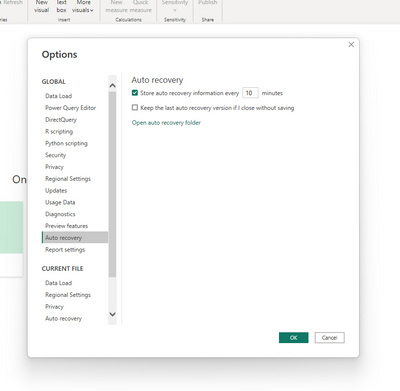
you may or may not have a few files in your auto recovery folder

in your options and settings you can go to your recovery folder via the link.

vanessafvg_0-1669933182820.png


If I took the time to answer your question and I came up with a solution, please mark my post as a solution and /or give kudos freely for the effort 🙂 Thank you!

Proud to be a Super User!


Anonymous
Not applicable

It's the folder that the MS Store default installs into.


C:/Users/UserName/Microsoft/Power BI Desktop Store App


I checked my Auto Recovery folder, and there were no files in it, so I know that's not the issue.

its probably C:\Users\username\Microsoft\Power BI Desktop Store App\TempSaves


mine is 11 gb and most of it is from this folder.


also try clearing your cache.


If I took the time to answer your question and I came up with a solution, please mark my post as a solution and /or give kudos freely for the effort 🙂 Thank you!

Proud to be a Super User!


Anonymous
Not applicable

Thanks - clearing the cache worked and dropped the folder size down to ~6GB. 


I didn't have any files in the TempSaves folder, so it appears to be the cache or the program files needed overall. 

Helpful resources

Announcements
April Power BI Update Carousel

Power BI Monthly Update - April 2026

Check out the April 2026 Power BI update to learn about new features.

New to Fabric survey Carousel

New to Fabric Survey

If you have recently started exploring Fabric, we'd love to hear how it's going. Your feedback can help with product improvements.

Power BI DataViz World Championships carousel

Power BI DataViz World Championships - June 2026

A new Power BI DataViz World Championship is coming this June! Don't miss out on submitting your entry.

FabCon and SQLCon Highlights Carousel

FabCon &SQLCon Highlights

Experience the highlights from FabCon & SQLCon, available live and on-demand starting April 14th.