cancel
Showing results for 
Search instead for 
Did you mean: 

July 7 - July 17 | Round 2 of the Power BI Dataviz World Championships. Don't miss your chance! Learn more

Reply
abrasington
Regular Visitor

Flagging duplicate fields

Hi all,


I have a table with every row describing a single quantity of different types of equipment.

Some rows are meant to have a unique item ID code, and I would like to first display all rows of only a certain type of equipment and then make sure that each row of said equipment isn't duplicating any item ID codes. 


I'm playing around with using DISTINCT, but so far no luck. Any good ideas of how to tackle this?


Thanks

1 ACCEPTED SOLUTION
v-xjiin-msft
Solution Sage
Solution Sage

Hi @abrasington,


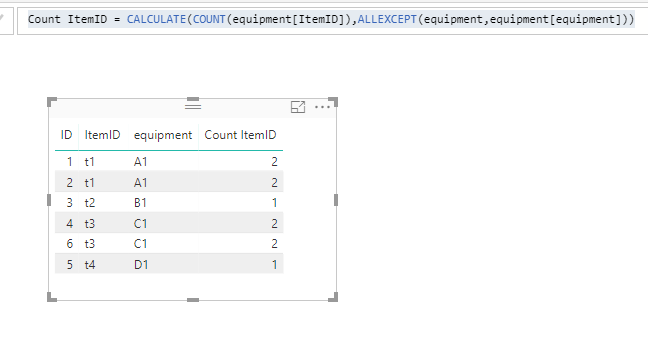
In your scenario, did you mean this?


We can create a calculated column to count the number of ItemID based on equipment type group. And if the number is more than 1, obviously there exists duplicate item id.


Count ItemID =
CALCULATE (
    COUNT ( equipment[ItemID] ),
    ALLEXCEPT ( equipment, equipment[equipment] )
)

4.PNG


And if you want to check a certain type of equipment. You can do this:


Count A1 =
CALCULATE (
    COUNT ( equipment[ItemID] ),
    FILTER ( equipment, equipment[equipment] = "A1" )
)

Thanks,
Xi Jin.

View solution in original post

2 REPLIES 2
v-xjiin-msft
Solution Sage
Solution Sage

Hi @abrasington,


In your scenario, did you mean this?


We can create a calculated column to count the number of ItemID based on equipment type group. And if the number is more than 1, obviously there exists duplicate item id.


Count ItemID =
CALCULATE (
    COUNT ( equipment[ItemID] ),
    ALLEXCEPT ( equipment, equipment[equipment] )
)

4.PNG


And if you want to check a certain type of equipment. You can do this:


Count A1 =
CALCULATE (
    COUNT ( equipment[ItemID] ),
    FILTER ( equipment, equipment[equipment] = "A1" )
)

Thanks,
Xi Jin.

Anonymous
Not applicable

My immediate thought is you could create a calculated column that does a count of each row and how often a particular field appears. You could then filter on that number.


Something like 

AppearCount = VAR searchStr = [YourField]
RETURN
Calculate(
         COUNTROWS('MyTable'),
         'MyTable'[YourField] = searchStr
)


Helpful resources

Announcements
FabCon and SQLCon Barcelona 2026

FabCon & SQLCon – Barcelona 2026

Join us in Barcelona for FabCon and SQLCon, the Fabric, Power BI, SQL, and AI community event. Save €200 with code FABCMTY200.

60 days of Data Days Carousel

Data Days 2026

Join Data Days 2026: 60 days of free live/on-demand sessions, challenges, study groups, and certification opportunities.

Power BI DataViz World Championships carousel

Power BI DataViz World Championships - June 2026

A new Power BI DataViz World Championship is coming this June! Don't miss out on submitting your entry.

Top Solution Authors
Top Kudoed Authors