Join us at FabCon Atlanta from March 16 - 20, 2026, for the ultimate Fabric, Power BI, AI and SQL community-led event. Save $200 with code FABCOMM.
Register now!The Power BI Data Visualization World Championships is back! It's time to submit your entry. Live now!
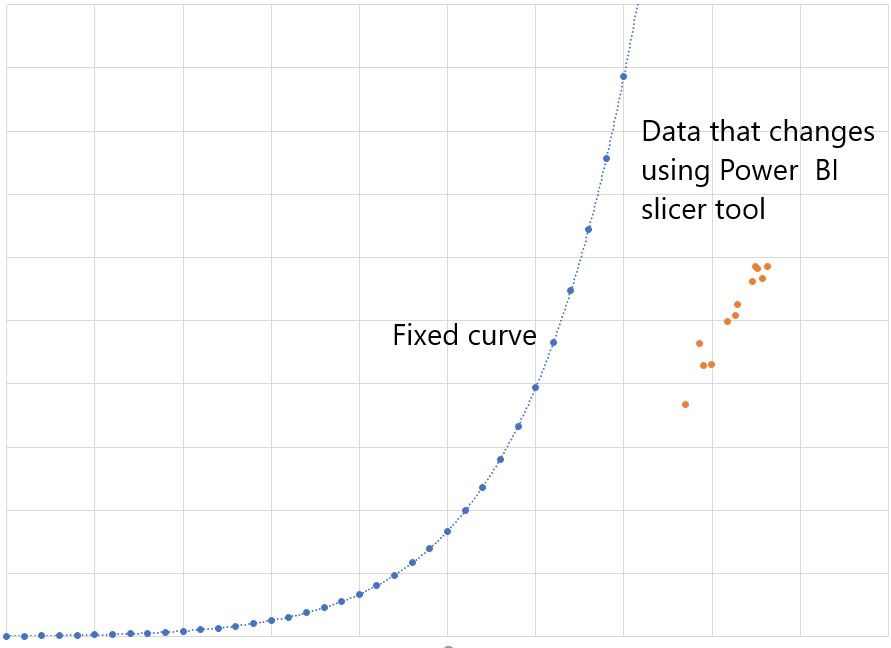
I have this Excel graph I want the fixed curve to stay put in a Power BI scatterplot or line graph. I know how to graph the data and I use the slicer tool to change the data, but I want to have this curve fixed in a scatterplot or line graph as the control limit of the data. I also want the curve to stay fixed even when I select another set of data using the slicer tool.
Without seeing your model, I would think you could do the following:
Pat
To learn more about Power BI, follow me on Twitter or subscribe on YouTube.
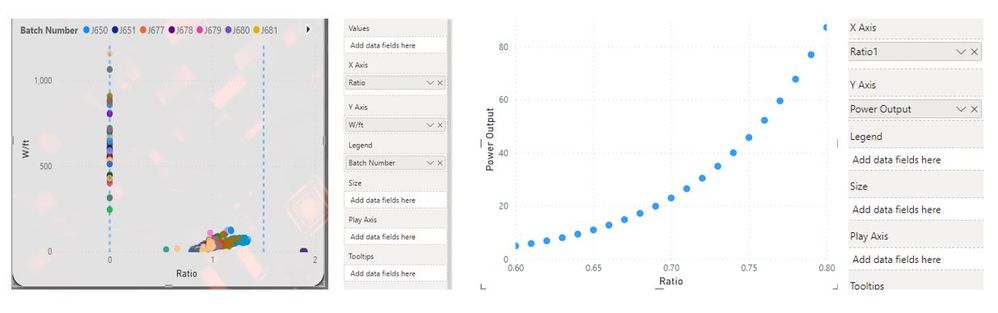
I would like the curved graph to show on the graph with the batches and stay even though I use a slicer to select a different batch number.
Is there a way to merge them or that a scatter plot shows two graphs in the same visual?
The Power BI Data Visualization World Championships is back! It's time to submit your entry.
Check out the January 2026 Power BI update to learn about new features.
| User | Count |
|---|---|
| 57 | |
| 40 | |
| 27 | |
| 25 | |
| 23 |
| User | Count |
|---|---|
| 127 | |
| 105 | |
| 55 | |
| 39 | |
| 33 |