Join us at FabCon Atlanta from March 16 - 20, 2026, for the ultimate Fabric, Power BI, AI and SQL community-led event. Save $200 with code FABCOMM.
Register now!The Power BI Data Visualization World Championships is back! Get ahead of the game and start preparing now! Learn more
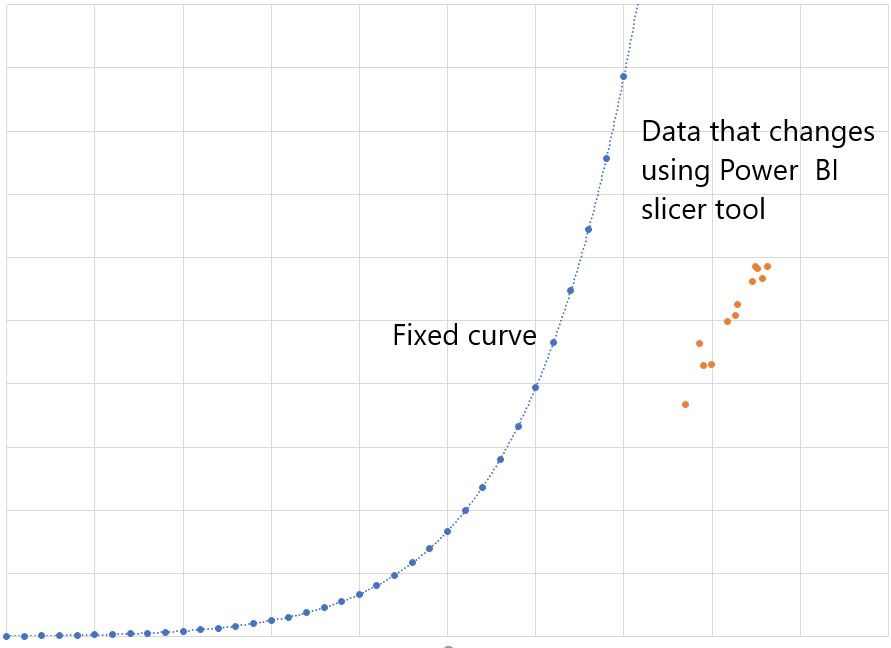
I have this Excel graph I want the fixed curve to stay put in a Power BI scatterplot or line graph. I know how to graph the data and I use the slicer tool to change the data, but I want to have this curve fixed in a scatterplot or line graph as the control limit of the data. I also want the curve to stay fixed even when I select another set of data using the slicer tool.
Without seeing your model, I would think you could do the following:
Pat
To learn more about Power BI, follow me on Twitter or subscribe on YouTube.
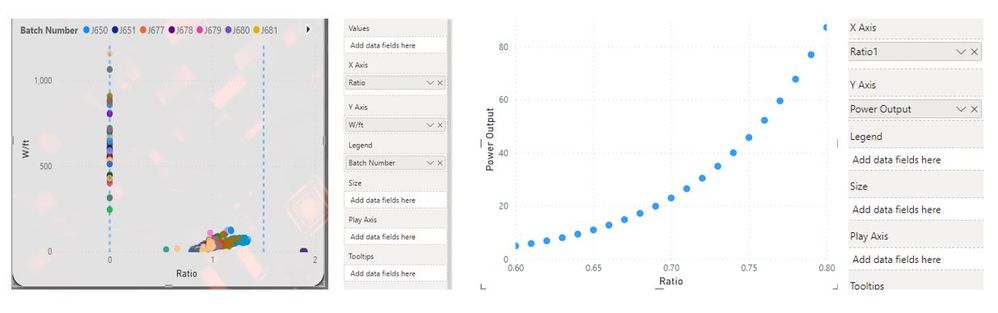
I would like the curved graph to show on the graph with the batches and stay even though I use a slicer to select a different batch number.
Is there a way to merge them or that a scatter plot shows two graphs in the same visual?
The Power BI Data Visualization World Championships is back! Get ahead of the game and start preparing now!
| User | Count |
|---|---|
| 39 | |
| 37 | |
| 35 | |
| 34 | |
| 27 |
| User | Count |
|---|---|
| 137 | |
| 97 | |
| 74 | |
| 66 | |
| 65 |