cancel
Showing results for 
Search instead for 
Did you mean: 

July 7 - July 17 | Round 2 of the Power BI Dataviz World Championships. Don't miss your chance! Learn more

Reply
ivan_larson_cki
Helper III
Helper III

Fixed Blocks Visualization

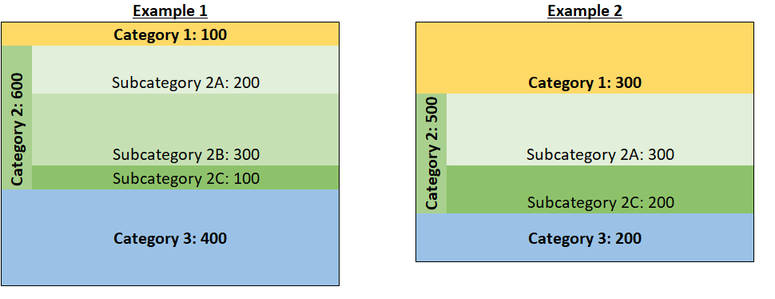
I'd like to create a visual with a select number of categories that shows visually the relative size of each category when that category is present like a treemap but with two stipulations:

  • For one of the categories, I'd like to show both the category total and a set of subcategories
  • I'd like the categories arranged in a predefined order. If a category is missing in a given instance, it doesn't appear and the others fill in.

Does such a visual exist?


Here's an example of what it should look like:

Example Visual.png


3 REPLIES 3
Syk
Resident Rockstar
Resident Rockstar

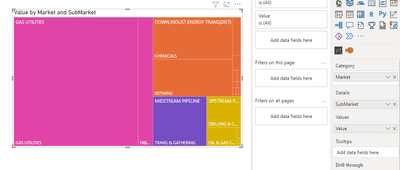
You can do something similar with a tree map. Just add your subcategory to the details field..

Syk_0-1654800199453.png


Fair enough - Details solves for that part of the need. But is there any way to lock the order in place so that the blocks always sort in the same direction?

I'm not sure about locking the order... In my experience with treemaps, it puts largest on the top left -> smallest bottom right

Helpful resources

Announcements
FabCon and SQLCon Barcelona 2026

FabCon & SQLCon – Barcelona 2026

Join us in Barcelona for FabCon and SQLCon, the Fabric, Power BI, SQL, and AI community event. Save €200 with code FABCMTY200.

60 days of Data Days Carousel

Data Days 2026

Join Fabric Data Days 2026: 60 days of free live/on-demand sessions, challenges, study groups, and certification opportunities.

Power BI DataViz World Championships carousel

Power BI DataViz World Championships - June 2026

A new Power BI DataViz World Championship is coming this June! Don't miss out on submitting your entry.