cancel
Showing results for 
Search instead for 
Did you mean: 

The Power BI Data Visualization World Championships is back! Get ahead of the game and start preparing now! Learn more

Reply
padminise
Regular Visitor

Fitted Line Plot

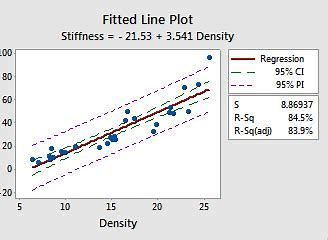
Using Power BI, can we create a Fillted Line Graph like the one below-


OIP.jfif

1 ACCEPTED SOLUTION
themistoklis
Community Champion
Community Champion

@padminise 


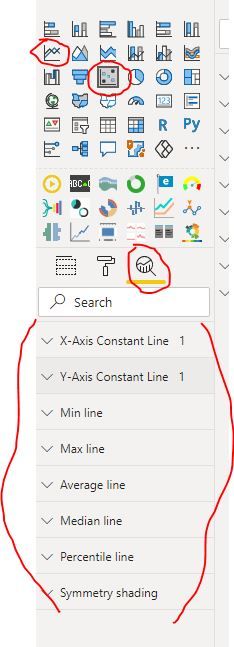
You can select a scatter chart or line chart --> then go to Analytics tab in Visualisations pane and add the type of line you want.


e.g Average Line, Trend Line, Pecrentile Line


Image below:

fitted_line.JPG

View solution in original post

1 REPLY 1
themistoklis
Community Champion
Community Champion

@padminise 


You can select a scatter chart or line chart --> then go to Analytics tab in Visualisations pane and add the type of line you want.


e.g Average Line, Trend Line, Pecrentile Line


Image below:

fitted_line.JPG

Helpful resources

Announcements
Power BI DataViz World Championships

Power BI Dataviz World Championships

The Power BI Data Visualization World Championships is back! Get ahead of the game and start preparing now!

December 2025 Power BI Update Carousel

Power BI Monthly Update - December 2025

Check out the December 2025 Power BI Holiday Recap!

FabCon Atlanta 2026 carousel

FabCon Atlanta 2026

Join us at FabCon Atlanta, March 16-20, for the ultimate Fabric, Power BI, AI and SQL community-led event. Save $200 with code FABCOMM.