Join us at FabCon Atlanta from March 16 - 20, 2026, for the ultimate Fabric, Power BI, AI and SQL community-led event. Save $200 with code FABCOMM.
Register now!Get Fabric Certified for FREE during Fabric Data Days. Don't miss your chance! Request now
I'm creating a date table and I've used the Calendar() function as the basis. So, I have a Date column in the Dates table, as well as other calculated columns for Month, Quarter, etc. I want to add an additional calculated column for Fiscal Year, based on start and end dates defined in another table in my model.
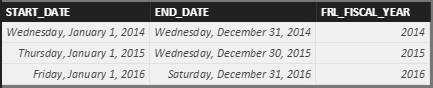
I have a GLYEAR table that has the following structure:
Date Start_Date
Date End_Date
int FRL_FISCAL_YEAR
Basically the psuedo code for the calculated colum should be "If Dates[Date] >= GLYEAR[START_DATE] and Dates[Date] <= GLYEAR[START_DATE] then FRL_FISCAL_YEAR
There is no existing relationship between Dates and GLYEAR.
Appreciate any pointers.
Solved! Go to Solution.
This seems like it's giving me the results I need. Does anyone see any issues with this solution?
Fiscal Year = CALCULATE(VALUES(GLYEAR[FISCAL_YEAR]), FILTER(GLYEAR, Dates[Date] >= GLYEAR[START_DATE] && Dates[Date] <= GLYEAR[END_DATE]))
This seems like it's giving me the results I need. Does anyone see any issues with this solution?
Fiscal Year = CALCULATE(VALUES(GLYEAR[FISCAL_YEAR]), FILTER(GLYEAR, Dates[Date] >= GLYEAR[START_DATE] && Dates[Date] <= GLYEAR[END_DATE]))
Hi @ChrisWilliams,
According to your description, the formula provided above should work in this scenario.![]()
In addition, could you accept your reply as solution to help others who has similar issue easily find the answer and close this thread?
Regards
Check out the November 2025 Power BI update to learn about new features.
Advance your Data & AI career with 50 days of live learning, contests, hands-on challenges, study groups & certifications and more!