cancel
Showing results for 
Search instead for 
Did you mean: 

Try your skills in the Power BI Dataviz World Championship! Round one ends June 26. Join now

Reply
AndresSalomon
Helper II
Helper II

First non blank value

Hi Community, need your help to solve a problem. I think is prety simple but I'm not being able to solve it.


My scenario is the next one. I have this table.

Name ID___________Month_______Date
Name1___________Sep_________BLANK
Name1___________Oct_________BLANK
Name1___________Nov________11/01/2017
Name1___________Dec_________12/01/2017
...
Name2___________Sep_________BLANK
Name2___________Oct_________10/01/2017
Name2___________Nov_________11/03/2017
Name2___________Dec_________12/02/2017

I need to extract the first-non-blank date from the Date column for each Name ID, in a column. The final table should looks like:

Name ID________Month_______Date__________________First Date
Name1___________Sep_________BLANK_______________11/01/2017
Name1___________Oct_________BLANK_______________11/01/2017
Name1___________Nov________11/01/2017__________11/01/2017
Name1___________Dec_________12/01/2017__________11/01/2017
...
Name2___________Sep_________BLANK_______________10/01/2017
Name2___________Oct_________10/01/2017__________10/01/2017
Name2___________Nov_________11/03/2017_________10/01/2017
Name2___________Dec_________12/02/2017__________10/01/2017

I tried the FIRSTNONBLANK fuction inside CALCULATE, but it didn't work for me. Maybe I'm using it in the wrong way. 


Any advice would be helpful. Really thanks in advance.


Kind regards,


Andy.-

2 ACCEPTED SOLUTIONS
Rich_P
Helper II
Helper II

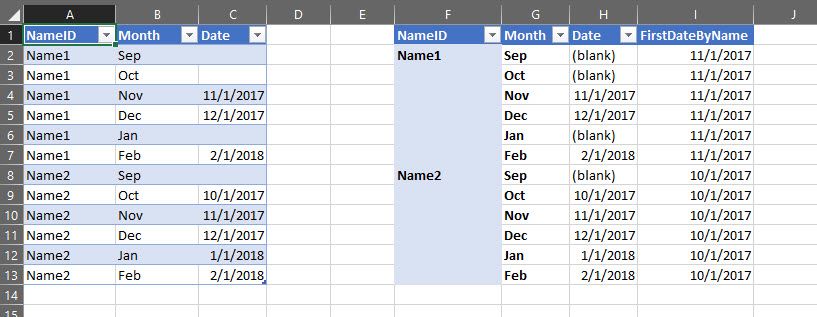
FirstDateOfRange.jpg


Here is the DAX Formula I used.

FirstDateByName:=CALCULATE(FIRSTDATE(Table2[Date]),ALL(Table2[Month]),ALL(Table2[Date]))

There is probably a better way, but this works. Hope it heloped.


Rich

View solution in original post

Ashish_Mathur
Super User
Super User

Hi,


This calculated column formula will work


=CALCULATE(MIN([Date]),FILTER(Data,Data[Name ID]=EARLIER(Data[Name ID])))

Hope this helps.


Regards,
Ashish Mathur
http://www.ashishmathur.com
https://www.linkedin.com/in/excelenthusiasts/

View solution in original post

5 REPLIES 5
AndresSalomon
Helper II
Helper II

Hey guys, really thaks for the help! I think both of your ideas can work but, FOR ME, I prefer to avoid using EARLIER fuction. It always brings me problems. 


Anyway both are great solutions. 


Thanks again. 


Kind regards,


Andy.-

Always happy to help (where I can). Gotta love this site and the members!

You are welcome.

Regards,
Ashish Mathur
http://www.ashishmathur.com
https://www.linkedin.com/in/excelenthusiasts/
Ashish_Mathur
Super User
Super User

Hi,


This calculated column formula will work


=CALCULATE(MIN([Date]),FILTER(Data,Data[Name ID]=EARLIER(Data[Name ID])))

Hope this helps.


Regards,
Ashish Mathur
http://www.ashishmathur.com
https://www.linkedin.com/in/excelenthusiasts/
Rich_P
Helper II
Helper II

FirstDateOfRange.jpg


Here is the DAX Formula I used.

FirstDateByName:=CALCULATE(FIRSTDATE(Table2[Date]),ALL(Table2[Month]),ALL(Table2[Date]))

There is probably a better way, but this works. Hope it heloped.


Rich

Helpful resources

Announcements
Fabric Data Days is here Carousel

Fabric Data Days 2026

Don't miss out on Data Days, June 15 through August 7. Learn Fabric, Power BI, SQL, AI and more.

May Power BI Update Carousel

Power BI Monthly Update - May 2026

Check out the May 2026 Power BI update to learn about new features.

Power BI DataViz World Championships carousel

Power BI DataViz World Championships - June 2026

A new Power BI DataViz World Championship is coming this June! Don't miss out on submitting your entry.