cancel
Showing results for 
Search instead for 
Did you mean: 

Learn from the best! Meet the four finalists headed to the FINALS of the Power BI Dataviz World Championships! Register now

Reply
FrugalEconomist
Helper III
Helper III

Finicky Fiscal Year Sorting

Dear Power BI Community,


As always, thank you for your helpful responses.

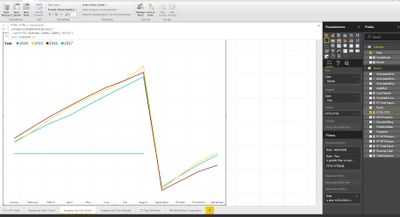
I'm having trouble now presenting my data in a custom end of year. I believe my DAX calculated formula is correct, but the axis is still in the default order.

How can I get my axis months to sort according to my custom end of year of September 1st?


My calendar table is a simple:

Calendar = Calenday("01-01-2010", Today())


Thank youFinicky fiscal year sorting.JPG


6 REPLIES 6
andre
Memorable Member
Memorable Member

The best way to solve this reliably is to create a new column and call it FiscalDate, then you can use the DATEADD function to shift it the required number of periods so that the Calendar date of 9/1/2016 is corresponding with a Fiscal Date 1/1/2017.  Once that's done, you can create Fiscal Period, Fiscal Qtr and Fiscal Year columns and use those for reporting.  You can use your calendar date for relationships.

adamh1
Frequent Visitor

Hi Guys - I have the same issue, We have a fiscal year Jul to Jun,  - in the format tab I'm nort able to sort graphs of tables by the sequence of Months form Jul to Jun

In trying to fix/resolve this  in the data tab I've tried 3 differnt columns for the financial year period numbers i.e.

i. FinMonthSort = if(Month(DateKey[date])>6,Month(DateKey[date])-6,Month(DateKey[Date])+6)

ii.FMonthNo = SWITCH(DateKey[MonthNo],    1,"7",    2, "8",    3, "9",    4, "10",    5, "11",    6, "12",    7, "1",    8, "2",    9, "3",    10, "4",    11, "5",    12, "6",  ( deriving financial month form calander month using switch)
    BLANK ())

iii.FinDate = DATEADD(DateKey[Date],+6,MONTH) and derived the Financial year period number from the FinDate


- when sorting each financial month column in the data tab the sequence of the table contents dones't change when clicking on the sort icon

- the table only sorts when sorting the column directly i.e. select the column and right click and select "Sort in asending order"... (don't know if this a the problem??) 

When I go to the format tab the changes from sorting don't flow thru - the month short name "MMM" continues to be sorted alphabetically 

any ideas or further information I could provide to help solve please let me know.


many thanks Adam

a68tbird
Resolver II
Resolver II

This might not be the most elegant solution, but I think it will work.  


First, extract the month number from your date in your Calendar table (Date.Month([Date])).  Then create a custom column in your calendar table that will set a custom sort order:


=if [Month Number] >= 9
then ([Month Number] - 9)
else ([Month Number] + 3)


Finally, in Data Table view, under the Modeling tab, use Sort by Column and select your new custom sort order. 


I believe this should work...haven't actually tested in an application. 

Thanks a68tbird.


Thanks for your feedback, but unfortunately it doesn't work because the 'canned' power bi date hierarchy can drill down date type fields into Year, Quarter, Month, and Day. However when I create custom columns, even though I've made the date to date join, it doesn't recognize any of the calcluated columns or measures for some reason 😞

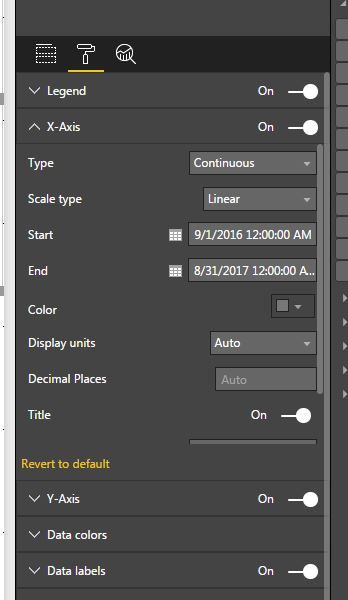
How about in the visulization settings. Under the X-Axis setting, you can set Start and End dates. 


powerBI_xaxis.JPG

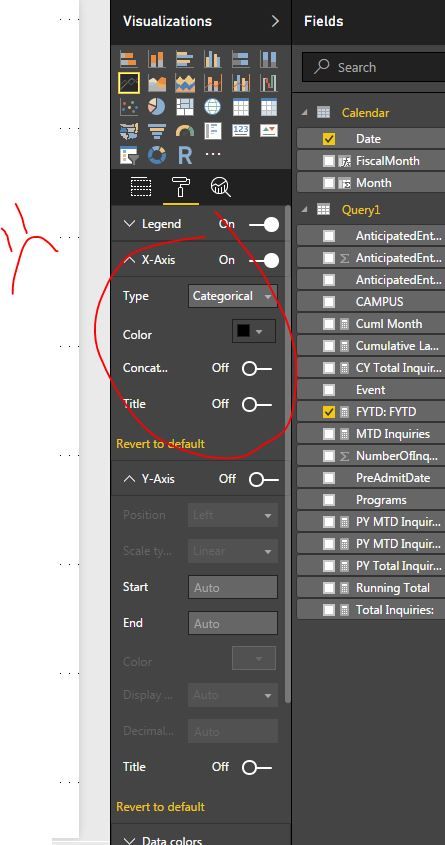
What!?!? That's so cool, but it doesn't show up for me 😞

I also cannot change the data type to continuous.

no selection.JPG

Helpful resources

Announcements
Join our Fabric User Panel

Join our Fabric User Panel

Share feedback directly with Fabric product managers, participate in targeted research studies and influence the Fabric roadmap.

February Power BI Update Carousel

Power BI Monthly Update - February 2026

Check out the February 2026 Power BI update to learn about new features.

FabCon Atlanta 2026 carousel

FabCon Atlanta 2026

Join us at FabCon Atlanta, March 16-20, for the ultimate Fabric, Power BI, AI and SQL community-led event. Save $200 with code FABCOMM.