Join us at FabCon Atlanta from March 16 - 20, 2026, for the ultimate Fabric, Power BI, AI and SQL community-led event. Save $200 with code FABCOMM.
Register now!The Power BI Data Visualization World Championships is back! Get ahead of the game and start preparing now! Learn more
Hi community,
I have searched for a solution here in the forum and on the web, came a couple of times close but ultimately wasn't able to solve my problem.
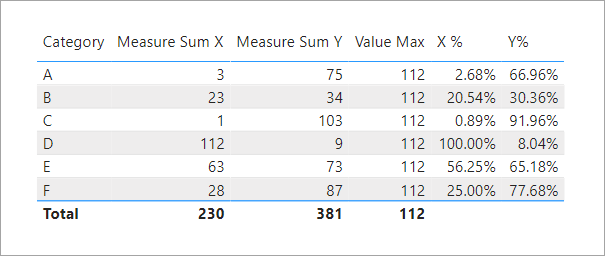
I have a matrix visual similar to this example:
‘Table’ [Category] | [Measure Sum X] | [Measure Sum Y] |
A | 3 | 75 |
B | 23 | 34 |
C | 1 | 103 |
D | 112 | 9 |
E | 63 | 73 |
F | 28 | 87 |
Now, I want to create a measure givng me the overall maximum value in this matrix. In this case "112".
I have tried
Value Max = MAX('Measures'[Measure Sum X], 'Measures'[Measure Sum Y])
but this only gives me the maximum value per category and not the desired overall maximum value.
Finally, I want to use this measure to standardize all values in the matrix to a percentage between 0% and 100%, with 100% representing the maximum value.
All help welcome. Thank you very much!
Solved! Go to Solution.
Try it like this.
Value Max =
CALCULATE (
MAXX ( VALUES ( 'Table'[Category] ), MAX ( [Measure Sum X], [Measure Sum Y] ) ),
ALLSELECTED ( 'Table' )
)X % =
IF (
HASONEVALUE ( 'Table'[Category] ),
DIVIDE ( [Measure Sum X], [Value Max] )
)Y% =
IF (
HASONEVALUE ( 'Table'[Category] ),
DIVIDE ( [Measure Sum Y], [Value Max] )
)
Try it like this.
Value Max =
CALCULATE (
MAXX ( VALUES ( 'Table'[Category] ), MAX ( [Measure Sum X], [Measure Sum Y] ) ),
ALLSELECTED ( 'Table' )
)X % =
IF (
HASONEVALUE ( 'Table'[Category] ),
DIVIDE ( [Measure Sum X], [Value Max] )
)Y% =
IF (
HASONEVALUE ( 'Table'[Category] ),
DIVIDE ( [Measure Sum Y], [Value Max] )
)
Thank you very much for your help @jdbuchanan71 ! Works like a charm! 🙂
Have a great week!
Hi
Try this ==>
Value Max = calculate(MAX('Measures'[Measure Sum X], 'Measures'[Measure Sum Y]),removefilter())
Thank you very much @Anonymous !
For other people trying your formula, just the hint that the 's' for "REMOVEFILTERS" is missing.
Value Max = calculate(MAX('Measures'[Measure Sum X], 'Measures'[Measure Sum Y]), REMOVEFILTERS())
Nevertheless this formula unfortunately did not give me the expected values. Therfore I will go with the solution from @jdbuchanan71 . But thanks so much for your efforts!
Have a great week!
The Power BI Data Visualization World Championships is back! Get ahead of the game and start preparing now!
Check out the November 2025 Power BI update to learn about new features.
| User | Count |
|---|---|
| 59 | |
| 43 | |
| 42 | |
| 23 | |
| 17 |
| User | Count |
|---|---|
| 190 | |
| 122 | |
| 96 | |
| 66 | |
| 47 |