cancel
Showing results for 
Search instead for 
Did you mean: 

The Power BI Data Visualization World Championships is back! Get ahead of the game and start preparing now! Learn more

Reply
spocx
Helper I
Helper I

Finding first value with same ID in multiple rows based on date/time

Dear Power BI community


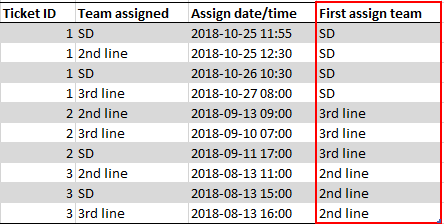
I need help to write a DAX formular that can identify the first value in multiple rows with the same ID based on date/time. I have a table as shown below and need to calculate the column "First assign team" marked in red. I have just filled out the values in "First assign team" manually for easy understanding. 


 Capture.PNG


I am able to identify the first date/time within the rows with same ID with the following formular, but I cannot figure out how to identify the first assign team.

First assignment time = CALCULATE(MIN(Table1[Assign date/time]);FILTER(Table1;Table1[Ticket ID]=EARLIER(Table1[Ticket ID])))

If anyone could help, it would be highly appreciated.


Best regards,

Jonas

1 ACCEPTED SOLUTION
v-yulgu-msft
Microsoft Employee
Microsoft Employee

Hi @spocx,


First Assign team =
VAR firstassigndate =
    CALCULATE (
        MIN ( 'table 1'[Assign date/time] ),
        ALLEXCEPT ( 'table 1', 'table 1'[Ticket ID] )
    )
RETURN
    CALCULATE (
        SELECTEDVALUE ( 'table 1'[Team assigned] ),
        FILTER (
            ALLEXCEPT ( 'table 1', 'table 1'[Ticket ID] ),
            'table 1'[Assign date/time] = firstassigndate
        )
    )

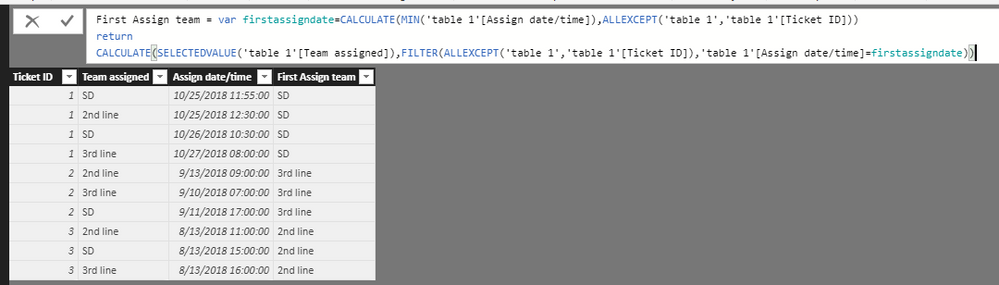
1.PNG


Best regards,

Yuliana Gu

Community Support Team _ Yuliana Gu
If this post helps, then please consider Accept it as the solution to help the other members find it more quickly.

View solution in original post

5 REPLIES 5
Anonymous
Not applicable

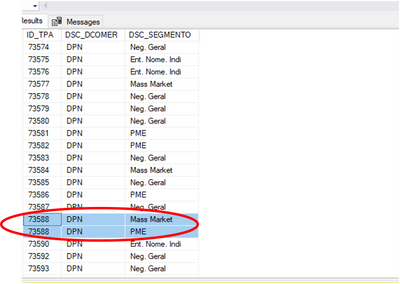
Hello, I have a similar problem but in my case i need the distict count of the Id´s.

madalenaabreu_1-1642085490784.png

Because it has lines with the same id but diferent direction the dax calcuate count 2 times this id.

I want to make a dax that counts these tables and if it finds the repeated id counts only one. 


v-yulgu-msft
Microsoft Employee
Microsoft Employee

Hi @spocx,


First Assign team =
VAR firstassigndate =
    CALCULATE (
        MIN ( 'table 1'[Assign date/time] ),
        ALLEXCEPT ( 'table 1', 'table 1'[Ticket ID] )
    )
RETURN
    CALCULATE (
        SELECTEDVALUE ( 'table 1'[Team assigned] ),
        FILTER (
            ALLEXCEPT ( 'table 1', 'table 1'[Ticket ID] ),
            'table 1'[Assign date/time] = firstassigndate
        )
    )

1.PNG


Best regards,

Yuliana Gu

Community Support Team _ Yuliana Gu
If this post helps, then please consider Accept it as the solution to help the other members find it more quickly.

HI

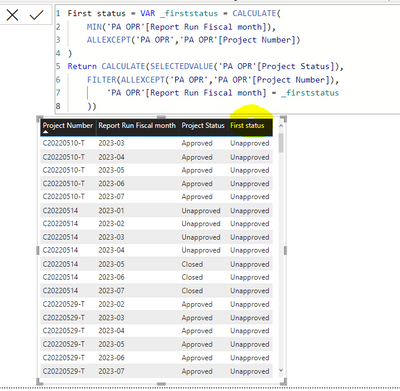
I have a very similar scenario, where for a project number I have multiple rows for various periods. The status changes in some periods. However, I want to see the first status for a particular project number. Using the formula above shows always just Unapproved status for some reason. E.G. for C20220510-T I should see as the first status 'Approved', for C20220514 I should see Unapproved, for C20220529-T I should see Approved. Can you help please?

MartinaRa_0-1692168319662.png


Hi Yuliana 


Your solution works perfectly. Thank you so much.


Best regards,

Jonas 

Anonymous
Not applicable

@spocx try this


First assignment time = CALCULATE(MIN(Table1[Assign date/time]),ALLEXCEPT(Table1, Table1[Ticket ID]))
assign team for first assignment= IF([First assignment time]=Table1[Assign date/time],Table1[Team Assigned],NULL)
First assign team = CALCULATE(MAX(assign team for first assignment),ALLEXCEPT(Table1, Table1[Ticket ID]))


Helpful resources

Announcements
Power BI DataViz World Championships

Power BI Dataviz World Championships

The Power BI Data Visualization World Championships is back! Get ahead of the game and start preparing now!

November Power BI Update Carousel

Power BI Monthly Update - November 2025

Check out the November 2025 Power BI update to learn about new features.

FabCon Atlanta 2026 carousel

FabCon Atlanta 2026

Join us at FabCon Atlanta, March 16-20, for the ultimate Fabric, Power BI, AI and SQL community-led event. Save $200 with code FABCOMM.