Share feedback directly with Fabric product managers, participate in targeted research studies and influence the Fabric roadmap.
Sign up nowGet Fabric certified for FREE! Don't miss your chance! Learn more
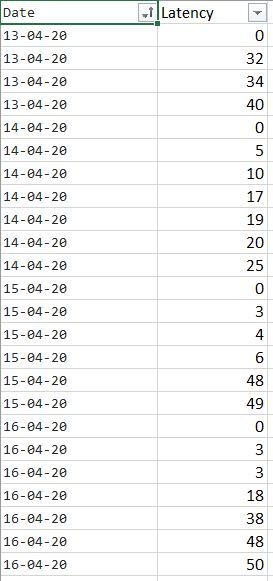
Hi have a table like below
I need to find the Min value for each day. however, all days have 0 in it and min(latency) will give 0 for all day.
But i want to show the next min value. For example : 32 for 13-04-20 & 5 for 14-04-20.
Please help me how i can achieve this.
Solved! Go to Solution.
@Anonymous try this measure
Min Value =
CALCULATE ( MIN ( Table[Latency] ), ALLEXCEPT ( Table, Table[Date] ), Table[Latency] > 0 )
I would 💖 Kudos 🙂 if my solution helped. ?
Subscribe to the @PowerBIHowTo YT channel for an upcoming video on List and Record functions in Power Query!!
Learn Power BI and Fabric - subscribe to our YT channel - Click here: @PowerBIHowTo
If my solution proved useful, I'd be delighted to receive Kudos. When you put effort into asking a question, it's equally thoughtful to acknowledge and give Kudos to the individual who helped you solve the problem. It's a small gesture that shows appreciation and encouragement! ❤
Did I answer your question? Mark my post as a solution. Proud to be a Super User! Appreciate your Kudos 🙂
Feel free to email me with any of your BI needs.
@Anonymous try this measure
Min Value =
CALCULATE ( MIN ( Table[Latency] ), ALLEXCEPT ( Table, Table[Date] ), Table[Latency] > 0 )
I would 💖 Kudos 🙂 if my solution helped. ?
Subscribe to the @PowerBIHowTo YT channel for an upcoming video on List and Record functions in Power Query!!
Learn Power BI and Fabric - subscribe to our YT channel - Click here: @PowerBIHowTo
If my solution proved useful, I'd be delighted to receive Kudos. When you put effort into asking a question, it's equally thoughtful to acknowledge and give Kudos to the individual who helped you solve the problem. It's a small gesture that shows appreciation and encouragement! ❤
Did I answer your question? Mark my post as a solution. Proud to be a Super User! Appreciate your Kudos 🙂
Feel free to email me with any of your BI needs.
I figured that the below also works
@Anonymous you want to avoid using FiLTER function as it can be very expensive on larger datasets. Cheers!
Subscribe to the @PowerBIHowTo YT channel for an upcoming video on List and Record functions in Power Query!!
Learn Power BI and Fabric - subscribe to our YT channel - Click here: @PowerBIHowTo
If my solution proved useful, I'd be delighted to receive Kudos. When you put effort into asking a question, it's equally thoughtful to acknowledge and give Kudos to the individual who helped you solve the problem. It's a small gesture that shows appreciation and encouragement! ❤
Did I answer your question? Mark my post as a solution. Proud to be a Super User! Appreciate your Kudos 🙂
Feel free to email me with any of your BI needs.
Share feedback directly with Fabric product managers, participate in targeted research studies and influence the Fabric roadmap.
| User | Count |
|---|---|
| 68 | |
| 59 | |
| 44 | |
| 19 | |
| 15 |
| User | Count |
|---|---|
| 108 | |
| 105 | |
| 37 | |
| 26 | |
| 26 |