Join us at FabCon Atlanta from March 16 - 20, 2026, for the ultimate Fabric, Power BI, AI and SQL community-led event. Save $200 with code FABCOMM.
Register now!The Power BI Data Visualization World Championships is back! Get ahead of the game and start preparing now! Learn more
Hello,
I have a table with historical data with ID, Status and Date. I would like to add 2 additional columns and can show what is the last "changed value" and last changed date for the same ID. Here is the example:
| ID | Status | Date |
| A | Active | 9/15/2019 |
| A | Active | 9/18/2019 |
| A | Inactive | 9/20/2019 |
| A | Active | 9/21/2019 |
| B | Active | 9/15/2019 |
| B | Inactive | 9/18/2019 |
| B | Active | 9/20/2019 |
| B | Active | 9/21/2019 |
| B | Active | 9/25/2019 |
| C | Inactive | 9/15/2019 |
| C | Maintenance | 9/18/2019 |
| C | Inactive | 9/20/2019 |
| C | Active | 9/21/2019 |
| C | Inactive | 9/25/2019 |
I want to have the result liks this:
| ID | Status | Date | Last changed value | Last Changed Date |
| A | Active | 9/15/2019 | ||
| A | Active | 9/18/2019 | ||
| A | Inactive | 9/20/2019 | Active | 9/18/2019 |
| A | Active | 9/21/2019 | Inactive | 9/20/2019 |
| B | Active | 9/15/2019 | ||
| B | Inactive | 9/18/2019 | Active | 9/15/2019 |
| B | Active | 9/20/2019 | Inactive | 9/18/2019 |
| B | Active | 9/21/2019 | Inactive | 9/18/2019 |
| B | Active | 9/25/2019 | Inactive | 9/18/2019 |
| C | Inactive | 9/15/2019 | ||
| C | Maintenance | 9/18/2019 | Inactive | 9/15/2019 |
| C | Inactive | 9/20/2019 | Maintenance | 9/18/2019 |
| C | Active | 9/21/2019 | Inactive | 9/20/2019 |
| C | Inactive | 9/25/2019 | Active | 9/21/2019 |
Any ideas is appreciated, thank you.
Solved! Go to Solution.
Hello @Anonymous
Two calculated columns will get what you are looking for I think.
First we figure out the [Last Changed Date]
Last Changed Date =
VAR _Status = 'Table'[Status]
VAR _Date = 'Table'[Date]
RETURN
CALCULATE(
MAX ( 'Table'[Date] ),
ALLEXCEPT ( 'Table', 'Table'[ID] ),
'Table'[Date] < _Date,
'Table'[Status] <> _Status
)
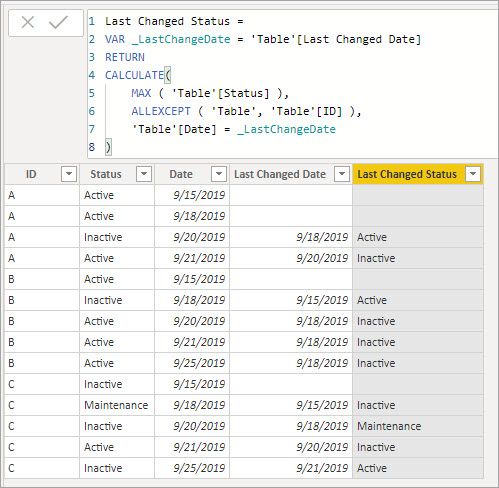
Then we can use that to get the [Last Changed Status]
Last Changed Status =
VAR _LastChangeDate = 'Table'[Last Changed Date]
RETURN
CALCULATE(
MAX ( 'Table'[Status] ),
ALLEXCEPT ( 'Table', 'Table'[ID] ),
'Table'[Date] = _LastChangeDate
)
Try, if this can help
https://community.powerbi.com/t5/Desktop/highest-value-by-category/td-p/428758
Hello @Anonymous
Two calculated columns will get what you are looking for I think.
First we figure out the [Last Changed Date]
Last Changed Date =
VAR _Status = 'Table'[Status]
VAR _Date = 'Table'[Date]
RETURN
CALCULATE(
MAX ( 'Table'[Date] ),
ALLEXCEPT ( 'Table', 'Table'[ID] ),
'Table'[Date] < _Date,
'Table'[Status] <> _Status
)
Then we can use that to get the [Last Changed Status]
Last Changed Status =
VAR _LastChangeDate = 'Table'[Last Changed Date]
RETURN
CALCULATE(
MAX ( 'Table'[Status] ),
ALLEXCEPT ( 'Table', 'Table'[ID] ),
'Table'[Date] = _LastChangeDate
)
The Power BI Data Visualization World Championships is back! Get ahead of the game and start preparing now!
| User | Count |
|---|---|
| 38 | |
| 38 | |
| 37 | |
| 28 | |
| 27 |
| User | Count |
|---|---|
| 124 | |
| 89 | |
| 73 | |
| 66 | |
| 65 |