Don't miss your chance to take the Fabric Data Engineer (DP-600) exam for FREE! Find out how by attending the DP-600 session on April 23rd (pacific time), live or on-demand.
Learn moreNext up in the FabCon + SQLCon recap series: The roadmap for Microsoft SQL and Maximizing Developer experiences in Fabric. All sessions are available on-demand after the live show. Register now
Hello,
I have a table with ID, Date, Facility, OR#, Start Time and End Time. I need to find surgeries that are overlapping in the same facility, same OR, as this is a mistake as two surgeries cannot occur at the same time. For example
Record 1 - 9/1/2022, Memorial HOspital, OR #5, Start 7:30 AM, End 9:30 AM
Record 2 - 9/1/2022, Memorial Hospital, OR #5, Start 8:00 AM, End 1100 AM
How could I display these overlapping records?
Solved! Go to Solution.
1. Decide your data granulatity level . Is it half hour slots, 15 minute slots, or minute level slots? What should happen when a surgery goes past midnight? Better use DateTime values.
2. For each surgery generate a list of slots based on 1. (in Power Query)
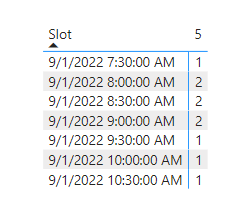
3. Load the data into Power BI. List all slots with their rowcount. Any rowcount above 1 means there is one or more conflicts for that slot.
Here is an example for half hourly slots.
See attached.
1. Decide your data granulatity level . Is it half hour slots, 15 minute slots, or minute level slots? What should happen when a surgery goes past midnight? Better use DateTime values.
2. For each surgery generate a list of slots based on 1. (in Power Query)
3. Load the data into Power BI. List all slots with their rowcount. Any rowcount above 1 means there is one or more conflicts for that slot.
Here is an example for half hourly slots.
See attached.
If you have recently started exploring Fabric, we'd love to hear how it's going. Your feedback can help with product improvements.
A new Power BI DataViz World Championship is coming this June! Don't miss out on submitting your entry.
| User | Count |
|---|---|
| 47 | |
| 43 | |
| 39 | |
| 20 | |
| 15 |
| User | Count |
|---|---|
| 68 | |
| 68 | |
| 31 | |
| 27 | |
| 24 |