cancel
Showing results for 
Search instead for 
Did you mean: 

The Power BI Data Visualization World Championships is back! Get ahead of the game and start preparing now! Learn more

Reply
Anonymous
Not applicable

Find Overlapping Dates Records

Hello All,


I am newbie to powerbi and i need your guide and suggestions.


I have a sample data as below.


Task      Resource   Start          End 
Task 1Resource 102-Jul-1926-Aug-19
Task 1Resource 101-Aug-1926-Aug-19
Task 3Resource 227-Aug-1931-Aug-19
Task 4Resource 301-Sep-1925-Sep-19
Task 5Resource 326-Sep-1925-Oct-19
Task 1Resource 201-Aug-1926-Aug-19
Task 1Resource 220-Aug-1931-Aug-19
Task 1Resource 301-Sep-1925-Sep-19
Task 1Resource 315-Sep-1925-Oct-19


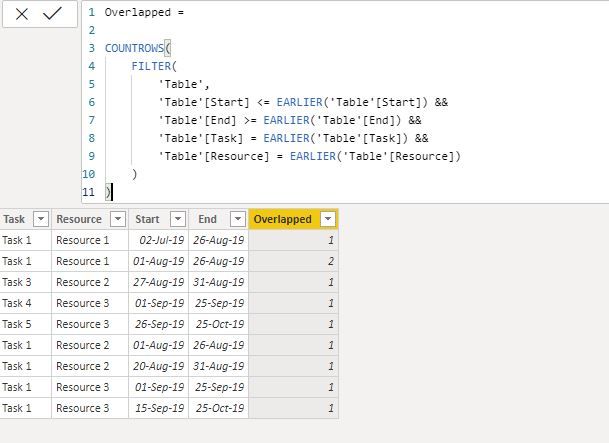
Now i am trying to create a column or measure which gives the count as 1

IF Start Date and End Date as getting overlapped even one day with Same Task and resource then the Column or Measure (OverLapped) gives the Count as 1.


The output that i am expecting.

Capture1.JPG

I tried the below dax but it was not the expected output.


Capture2.JPG


Please help.


Thanks,

Mohan V.

1 ACCEPTED SOLUTION
camargos88
Community Champion
Community Champion

Hi @Anonymous ,


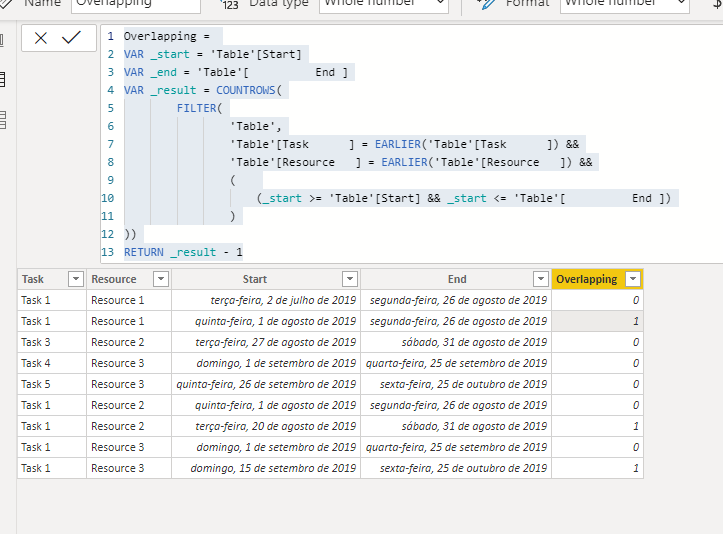
Try this code:


Overlapping =
VAR _start = 'Table'[Start]
VAR _end = 'Table'[ End ]
VAR _result = COUNTROWS(
FILTER(
'Table',
'Table'[Task ] = EARLIER('Table'[Task ]) &&
'Table'[Resource ] = EARLIER('Table'[Resource ]) &&
(
(_start >= 'Table'[Start] && _start <= 'Table'[ End ])
)
))
RETURN _result - 1
 
 
Capture.PNG


Did I answer your question? Mark my post as a solution!

Proud to be a Super User!


View solution in original post

2 REPLIES 2
amitchandak
Super User
Super User

@Anonymous , refer if this file on a similar issue can help

https://www.dropbox.com/s/1mlq21o1xjuw8il/overlappingdates.pbix?dl=0


Share with Power BI Enthusiasts: Full Power BI Video (20 Hours) YouTube
Microsoft Fabric Series 60+ Videos YouTube
Microsoft Fabric Hindi End to End YouTube
camargos88
Community Champion
Community Champion

Hi @Anonymous ,


Try this code:


Overlapping =
VAR _start = 'Table'[Start]
VAR _end = 'Table'[ End ]
VAR _result = COUNTROWS(
FILTER(
'Table',
'Table'[Task ] = EARLIER('Table'[Task ]) &&
'Table'[Resource ] = EARLIER('Table'[Resource ]) &&
(
(_start >= 'Table'[Start] && _start <= 'Table'[ End ])
)
))
RETURN _result - 1
 
 
Capture.PNG


Did I answer your question? Mark my post as a solution!

Proud to be a Super User!


Helpful resources

Announcements
Power BI DataViz World Championships

Power BI Dataviz World Championships

The Power BI Data Visualization World Championships is back! Get ahead of the game and start preparing now!

December 2025 Power BI Update Carousel

Power BI Monthly Update - December 2025

Check out the December 2025 Power BI Holiday Recap!

FabCon Atlanta 2026 carousel

FabCon Atlanta 2026

Join us at FabCon Atlanta, March 16-20, for the ultimate Fabric, Power BI, AI and SQL community-led event. Save $200 with code FABCOMM.