Join us in Barcelona for FabCon and SQLCon, September 28 - October 1, 2026.
This is best Fabric, Power BI, SQL and AI community event. How do we know? The last event sold out! Save €200 with code FABCMTY200.
Register now- Power BI forums
- Get Help with Power BI
- Desktop
- Service
- Report Server
- Power Query
- Mobile Apps
- Developer
- DAX Commands and Tips
- Custom Visuals Development Discussion
- Health and Life Sciences
- Power BI Spanish forums
- Translated Spanish Desktop
- Training and Consulting
- Instructor Led Training
- Dashboard in a Day for Women, by Women
- Galleries
- Data Stories Gallery
- Themes Gallery
- Contests Gallery
- QuickViz Gallery
- Quick Measures Gallery
- Visual Calculations Gallery
- Notebook Gallery
- Translytical Task Flow Gallery
- TMDL Gallery
- R Script Showcase
- Webinars and Video Gallery
- Ideas
- Custom Visuals Ideas (read-only)
- Issues
- Issues
- Events
- Upcoming Events
A new Data Days event is coming soon! This time we’re going bigger than ever. Fabric, Power BI, SQL, AI and more. Don't miss out.
- Power BI forums
- Forums
- Get Help with Power BI
- Desktop
- Re: Financial statement
- Subscribe to RSS Feed
- Mark Topic as New
- Mark Topic as Read
- Float this Topic for Current User
- Bookmark
- Subscribe
- Printer Friendly Page


- Mark as New
- Bookmark
- Subscribe
- Mute
- Subscribe to RSS Feed
- Permalink
- Report Inappropriate Content
Financial statement
Dear experts,
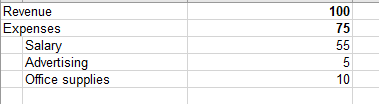
I am trying to build a financial report to show in below format using matrix:
Note that the revenue has no children
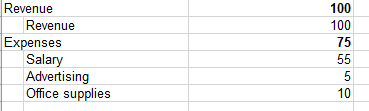
So far, below is the format that I managed to get:
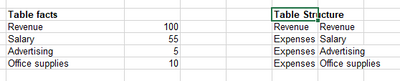
and this is the data structure that I am currently using
Any help is appreciated. Please note that I need expand/collapse to work as well (the actual statement is huge with much more financial items)
Thanks,
hcze
Solved! Go to Solution.


- Mark as New
- Bookmark
- Subscribe
- Mute
- Subscribe to RSS Feed
- Permalink
- Report Inappropriate Content
Hi @hcze ,
it seems you're looking for a ragged hierarchy where drilldown/level expansion stops once there are no more children:
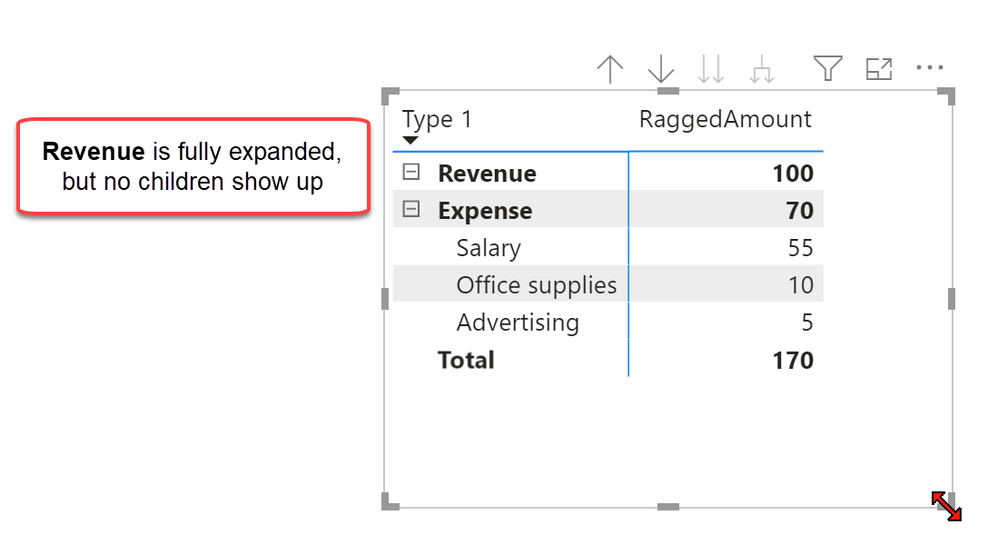
This isn't natively supported in Power BI and you need some data modelling and DAX sorcery to achieve this.
I've blogged about this method here: https://www.thebiccountant.com/2019/10/03/parent-child-hierarchies-with-multiple-parents-in-power-bi...
But realized that a dedicated blogpost for your kind of task would be helpful as well, as the data has to be prepared in a special way. Hopfully I find the time to write this up soon.
However, I'm enclosing a sample file that hopefully helps you to apply this to your data.
Imke Feldmann (The BIccountant)
If you liked my solution, please give it a thumbs up. And if I did answer your question, please mark this post as a solution. Thanks!
How to integrate M-code into your solution -- How to get your questions answered quickly -- How to provide sample data -- Check out more PBI- learning resources here -- Performance Tipps for M-queries

- Mark as New
- Bookmark
- Subscribe
- Mute
- Subscribe to RSS Feed
- Permalink
- Report Inappropriate Content
Hi @hcze ,
Please check if the below screen shot is what you want. If yes, you can refer my sample pbix file to get it.
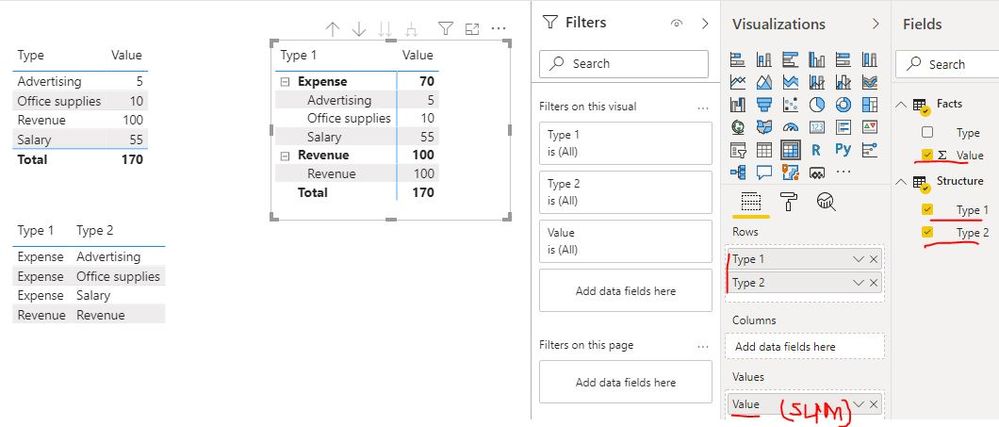
Best Regards
Rena
- Mark as New
- Bookmark
- Subscribe
- Mute
- Subscribe to RSS Feed
- Permalink
- Report Inappropriate Content
Hi @hcze ,
it seems you're looking for a ragged hierarchy where drilldown/level expansion stops once there are no more children:
This isn't natively supported in Power BI and you need some data modelling and DAX sorcery to achieve this.
I've blogged about this method here: https://www.thebiccountant.com/2019/10/03/parent-child-hierarchies-with-multiple-parents-in-power-bi...
But realized that a dedicated blogpost for your kind of task would be helpful as well, as the data has to be prepared in a special way. Hopfully I find the time to write this up soon.
However, I'm enclosing a sample file that hopefully helps you to apply this to your data.
Imke Feldmann (The BIccountant)
If you liked my solution, please give it a thumbs up. And if I did answer your question, please mark this post as a solution. Thanks!
How to integrate M-code into your solution -- How to get your questions answered quickly -- How to provide sample data -- Check out more PBI- learning resources here -- Performance Tipps for M-queries
- Mark as New
- Bookmark
- Subscribe
- Mute
- Subscribe to RSS Feed
- Permalink
- Report Inappropriate Content
Awesome! That's exactly what I am looking for. Thanks!


- Mark as New
- Bookmark
- Subscribe
- Mute
- Subscribe to RSS Feed
- Permalink
- Report Inappropriate Content
@hcze , refer if this can help
https://community.powerbi.com/t5/Desktop/Traditional-Financial-Statements/td-p/7223

- Mark as New
- Bookmark
- Subscribe
- Mute
- Subscribe to RSS Feed
- Permalink
- Report Inappropriate Content
@hcze - Take a look at this: https://community.powerbi.com/t5/Quick-Measures-Gallery/The-New-Hotness-Custom-Matrix-Hierarchy/m-p/...
I realize that your goal is slightly different. However, I think you should be able to achieve your goals by using the disconnected table trick to create a custom hierarchy as in the link above. It's just you would use that hierarchy on your rows instead of your columns.
Follow on LinkedIn
@ me in replies or I'll lose your thread!!!
Instead of a Kudo, please vote for this idea
Become an expert!: Enterprise DNA
External Tools: MSHGQM
YouTube Channel!: Microsoft Hates Greg
Latest book!: DAX For Humans
DAX is easy, CALCULATE makes DAX hard...
- Mark as New
- Bookmark
- Subscribe
- Mute
- Subscribe to RSS Feed
- Permalink
- Report Inappropriate Content
Thanks Greg.
I used that trick before but unfortunately I still need to be able to collapse/expand and that trick doesnt address that.
I am sure I am not the only one having this issue 🙂
Helpful resources

Power BI Monthly Update - May 2026
Check out the May 2026 Power BI update to learn about new features.

Data Days 2026 coming soon!
Sign up to receive a private message when registration opens and key events begin.

New to Fabric Survey
If you have recently started exploring Fabric, we'd love to hear how it's going. Your feedback can help with product improvements.

Power BI DataViz World Championships - June 2026
A new Power BI DataViz World Championship is coming this June! Don't miss out on submitting your entry.

| User | Count |
|---|---|
| 27 | |
| 25 | |
| 22 | |
| 20 | |
| 14 |


| User | Count |
|---|---|
| 50 | |
| 45 | |
| 20 | |
| 18 | |
| 18 |


