cancel
Showing results for 
Search instead for 
Did you mean: 

We've captured the moments from FabCon & SQLCon that everyone is talking about, and we are bringing them to the community, live and on-demand. Starts on April 14th. Register now

Reply
toddpbi
Helper II
Helper II

Financial Statement IF ( SWITCH

Hello there PBI community,


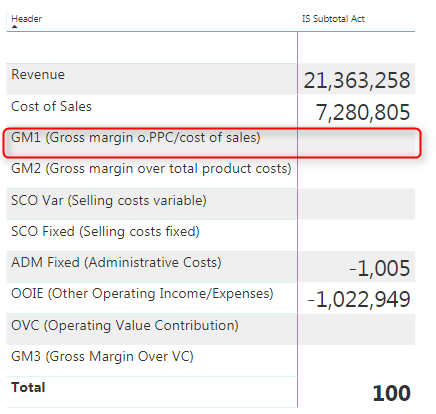
Recently I have been referencing an article to learn more about DAX language in an attempt to create a P&L statement within Power BI Desktop. The problem I am facing is that calculated members of my report are showing as blank within the matrix visual, but show fine within a PivotTable within excel.

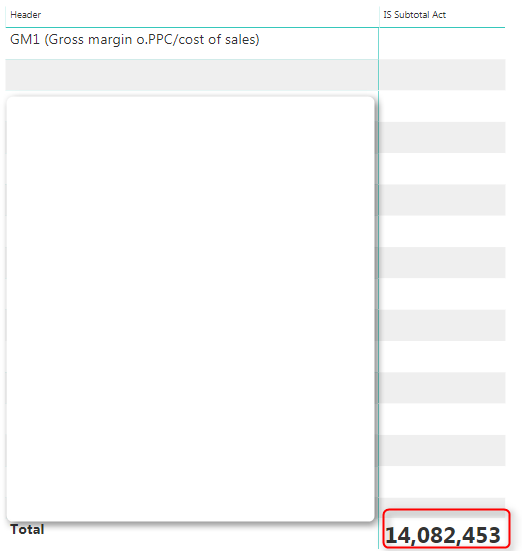
My calculated members are GM1 (Gross margin o. PPC/cost of sales) which for simplicities sake, I am calculating by simply subtracting [Total Revenue] - [Cost of Sales] measures. When I drag the measure on the canvas, it shows correctly as 14,082,453. This is also the total figure I get when drilling down to GM1. However, it does not display and simply displays as a blank value in the matrix visual.

I have used this DAX formula in order to arrange my FS in the order of the calculated measures I require:


IF (
    COUNTROWS ( VALUES ( DIM_Headers[Header] ) ) = 1,
    SWITCH (
        VALUES ( DIM_Headers[Header Order] ),
        1, [Rev Act],
        2, [CoS Act],
        3, [GM1 Act],
        4, [SCO Var Act],
        5, [SCO Fixed Act],
        6, [OOIE Act],
        7, [ADM Fix Act],
        8, [OVC Act],
        BLANK ()
    ),
    100
)

My non-calculated measures (such as the sums of revenue and cost of goods sold, however, show correctly in the matrix. Is there any potential way to get these to show up within the matrix visual in Power BI? I have tried for hours on this with no result and it is getting rather frustrating.....


Any help would be greatly greatly appreciated!!!
 

2018-05-07_19h11_11.png

 2018-05-07_19h16_06.png

3 REPLIES 3
Floriankx
Solution Sage
Solution Sage

Hello,


it is not that trivial to figure out without knowing the structure of your raw data.


Nontheless I think ALL should help you. I guess GM should be something like:

GM=CALCULATE([Rev Act]-[CoS Act],ALL(Table[SubCategories]).


For a more complicated P&L check here.

Hello,

Thanks for your response. The source table comes from this blog post. You can download the raw data as well as see the structure of the tables here by downloading the excel file: http://www.thebiccountant.com/2017/01/16/easy-profit-loss-and-other-account-statements-part2/

Helpful resources

Announcements
New to Fabric survey Carousel

New to Fabric Survey

If you have recently started exploring Fabric, we'd love to hear how it's going. Your feedback can help with product improvements.

Power BI DataViz World Championships carousel

Power BI DataViz World Championships - June 2026

A new Power BI DataViz World Championship is coming this June! Don't miss out on submitting your entry.

Join our Fabric User Panel

Join our Fabric User Panel

Share feedback directly with Fabric product managers, participate in targeted research studies and influence the Fabric roadmap.

March Power BI Update Carousel

Power BI Community Update - March 2026

Check out the March 2026 Power BI update to learn about new features.