cancel
Showing results for 
Search instead for 
Did you mean: 

The Power BI Data Visualization World Championships is back! Get ahead of the game and start preparing now! Learn more

Reply
pedanticpad
Helper II
Helper II

Financial P&L - How to Layout Data

Hi,


I have system driven data laid out like the below;


MonthSalesmanInvoice Sales  Direct Consumables  Direct Payroll  etc 
JanX12345    
JanY12346    
JanZ12347    
JanAA12348    
JanAB12349    
Feb      
Mar      


I may be wrong but to create a P&L matrix table I need the data to be like this;


Category Jan  Feb  Mar  Apr 
Sales    
Direct Consumables    
Direct Payroll    
Contribution    
Other Costs    
Other Payroll    
Contribution    
Overheads & Non Direct Payroll    
EBITDA    


Is there any way to achieve this in power BI?  I have over 5,000 lines each month so I need something with minimal manual intervention.


Thanks!

1 ACCEPTED SOLUTION
SivaMani
Resident Rockstar
Resident Rockstar

@pedanticpad,


Yes, It is possible in Power BI. Please do follow the below steps,

  •  Go to Transform Data (aka Query Editor)
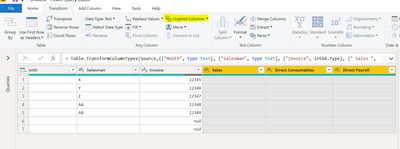
  • Select the categories which are plotted as columns like below,

Select Columns.PNG

  • Click the Unpivot Columns option (under Transform tab) --Highlighted in the above image.

Unpivot Columns.PNG

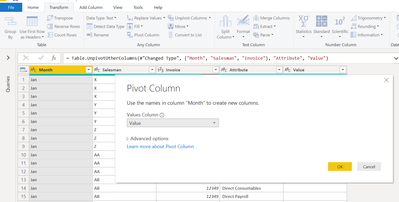
  • Select Month Column and click the Pivot Column option (under Transform Tab). A dialogue window will appear to choose the value field.

Pivot Column.PNG

  • Choose your value field and aggregation. Click Ok

Output.PNG


Here you go!


Let me know if you have any issues.


Appreciate your kudos!


Regards,

Siva Mani


View solution in original post

5 REPLIES 5
PaulDBrown
Community Champion
Community Champion

@pedanticpad 


Check out this demo from Enterprise DNA

Financial Reporting Showcase


And a "how to" video on PnL satements, also from Enterprise DNA:
Creating PnL Statement 


Did I answer your question? Mark my post as a solution!
In doing so, you are also helping me. Thank you!

Proud to be a Super User!
Paul on Linkedin.


SivaMani
Resident Rockstar
Resident Rockstar

@pedanticpad,


Yes, It is possible in Power BI. Please do follow the below steps,

  •  Go to Transform Data (aka Query Editor)
  • Select the categories which are plotted as columns like below,

Select Columns.PNG

  • Click the Unpivot Columns option (under Transform tab) --Highlighted in the above image.

Unpivot Columns.PNG

  • Select Month Column and click the Pivot Column option (under Transform Tab). A dialogue window will appear to choose the value field.

Pivot Column.PNG

  • Choose your value field and aggregation. Click Ok

Output.PNG


Here you go!


Let me know if you have any issues.


Appreciate your kudos!


Regards,

Siva Mani


Thanks so much!

Glad that it helped you!

Hi,


Is to possible to do something similar to a table that has been created in PowerBI rather than imported as a query?  I've had to import a table, add several calculated columns, etc to get my desired values but I need to get it laid out like the above to create a P&L.


Thanks,
Paddy

Helpful resources

Announcements
Power BI DataViz World Championships

Power BI Dataviz World Championships

The Power BI Data Visualization World Championships is back! Get ahead of the game and start preparing now!

December 2025 Power BI Update Carousel

Power BI Monthly Update - December 2025

Check out the December 2025 Power BI Holiday Recap!

FabCon Atlanta 2026 carousel

FabCon Atlanta 2026

Join us at FabCon Atlanta, March 16-20, for the ultimate Fabric, Power BI, AI and SQL community-led event. Save $200 with code FABCOMM.