cancel
Showing results for 
Search instead for 
Did you mean: 

July 7 - July 17 | Round 2 of the Power BI Dataviz World Championships. Don't miss your chance! Learn more

Reply
Jaden
New Member

Filters Pane

Hello,


I am unable to rearrange my filters pane by dragging and dropping. It can be very inconvenient when trying to organize an existing report's filters, by manually deleting and adding in the correct order. I'm not sure why it won't let me drag and drop to reorder. Any help would be great! Thanks!

7 REPLIES 7
jdbuchanan71
Super User
Super User

jdbuchanan71
Super User
Super User

I'm sorry, I did not try actually dropping the selection in the new spot.  They are not changing for me either.

Anonymous
Not applicable

That makes me feel better that it is not only my machine. I hope they can fix this soon. Thank you!

HamedM1125
Advocate III
Advocate III

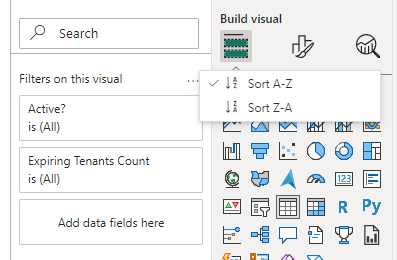
I also can't use drag and drop to arrange the filters, may be they have updated this in new version to sort based on Alphabetical order.

HamedM1125_0-1687800513527.png


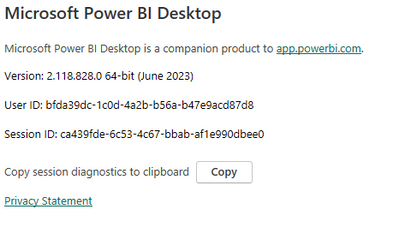
I am using this latest version:

HamedM1125_1-1687800600333.png

Thanks,

Hamed

https://www.linkedin.com/in/hamed-mohammed-6aa073197/

jdbuchanan71
Super User
Super User

Maybe try rebooting your machine?  I know it is always used as the first answer from IT but that's because it works so often.

Anonymous
Not applicable

Strange.. I am using the same version you mention. I never had a problem reordering filters until updating to this version. 

jdbuchanan71
Super User
Super User

@Jaden 

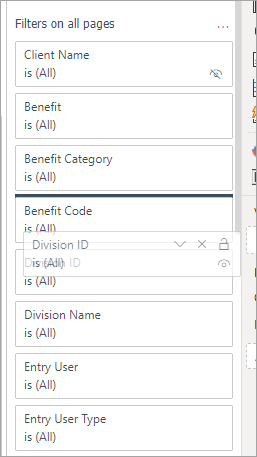
What version are you working in?  I am on PowerBI desktop Version: 2.118.621.0 64-bit (June 2023) and the functionality is working how I would expect.  If I grab 'Division ID' I can move it up in the list.

jdbuchanan71_0-1687798344175.png

Perhaps try updating to the latest version?


Helpful resources

Announcements
FabCon and SQLCon Barcelona 2026

FabCon & SQLCon – Barcelona 2026

Join us in Barcelona for FabCon and SQLCon, the Fabric, Power BI, SQL, and AI community event. Save €200 with code FABCMTY200.

60 days of Data Days Carousel

Data Days 2026

Join Data Days 2026: 60 days of free live/on-demand sessions, challenges, study groups, and certification opportunities.

Power BI DataViz World Championships carousel

Power BI DataViz World Championships - June 2026

A new Power BI DataViz World Championship is coming this June! Don't miss out on submitting your entry.

Top Solution Authors