This time we’re going bigger than ever. Fabric, Power BI, SQL, AI and more. We're covering it all. You won't want to miss it.
Learn moreJoin the FabCon + SQLCon recap series. Up next: Power BI, Real-Time Intelligence, IQ and AI, and Data Factory take center stage. All sessions are available on-demand after the live show. Register now
Hi,
I have a column of that I need to filter by a set values contained in a 2nd table.
The closest thing I could find is the following, using List.Contains or List.ConstainsAny:
https://community.powerbi.com/t5/Desktop/Filter-using-imported-list/m-p/155804#M67461
However, this approach only gives me exact matchs.
Example:
List.Constains({{"wine"}}, {{"wine"}}) returns true
List.Contains({"a wine from italy"}}, {{"wine}}) returns false
Text.Contains goes beyond exact matches, but there is no Text.ContainsAny to text for a list of values (only 1).
Is there an easy way to use Text.Contains("string to evaluate", "string to look for")...
With the goals of:
?
Thanks!
Solved! Go to Solution.
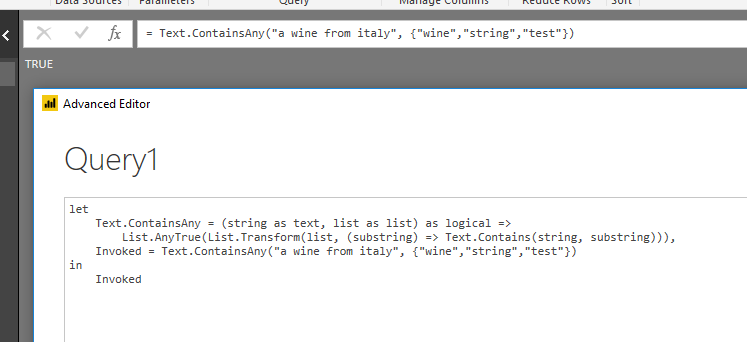
To search multiple values in a string, you need to custom a function like:
Text.ContainsAny = (string as text, list as list) as logical =>
List.AnyTrue(List.Transform(list, (substring) => Text.Contains(string, substring)))
See a similar thread below:
https://stackoverflow.com/questions/35316657/how-to-search-multiple-strings-in-a-string/35324537
Regards,
To search multiple values in a string, you need to custom a function like:
Text.ContainsAny = (string as text, list as list) as logical =>
List.AnyTrue(List.Transform(list, (substring) => Text.Contains(string, substring)))
See a similar thread below:
https://stackoverflow.com/questions/35316657/how-to-search-multiple-strings-in-a-string/35324537
Regards,
Thanks, it works great on a 400 rows dataset I tried.
Hopefully, I can optimize my filters prior to launching the function, because it currently doesn't work on a million+ rows dataset I'm targeting.
Which I find odd, since I only tested for 2 keywords, which I would have expected to take a similar amount of time to when using:
each Text.Contains([Column 1], "Keyword 1") or Text.Contains([Column 1], "Keyword 2")
The code is at risk of leaving residual errors if one of the text value is null, so I added a "try" when filtering.
Text.ContainsAny = (string as text, list as list) as logical =>
List.AnyTrue(List.Transform(list, (substring) => Text.Contains(string, substring))),
#"Filtered Rows" = Table.SelectRows(#"lowercased dataset", each try Text.ContainsAny([Nom du produit], Keywords) otherwise false)
Check out the April 2026 Power BI update to learn about new features.
If you have recently started exploring Fabric, we'd love to hear how it's going. Your feedback can help with product improvements.
A new Power BI DataViz World Championship is coming this June! Don't miss out on submitting your entry.
| User | Count |
|---|---|
| 40 | |
| 39 | |
| 31 | |
| 22 | |
| 15 |
| User | Count |
|---|---|
| 76 | |
| 61 | |
| 34 | |
| 30 | |
| 25 |