Get certified for free when you join Fabric Data Days 2026 and dive into Fabric, Power BI, SQL, AI, and other essential data skills.
Join nowTry your skills in the Power BI Dataviz World Championship! Round one ends June 26. Join now
Hello,
I've a list of sales with a line each time an article is sold, the date and the sell amount. I've created a measure in order to do a Pareto analysis:
Pareto =
VAR CostVar = [Total_Cost]
VAR All_CA = CALCULATE([Total_Cost],ALLSELECTED(Sales))
RETURN
DIVIDE(
SUMX(
FILTER(
SUMMARIZE(ALLSELECTED(Sales),Sales[Article],
"CA", [Total_Cost]),
[CA] >= CostVar),
[CA]),
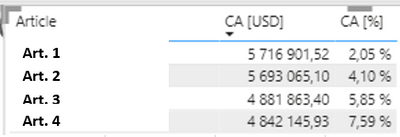
Total_CA,0)The result I obtain at the end is something like this:
The only problem I have now it's that I cannot apply a filter on the CA[%].
Is there any way to apply a filter on this column up to a certain value ?
@capko , Try like
Power BI Window: Pareto Analysis Again, 80% of sales, Order by Measure when REL position is used: https://youtu.be/GpoITi_tRIw
Thanks for you support !
I'm trying to replicate the video but I'm facing several problems. The most important one: 'WINDOW' is not recognised as a function, as well as 'ORDERBY' (it recognize 'ORDER BY') 😕
Am I doing something wrong ?
Well, I've checked and the 'WINDOW' function seems to be a new one included in another version of Power BI than the one I'm allow to use at work... There is any other way of doing exactly the same using the version of Power BI 2.107 ?
Don't miss out on Data Days, June 15 through August 7. Learn Fabric, Power BI, SQL, AI and more.
Check out the May 2026 Power BI update to learn about new features.
| User | Count |
|---|---|
| 24 | |
| 20 | |
| 20 | |
| 19 | |
| 12 |
| User | Count |
|---|---|
| 70 | |
| 56 | |
| 42 | |
| 40 | |
| 30 |