cancel
Showing results for 
Search instead for 
Did you mean: 

The Power BI Data Visualization World Championships is back! It's time to submit your entry. Live now!

Reply
Ramps
Helper I
Helper I

Filtering multiple instances

Salesfile contains the fields Invoice Ref, Date, Week, Customer, Product & Quantity. (To keep things simple in this example the invoice line is unique for each row).


How can the invoice lines be listed in a Power BI Table (not Excel) just for products with more than 1 invoice in any week?

See example of Salesfile and the Desired Report. 

Note the Radio product only had one invoice in week 5 but 2 in week 6


Many thanks in advance for sharing hints and tips.


Example Salesfiles:-

ProductWeekCustomerQuantityDateInvoice
Car4John2526-Jan-185894
Kettle2Mary1611-Jan-189864
Laptop2Gill2811-Jan-185678
Phone3Paul814-Jan-183256
Phone3Kath1714-Jan-183256
Radio5John3430-Jan-187654
Radio6Gill3105-Feb-188786
Radio6Mary1910-Feb-184568
TV1Mary2801-Jan-181234
TV1Fred1405-Jan-182267
Washing Machine3John1916-Jan-18

1567


Desired report:-

ProductWeekCustomerQuantityDateInvoice
Phone3Paul814-Jan-183256
Phone3Kath1714-Jan-183256
Radio6Gill3105-Feb-188786
Radio6Mary1910-Feb-184568
TV1Mary2801-Jan-181234
TV1Fred1405-Jan-182267


1 ACCEPTED SOLUTION
Zubair_Muhammad
Community Champion
Community Champion

Hi @Ramps


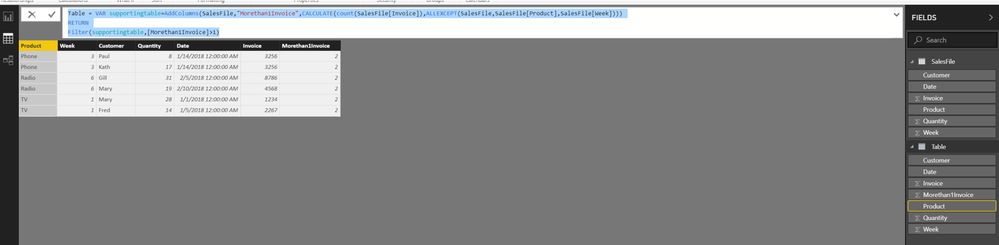
One way is to create a CALCULATED TABLE....

From the Modelling Tab >>> NEW TABLE


Table =
VAR supportingtable =
    ADDCOLUMNS (
        SalesFile,
        "Morethan1Invoice", CALCULATE (
            COUNT ( SalesFile[Invoice] ),
            ALLEXCEPT ( SalesFile, SalesFile[Product], SalesFile[Week] )
        )
    )
RETURN
    FILTER ( supportingtable, [Morethan1Invoice] > 1 )

View solution in original post

4 REPLIES 4
Zubair_Muhammad
Community Champion
Community Champion

Hi @Ramps


One way is to create a CALCULATED TABLE....

From the Modelling Tab >>> NEW TABLE


Table =
VAR supportingtable =
    ADDCOLUMNS (
        SalesFile,
        "Morethan1Invoice", CALCULATE (
            COUNT ( SalesFile[Invoice] ),
            ALLEXCEPT ( SalesFile, SalesFile[Product], SalesFile[Week] )
        )
    )
RETURN
    FILTER ( supportingtable, [Morethan1Invoice] > 1 )

Thank you Zubair_Muhammad for helping me twice this week with hints and tips.


I got your well explained solution to work OK, thank you, and I will try the 2nd suggestion  later.

@Ramps


Or you can add a calculated column and use it to filter the table


Column =
CALCULATE (
    COUNT ( SalesFile[Invoice] ),
    ALLEXCEPT ( SalesFile, SalesFile[Product], SalesFile[Week] )
)

Helpful resources

Announcements
Power BI DataViz World Championships

Power BI Dataviz World Championships

The Power BI Data Visualization World Championships is back! It's time to submit your entry.

December 2025 Power BI Update Carousel

Power BI Monthly Update - December 2025

Check out the December 2025 Power BI Holiday Recap!

FabCon Atlanta 2026 carousel

FabCon Atlanta 2026

Join us at FabCon Atlanta, March 16-20, for the ultimate Fabric, Power BI, AI and SQL community-led event. Save $200 with code FABCOMM.