cancel
Showing results for 
Search instead for 
Did you mean: 

The Power BI Data Visualization World Championships is back! It's time to submit your entry. Live now!

Reply
Ramps
Helper I
Helper I

Filtering multiple instances

Salesfile contains the fields Invoice Ref, Date, Week, Customer, Product & Quantity. (To keep things simple in this example the invoice line is unique for each row).


How can the invoice lines be listed in a Power BI Table (not Excel) just for products with more than 1 invoice in any week?

See example of Salesfile and the Desired Report. 

Note the Radio product only had one invoice in week 5 but 2 in week 6


Many thanks in advance for sharing hints and tips.


Example Salesfiles:-

ProductWeekCustomerQuantityDateInvoice
Car4John2526-Jan-185894
Kettle2Mary1611-Jan-189864
Laptop2Gill2811-Jan-185678
Phone3Paul814-Jan-183256
Phone3Kath1714-Jan-183256
Radio5John3430-Jan-187654
Radio6Gill3105-Feb-188786
Radio6Mary1910-Feb-184568
TV1Mary2801-Jan-181234
TV1Fred1405-Jan-182267
Washing Machine3John1916-Jan-18

1567


Desired report:-

ProductWeekCustomerQuantityDateInvoice
Phone3Paul814-Jan-183256
Phone3Kath1714-Jan-183256
Radio6Gill3105-Feb-188786
Radio6Mary1910-Feb-184568
TV1Mary2801-Jan-181234
TV1Fred1405-Jan-182267


1 ACCEPTED SOLUTION
Zubair_Muhammad
Community Champion
Community Champion

Hi @Ramps


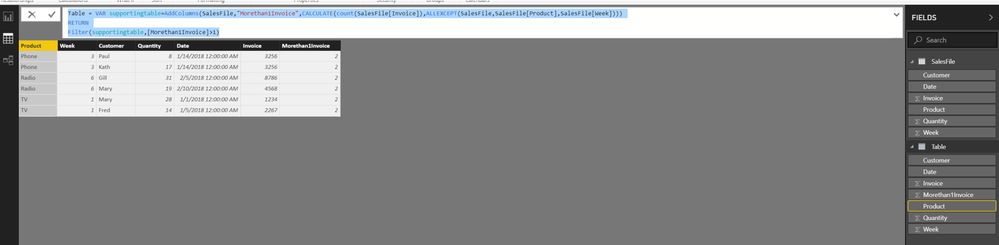
One way is to create a CALCULATED TABLE....

From the Modelling Tab >>> NEW TABLE


Table =
VAR supportingtable =
    ADDCOLUMNS (
        SalesFile,
        "Morethan1Invoice", CALCULATE (
            COUNT ( SalesFile[Invoice] ),
            ALLEXCEPT ( SalesFile, SalesFile[Product], SalesFile[Week] )
        )
    )
RETURN
    FILTER ( supportingtable, [Morethan1Invoice] > 1 )

View solution in original post

4 REPLIES 4
Zubair_Muhammad
Community Champion
Community Champion

Hi @Ramps


One way is to create a CALCULATED TABLE....

From the Modelling Tab >>> NEW TABLE


Table =
VAR supportingtable =
    ADDCOLUMNS (
        SalesFile,
        "Morethan1Invoice", CALCULATE (
            COUNT ( SalesFile[Invoice] ),
            ALLEXCEPT ( SalesFile, SalesFile[Product], SalesFile[Week] )
        )
    )
RETURN
    FILTER ( supportingtable, [Morethan1Invoice] > 1 )

Thank you Zubair_Muhammad for helping me twice this week with hints and tips.


I got your well explained solution to work OK, thank you, and I will try the 2nd suggestion  later.

@Ramps


Or you can add a calculated column and use it to filter the table


Column =
CALCULATE (
    COUNT ( SalesFile[Invoice] ),
    ALLEXCEPT ( SalesFile, SalesFile[Product], SalesFile[Week] )
)

Helpful resources

Announcements
December 2025 Power BI Update Carousel

Power BI Monthly Update - December 2025

Check out the December 2025 Power BI Holiday Recap!

FabCon Atlanta 2026 carousel

FabCon Atlanta 2026

Join us at FabCon Atlanta, March 16-20, for the ultimate Fabric, Power BI, AI and SQL community-led event. Save $200 with code FABCOMM.