cancel
Showing results for 
Search instead for 
Did you mean: 

The Power BI Data Visualization World Championships is back! It's time to submit your entry. Live now!

Reply
TatianaGuihur
Helper I
Helper I

Filtering multiple arrays

Hi,

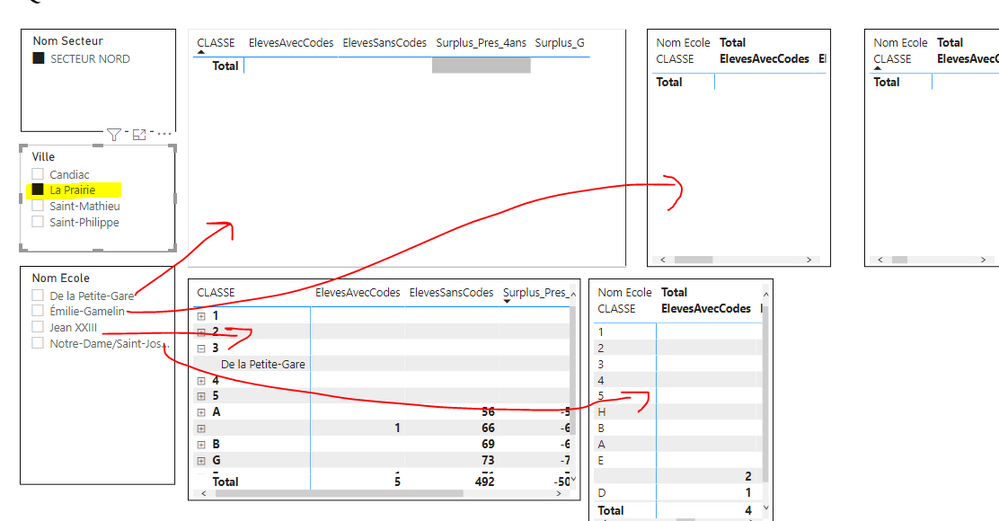
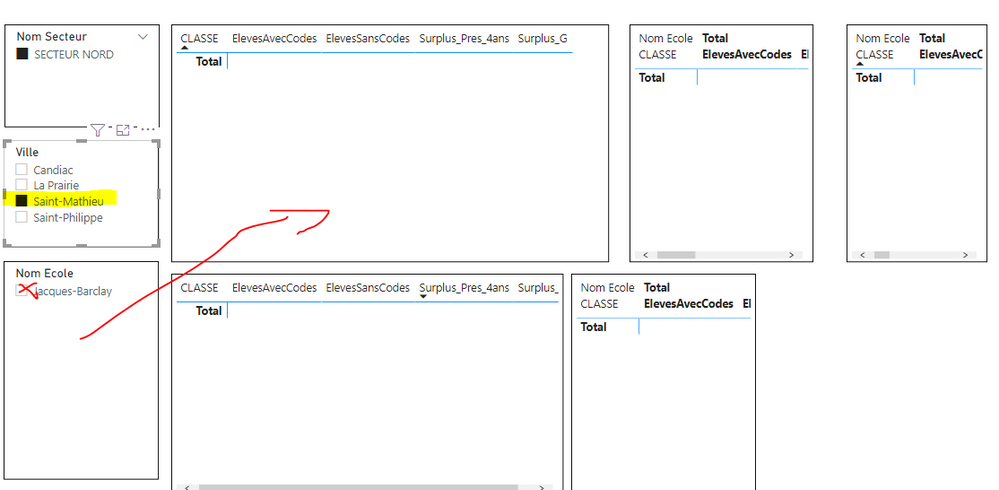
I would like to display some matrix for each "Ville" I check.  How can I use the same matrix to filter different villes?

If I check one "Ville" and one "Nom Ecole"  is shows one matrix with the right values but What I need is show all the "Nom Ecoles" by "Ville" at the same time in different arrays.  Thanks FilterMatrix.PNGFilterMatrix2.PNGFilterMatrix3.PNG

2 ACCEPTED SOLUTIONS
v-cazheng-msft
Community Support
Community Support

Hi @TatianaGuihur 

You can try these steps.


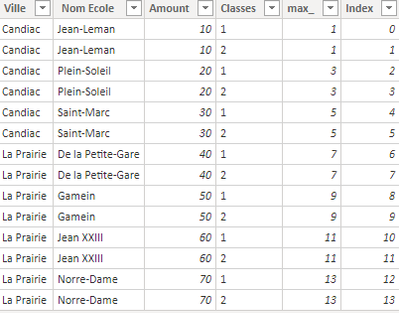
1 Add Index to the table in Power Query

v-cazheng-msft_0-1619682535771.png


2 Get max value for every Nom Ecole in every Ville

max_ = MAXX(FILTER('Table','Table'[Ville]=EARLIER('Table'[Ville])&&'Table'[Nom Ecole]=EARLIER('Table'[Nom Ecole])),'Table'[Index])


v-cazheng-msft_1-1619682535774.png


3 Rank by the max value

rank_ = RANKX(FILTER('Table','Table'[Ville]=EARLIER('Table'[Ville])),'Table'[max_],,ASC,Dense)


v-cazheng-msft_2-1619682535793.png


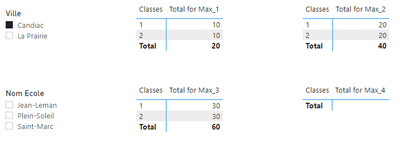
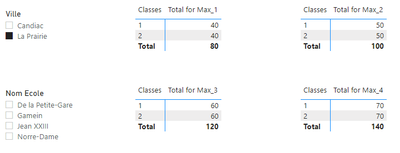
4 Create Measures for every matrices

Total for Max_1 = CALCULATE(SUM('Table'[Amount]),FILTER('Table','Table'[Ville]=SELECTEDVALUE('Table'[Ville])&&'Table'[rank_]=1))

Total for Max_2 = CALCULATE(SUM('Table'[Amount]),FILTER('Table','Table'[Ville]=SELECTEDVALUE('Table'[Ville])),'Table'[rank_]=2)

...


v-cazheng-msft_3-1619682535794.png


v-cazheng-msft_4-1619682535795.png


For more details, you can refer the attached pbix file.


Best Regards

Caiyun Zheng


Is that the answer you're looking for? If this post helps, then please consider Accept it as the solution to help the other members find it more quickly.


View solution in original post

TatianaGuihur
Helper I
Helper I

Thank you so much @v-cazheng-msft  for your reply. I was able to do it.

View solution in original post

3 REPLIES 3
TatianaGuihur
Helper I
Helper I

I really appreciate the measure you created for me.  They worked excellent!!

TatianaGuihur
Helper I
Helper I

Thank you so much @v-cazheng-msft  for your reply. I was able to do it.

v-cazheng-msft
Community Support
Community Support

Hi @TatianaGuihur 

You can try these steps.


1 Add Index to the table in Power Query

v-cazheng-msft_0-1619682535771.png


2 Get max value for every Nom Ecole in every Ville

max_ = MAXX(FILTER('Table','Table'[Ville]=EARLIER('Table'[Ville])&&'Table'[Nom Ecole]=EARLIER('Table'[Nom Ecole])),'Table'[Index])


v-cazheng-msft_1-1619682535774.png


3 Rank by the max value

rank_ = RANKX(FILTER('Table','Table'[Ville]=EARLIER('Table'[Ville])),'Table'[max_],,ASC,Dense)


v-cazheng-msft_2-1619682535793.png


4 Create Measures for every matrices

Total for Max_1 = CALCULATE(SUM('Table'[Amount]),FILTER('Table','Table'[Ville]=SELECTEDVALUE('Table'[Ville])&&'Table'[rank_]=1))

Total for Max_2 = CALCULATE(SUM('Table'[Amount]),FILTER('Table','Table'[Ville]=SELECTEDVALUE('Table'[Ville])),'Table'[rank_]=2)

...


v-cazheng-msft_3-1619682535794.png


v-cazheng-msft_4-1619682535795.png


For more details, you can refer the attached pbix file.


Best Regards

Caiyun Zheng


Is that the answer you're looking for? If this post helps, then please consider Accept it as the solution to help the other members find it more quickly.


Helpful resources

Announcements
FabCon Atlanta 2026 carousel

FabCon Atlanta 2026

Join us at FabCon Atlanta, March 16-20, for the ultimate Fabric, Power BI, AI and SQL community-led event. Save $200 with code FABCOMM.