This time we’re going bigger than ever. Fabric, Power BI, SQL, AI and more. We're covering it all. You won't want to miss it.
Learn moreLevel up your Power BI skills this month - build one visual each week and tell better stories with data! Get started
Hi,
I am trying to look up values using DAX, but only where a text entry is = to something. I have the look up element working:
RTSG_Costs = LOOKUPVALUE(RTSGMatrix[RTSGAmount],RTSGMatrix[Award],LOOKUPVALUE(StudentDetails[Award],StudentDetails[SITS_StudentNumber],StudentYearsActive[SITS_StudentNumber]),RTSGMatrix[AcademicYear],StudentYearsActive[AcademicYear])*StudentYearsActive[MonthDecimal]
If I was working in excel I would add something like:
IF(RTSGMatrix[annualised]="Annual", FORMULA AS ABOVE, 0)
so that only look ups from entries that have 'Annual' against them are pulled through, with the rest returning a 0 value.
Solved! Go to Solution.
@SamGibbs1,
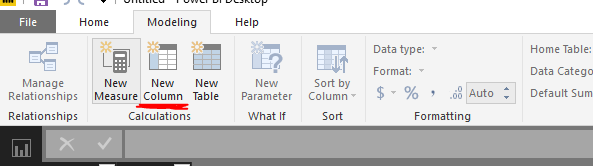
Firstly, please ensure that you use "New Column" option in Power BI Desktop to create calculated columns.
Secondly, please split the above DAX formula into multiple formulas to better troubleshoot the issue.
Col2=LOOKUPVALUE(RTSGMatrix[RTSGAmount],RTSGMatrix[Award],LOOKUPVALUE(StudentDetails[Award],StudentDetails[SITS_StudentNumber],StudentYearsActive[SITS_StudentNumber]),RTSGMatrix[AcademicYear],StudentYearsActive[AcademicYear])*StudentYearsActive[MonthDecimal]
Col1=LOOKUPVALUE(RTSGMatrix[RTSGPaidLump_or_Annual],RTSGMatrix[Award],LOOKUPVALUE(StudentDetails[Award],StudentDetails[SITS_StudentNumber],StudentYearsActive[SITS_StudentNumber]))
LastColumn = IF(TableName[Col1]="Annual",TableName[Col2],0)
If you still get errors, please share sample data of your table and post expected result here following the guide in this thread:https://community.powerbi.com/t5/Community-Blog/How-to-Get-Your-Question-Answered-Quickly/ba-p/38490.
Regards,
Lydia
Hi,
To expand a bit further I have tried this:
RTSG_Costs = If(LOOKUPVALUE(RTSGMatrix[RTSGPaidLump_or_Annual],RTSGMatrix[Award],LOOKUPVALUE(StudentDetails[Award],StudentDetails[SITS_StudentNumber],StudentYearsActive[SITS_StudentNumber]))="Annual",LOOKUPVALUE(RTSGMatrix[RTSGAmount],RTSGMatrix[Award],LOOKUPVALUE(StudentDetails[Award],StudentDetails[SITS_StudentNumber],StudentYearsActive[SITS_StudentNumber]),RTSGMatrix[AcademicYear],StudentYearsActive[AcademicYear])*StudentYearsActive[MonthDecimal],0)
but it returns an error "A table of multiple values was supplied where a single value was expected". I am guessing this is due to the IF statement returning multiple records to check?
@SamGibbs1,
Firstly, please ensure that you use "New Column" option in Power BI Desktop to create calculated columns.
Secondly, please split the above DAX formula into multiple formulas to better troubleshoot the issue.
Col2=LOOKUPVALUE(RTSGMatrix[RTSGAmount],RTSGMatrix[Award],LOOKUPVALUE(StudentDetails[Award],StudentDetails[SITS_StudentNumber],StudentYearsActive[SITS_StudentNumber]),RTSGMatrix[AcademicYear],StudentYearsActive[AcademicYear])*StudentYearsActive[MonthDecimal]
Col1=LOOKUPVALUE(RTSGMatrix[RTSGPaidLump_or_Annual],RTSGMatrix[Award],LOOKUPVALUE(StudentDetails[Award],StudentDetails[SITS_StudentNumber],StudentYearsActive[SITS_StudentNumber]))
LastColumn = IF(TableName[Col1]="Annual",TableName[Col2],0)
If you still get errors, please share sample data of your table and post expected result here following the guide in this thread:https://community.powerbi.com/t5/Community-Blog/How-to-Get-Your-Question-Answered-Quickly/ba-p/38490.
Regards,
Lydia
Check out the April 2026 Power BI update to learn about new features.
Sign up to receive a private message when registration opens and key events begin.
If you have recently started exploring Fabric, we'd love to hear how it's going. Your feedback can help with product improvements.
| User | Count |
|---|---|
| 36 | |
| 33 | |
| 27 | |
| 24 | |
| 18 |
| User | Count |
|---|---|
| 66 | |
| 50 | |
| 33 | |
| 24 | |
| 24 |