cancel
Showing results for 
Search instead for 
Did you mean: 

The Power BI Data Visualization World Championships is back! Get ahead of the game and start preparing now! Learn more

Reply
SamGibbs1
Frequent Visitor

Filtering lookup

Hi,


I am trying to look up values using DAX, but only where a text entry is = to something. I have the look up element working:


RTSG_Costs = LOOKUPVALUE(RTSGMatrix[RTSGAmount],RTSGMatrix[Award],LOOKUPVALUE(StudentDetails[Award],StudentDetails[SITS_StudentNumber],StudentYearsActive[SITS_StudentNumber]),RTSGMatrix[AcademicYear],StudentYearsActive[AcademicYear])*StudentYearsActive[MonthDecimal]


If I was working in excel I would add something like:

IF(RTSGMatrix[annualised]="Annual", FORMULA AS ABOVE, 0)

so that only look ups from entries that have 'Annual' against them are pulled through, with the rest returning a 0 value.


1 ACCEPTED SOLUTION
Anonymous
Not applicable

@SamGibbs1,

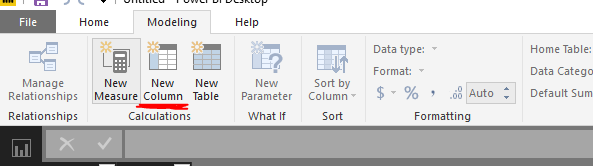
Firstly, please ensure that you use "New Column" option in Power BI Desktop to create calculated columns.
1.PNG

Secondly, please split the above DAX formula into multiple formulas to better troubleshoot the issue.

Col2=LOOKUPVALUE(RTSGMatrix[RTSGAmount],RTSGMatrix[Award],LOOKUPVALUE(StudentDetails[Award],StudentDetails[SITS_StudentNumber],StudentYearsActive[SITS_StudentNumber]),RTSGMatrix[AcademicYear],StudentYearsActive[AcademicYear])*StudentYearsActive[MonthDecimal]
Col1=LOOKUPVALUE(RTSGMatrix[RTSGPaidLump_or_Annual],RTSGMatrix[Award],LOOKUPVALUE(StudentDetails[Award],StudentDetails[SITS_StudentNumber],StudentYearsActive[SITS_StudentNumber]))
LastColumn = IF(TableName[Col1]="Annual",TableName[Col2],0)


If you still get errors, please share sample data of your table and post expected result here following the guide in this thread:https://community.powerbi.com/t5/Community-Blog/How-to-Get-Your-Question-Answered-Quickly/ba-p/38490.

Regards,
Lydia

View solution in original post

2 REPLIES 2
SamGibbs1
Frequent Visitor

Hi,


To expand a bit further I have tried this:

RTSG_Costs = If(LOOKUPVALUE(RTSGMatrix[RTSGPaidLump_or_Annual],RTSGMatrix[Award],LOOKUPVALUE(StudentDetails[Award],StudentDetails[SITS_StudentNumber],StudentYearsActive[SITS_StudentNumber]))="Annual",LOOKUPVALUE(RTSGMatrix[RTSGAmount],RTSGMatrix[Award],LOOKUPVALUE(StudentDetails[Award],StudentDetails[SITS_StudentNumber],StudentYearsActive[SITS_StudentNumber]),RTSGMatrix[AcademicYear],StudentYearsActive[AcademicYear])*StudentYearsActive[MonthDecimal],0)


but it returns an error "A table of multiple values was supplied where a single value was expected". I am guessing this is due to the IF statement returning multiple records to check?


Anonymous
Not applicable

@SamGibbs1,

Firstly, please ensure that you use "New Column" option in Power BI Desktop to create calculated columns.
1.PNG

Secondly, please split the above DAX formula into multiple formulas to better troubleshoot the issue.

Col2=LOOKUPVALUE(RTSGMatrix[RTSGAmount],RTSGMatrix[Award],LOOKUPVALUE(StudentDetails[Award],StudentDetails[SITS_StudentNumber],StudentYearsActive[SITS_StudentNumber]),RTSGMatrix[AcademicYear],StudentYearsActive[AcademicYear])*StudentYearsActive[MonthDecimal]
Col1=LOOKUPVALUE(RTSGMatrix[RTSGPaidLump_or_Annual],RTSGMatrix[Award],LOOKUPVALUE(StudentDetails[Award],StudentDetails[SITS_StudentNumber],StudentYearsActive[SITS_StudentNumber]))
LastColumn = IF(TableName[Col1]="Annual",TableName[Col2],0)


If you still get errors, please share sample data of your table and post expected result here following the guide in this thread:https://community.powerbi.com/t5/Community-Blog/How-to-Get-Your-Question-Answered-Quickly/ba-p/38490.

Regards,
Lydia

Helpful resources

Announcements
Power BI DataViz World Championships

Power BI Dataviz World Championships

The Power BI Data Visualization World Championships is back! Get ahead of the game and start preparing now!

December 2025 Power BI Update Carousel

Power BI Monthly Update - December 2025

Check out the December 2025 Power BI Holiday Recap!

FabCon Atlanta 2026 carousel

FabCon Atlanta 2026

Join us at FabCon Atlanta, March 16-20, for the ultimate Fabric, Power BI, AI and SQL community-led event. Save $200 with code FABCOMM.