cancel
Showing results for 
Search instead for 
Did you mean: 

July 7 - July 17 | Round 2 of the Power BI Dataviz World Championships. Don't miss your chance! Learn more

Reply
CROforce
Helper I
Helper I

Filtering issue

I have two tables… one is my source data (named “observations”) and the other is custom table named “Calendar”. These two have relationship by “observation”[Date Opened”] and “Calendar”[Date Open].

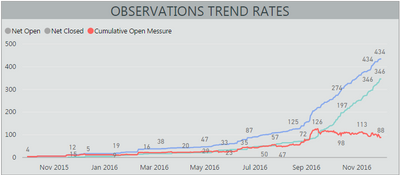
Under the “Calendar table, I have few measures and columns to perform calculation like number of observations open, closed, net open and net closed... Like this:

 Capture.PNG

However, a requirement now is to do some aditional filtering based on column name "Gating Milestone" which is under "observations" table. Now if I simply create a slicer which contianes "Gating Milestone", it's not going to do anythyng to this chart becasue (I am guessing) dates under "Calendar" table are static starting from 9/30/2015 untill today() and I use formula like this to calculate how many observations are open on any particular day

Open = 
    COUNTX (
        FILTER ( 'observation', 'observation'[Date Opened] = 'Calendar'[Date Open] ),
        'observation'[Date Opened]
    )

So the question is... what do I need to do to here under "Calendar" table in order to be able to filter by "Gating Milestone" which is under "observations" table?


Any helpwould be greatly appriciated

1 ACCEPTED SOLUTION

Hi @CROforce,


In this scenario, you should use "OR"(||) instead of "AND"(&&) in the filter logic for 'observation'[Gating Milestone]. The formula below is for your reference.

Open =
COUNTX (
    FILTER (
        'observation',
        'observation'[Date Opened] = RELATED ( 'Calendar'[Date Open] )
            && ( ( 'observation'[Gating Milestone] = "DVT 1" )
            || ( 'observation'[Gating Milestone] = "DVT 2" )
            || ( 'observation'[Gating Milestone] = "DVT 3" ) )
    ),
    'observation'[Date Opened]
)


Regards

View solution in original post

4 REPLIES 4
v-ljerr-msft
Microsoft Employee
Microsoft Employee

Hi @CROforce,


The value of a Calculate Column cannot be changed by a Slicer. In this scenario, you should create a Measure instead, and show it on the report. Then the value of the measure should be filtered.


The formula below to create the measure for "Open" is for your reference.

Open =
COUNTX (
    FILTER (
        'observation',
        'observation'[Date Opened] = RELATED ( 'Calendar'[Date Open] )
    ),
    'observation'[Date Opened]
)


Reference: 
https://community.powerbi.com/t5/Desktop/column-vs-measure/td-p/13201

https://powerbi.microsoft.com/en-us/documentation/powerbi-desktop-tutorial-create-measures/


Regards

I am new to Power BI and not sure if there is a way to share sample data which would be easier to understand (I guess) what I am trying to do... in this example, I am trying to filter by Gating Milestone which is a column under 'observation' table. I have tried to use this formula in a column and messure and I am not getting any resoults if I try to use multiple filters like this:

Open = 
COUNTX (
    FILTER (
        'observation',
        'observation'[Date Opened] = RELATED ( 'Calendar'[Date Open])
        && ( 'observation'[Gating Milestone] = "DVT 1" )
        && ( 'observation'[Gating Milestone] = "DVT 2" )
        && ( 'observation'[Gating Milestone] = "DVT 3" )
    ),
    'observation'[Date Opened]
)

But if I only use one filter like so:

Open = 
COUNTX (
    FILTER (
        'observation',
        'observation'[Date Opened] = RELATED ( 'Calendar'[Date Open])
        && ( 'observation'[Gating Milestone] = "DVT 1" )
    ),
    'observation'[Date Opened]
)

Then I am getting proper values.

Hi @CROforce,


In this scenario, you should use "OR"(||) instead of "AND"(&&) in the filter logic for 'observation'[Gating Milestone]. The formula below is for your reference.

Open =
COUNTX (
    FILTER (
        'observation',
        'observation'[Date Opened] = RELATED ( 'Calendar'[Date Open] )
            && ( ( 'observation'[Gating Milestone] = "DVT 1" )
            || ( 'observation'[Gating Milestone] = "DVT 2" )
            || ( 'observation'[Gating Milestone] = "DVT 3" ) )
    ),
    'observation'[Date Opened]
)


Regards

That was it... Thank you and much appriciated 🙂

Helpful resources

Announcements
FabCon and SQLCon Barcelona 2026

FabCon & SQLCon – Barcelona 2026

Join us in Barcelona for FabCon and SQLCon, the Fabric, Power BI, SQL, and AI community event. Save €200 with code FABCMTY200.

60 days of Data Days Carousel

Data Days 2026

Join Data Days 2026: 60 days of free live/on-demand sessions, challenges, study groups, and certification opportunities.

Power BI DataViz World Championships carousel

Power BI DataViz World Championships - June 2026

A new Power BI DataViz World Championship is coming this June! Don't miss out on submitting your entry.

Top Solution Authors