Share feedback directly with Fabric product managers, participate in targeted research studies and influence the Fabric roadmap.
Sign up nowGet Fabric certified for FREE! Don't miss your chance! Learn more
Hello
So i'm doing some analysis on my company's clients and some of them have projects with multiple sectors within our company.
I want to filter my data to show clients who have projects with one particular sector.
Thanks in advance.
Solved! Go to Solution.
Hi @SDigital,
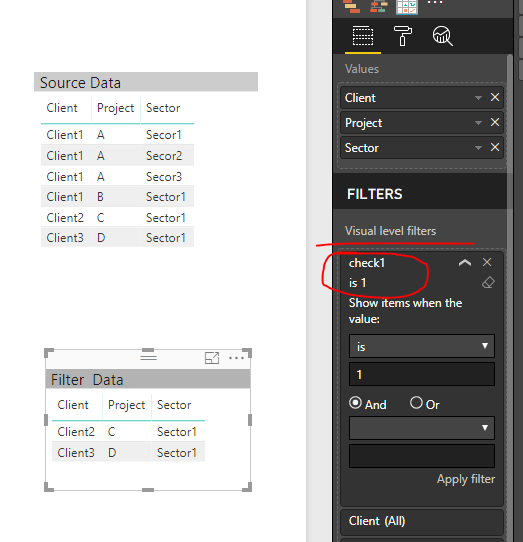
Based on my understanding, you want to display those clients who have only one project with only one sector, right?
If so, you can create a measure similar to below, add this measure to visual level filter and set its value to 1.
check1 =
IF (
CALCULATE (
DISTINCTCOUNT ( Sheet1[Project] ),
ALLEXCEPT ( Sheet1, Sheet1[Client] )
)
= 1
&& CALCULATE (
DISTINCTCOUNT ( Sheet1[Sector] ),
ALLEXCEPT ( Sheet1, Sheet1[Client], Sheet1[Project] )
)
= 1,
1,
0
)
Best regards,
Yuliana Gu
Hi @SDigital,
Based on my understanding, you want to display those clients who have only one project with only one sector, right?
If so, you can create a measure similar to below, add this measure to visual level filter and set its value to 1.
check1 =
IF (
CALCULATE (
DISTINCTCOUNT ( Sheet1[Project] ),
ALLEXCEPT ( Sheet1, Sheet1[Client] )
)
= 1
&& CALCULATE (
DISTINCTCOUNT ( Sheet1[Sector] ),
ALLEXCEPT ( Sheet1, Sheet1[Client], Sheet1[Project] )
)
= 1,
1,
0
)
Best regards,
Yuliana Gu
Thanks for answering my query. This formula is almost there but i want to show clients that have one or more projects with one sector.
Thanks again!
If you love stickers, then you will definitely want to check out our Community Sticker Challenge!
Check out the January 2026 Power BI update to learn about new features.
| User | Count |
|---|---|
| 62 | |
| 61 | |
| 42 | |
| 21 | |
| 18 |
| User | Count |
|---|---|
| 122 | |
| 117 | |
| 37 | |
| 34 | |
| 30 |