Don't miss your chance to take exam DP-600 or DP-700 on us!
Request nowLearn from the best! Meet the four finalists headed to the FINALS of the Power BI Dataviz World Championships! Register now
Hi,
I'm trying to figure out repeat customers (where repeat customers are defined as customers making multiple transactions on different dates (i.e. so if a customer makes 3 transactions in one day but no other transactions they count as a new customer).
Example data:
| Customer ID | Transaction date | Value |
| 1 | 30/12/2017 | 11 |
| 1 | 31/12/2017 | 36 |
| 2 | 01/01/2018 | 54 |
| 2 | 02/01/2018 | 34 |
| 3 | 03/01/2018 | 10 |
| 3 | 03/01/2018 | 22 |
So far I've duplicated the columns, removed everything except date & customer ID and grouped the data on customer ID so the data looks like this:
| Customer ID | Unique transaction dates |
| 1 | 2 |
| 2 | 2 |
| 3 | 1 |
Using % repeats = calculate(count([customer ID]), unique transcation dates >1)/distinctcount([customer ID])
gives a perecent of repeat customers of 66% which is good
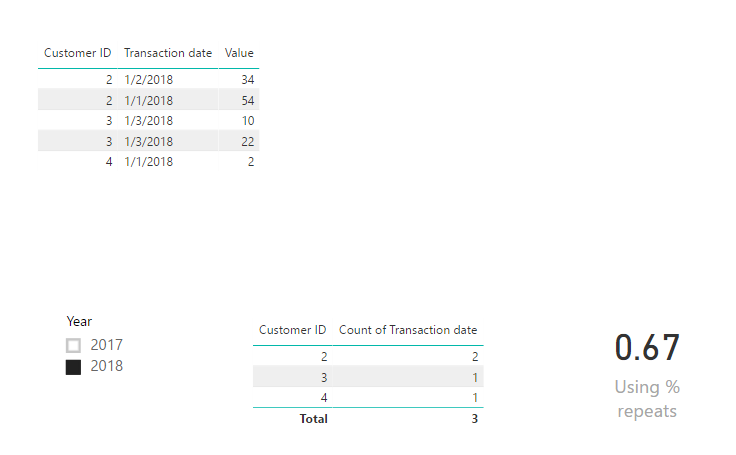
However, if I want to apply a filter in a report to look at transactions made in 2018, my measure doesn't change as the grouping removes the date column. In this case I want my grouped data to look like this:
| Customer ID | Unique transaction dates (2018) |
| 2 | 2 |
| 3 | 1 |
Giving a % repeats of 50%.
Similarly if Customer 1 had made one transaction in 2018 and one in 2017 I'd still like them to appear as a repeat customer, as they've made a transaction in the year filtered for & have made bookings previously.
Hope this makes sense, thank you in advance!
Sarah
Solved! Go to Solution.
Hi @saferguson,
Please try below measures:
Unique transaction dates =
CALCULATE (
DISTINCTCOUNT ( 'Customer Transaction'[Transaction date] ),
ALLEXCEPT ( 'Customer Transaction', 'Customer Transaction'[Customer ID] )
)
Using % repeats =
CALCULATE (
DISTINCTCOUNT ( 'Customer Transaction'[Customer ID] ),
FILTER ( 'Customer Transaction', [Unique transaction dates] > 1 )
)
/ DISTINCTCOUNT ( 'Customer Transaction'[Customer ID] )
Best regards,
Yuliana Gu
Hi @saferguson,
Please try below measures:
Unique transaction dates =
CALCULATE (
DISTINCTCOUNT ( 'Customer Transaction'[Transaction date] ),
ALLEXCEPT ( 'Customer Transaction', 'Customer Transaction'[Customer ID] )
)
Using % repeats =
CALCULATE (
DISTINCTCOUNT ( 'Customer Transaction'[Customer ID] ),
FILTER ( 'Customer Transaction', [Unique transaction dates] > 1 )
)
/ DISTINCTCOUNT ( 'Customer Transaction'[Customer ID] )
Best regards,
Yuliana Gu
Brilliant, that works. Thank you! Could you please explain what exactly you've done just so I understand fully?
Share feedback directly with Fabric product managers, participate in targeted research studies and influence the Fabric roadmap.
Check out the February 2026 Power BI update to learn about new features.
| User | Count |
|---|---|
| 51 | |
| 40 | |
| 37 | |
| 14 | |
| 14 |
| User | Count |
|---|---|
| 84 | |
| 71 | |
| 38 | |
| 29 | |
| 27 |