

Join us at FabCon Atlanta from March 16 - 20, 2026, for the ultimate Fabric, Power BI, AI and SQL community-led event. Save $200 with code FABCOMM.
Register now!Learn from the best! Meet the four finalists headed to the FINALS of the Power BI Dataviz World Championships! Register now
Hello all.
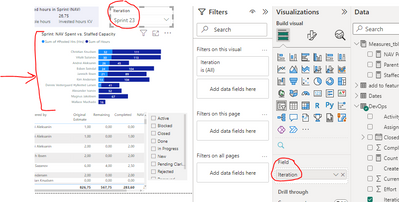
I am new to PBI and I am trying to filter the graph marked with the arrow based on the selection highlighted in the image bellow
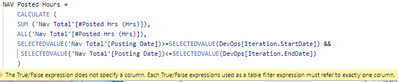
I have developed two measures that clearly are wrong (same logic so I only posted one) and I am getting the folowing warning: 😅
How can I correct the measure? I want to sum the total hours that are posted in the days that are between the time range based on the Sprint number of the selection.
I have a Date table with all dates, connected to the Posting Date and both the Iteration Started and Finish Dates. An example of the tables is bellow to help to understand the model.
Devops table:
Nav Total table:
Thanks in advance!
Don't use SELECTEDVALUE inside CALCULATE (read about filter context, and context transition). Use variables.
Hello, thank you for the ideas. Can you help me write a Dax measure with those? I have started something like this:
Thank you!
Share feedback directly with Fabric product managers, participate in targeted research studies and influence the Fabric roadmap.
Check out the February 2026 Power BI update to learn about new features.
| User | Count |
|---|---|
| 60 | |
| 59 | |
| 41 | |
| 18 | |
| 15 |
| User | Count |
|---|---|
| 106 | |
| 106 | |
| 40 | |
| 29 | |
| 28 |