Join us at FabCon Atlanta from March 16 - 20, 2026, for the ultimate Fabric, Power BI, AI and SQL community-led event. Save $200 with code FABCOMM.
Register now!The Power BI Data Visualization World Championships is back! It's time to submit your entry. Live now!
Hello everyone!) I need to filter clients in three ways:
1) Filtering customers without purchases within X days (X means that instead of X there should be a "what if" parameter that will change)
2) Filtering customers with at least 1 purchase per week
3) Filtering customers with at least 1 purchase per month
Thanks in advance!!
It is a link to Power Bi file, where is a example of my DataBase - https://www.dropbox.com/s/09kcljnmx6zhuhw/Example.pbix?dl=0
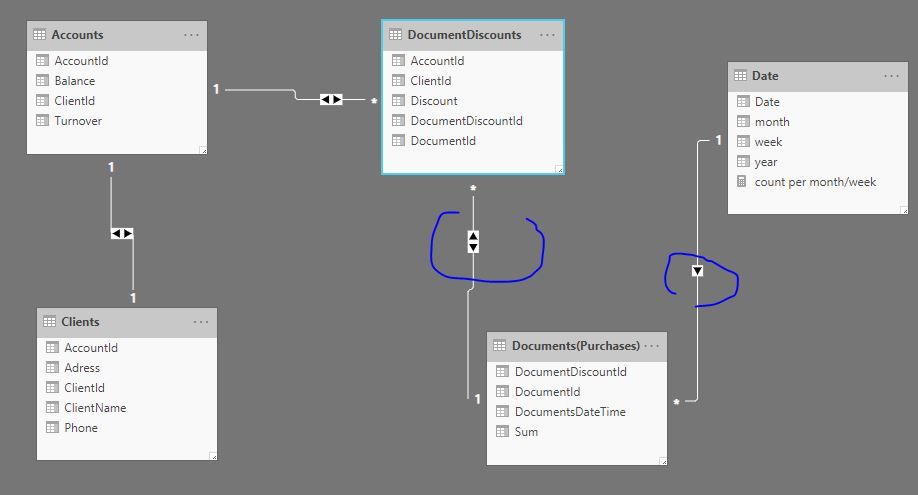
And pic of my tables:
Accounts:
Clients:
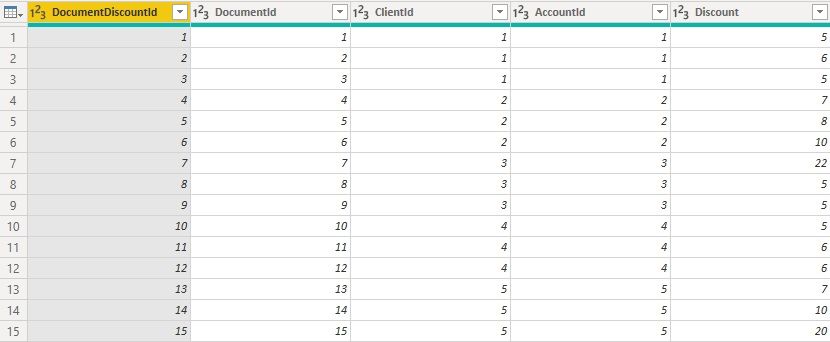
Discounts:
Purchases:
Hi @Anonymous
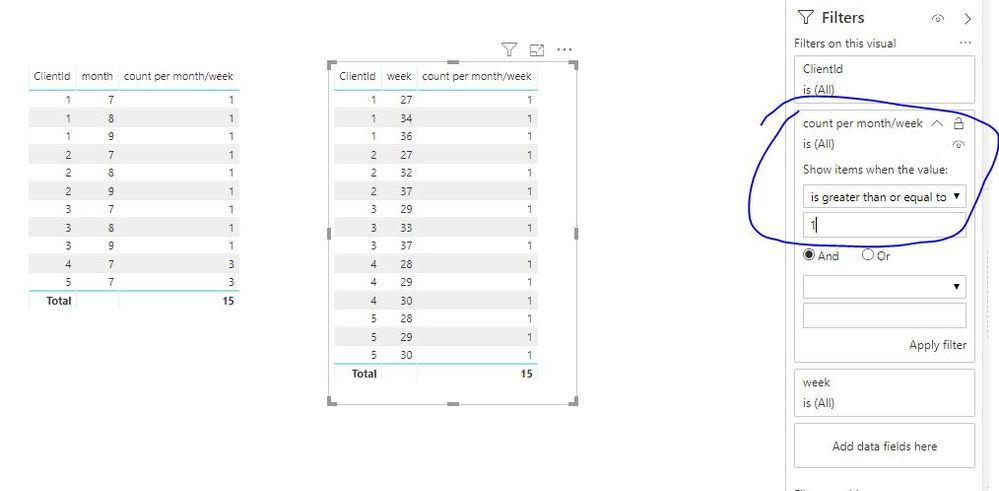
@Anonymous wrote:About Filtering per month/per week. I think there are errors in the calculations. The fact is that if we compare the purchase dates of all customers, we will see that at least once a month only customers with clientId = 1, 2, 3 bought. And at least once a week bought only clientId = 4 and clientId =5.
Sorry, i don't understand the requirement, to get solutions for this, you may need post a new one. Others may help you.
Best Regards
Maggie
Community Support Team _ Maggie Li
If this post helps, then please consider Accept it as the solution to help the other members find it more quickly.
@v-juanli-msft Ok, possibly I inaccurately stated the requirements. I need to filter out customers who have made a purchase at least once a month. For example, our date slicer captures three months: June, July and August. If the customer made at least one purchase in each of the months, he will pass through the filter. If this customer does not make a purchase in at least one of the months, the filter will reject it. Same thing with weeks.
Hi @Anonymous
For
2) Filtering customers with at least 1 purchase per week
3) Filtering customers with at least 1 purchase per month
I create a date table
Date = ADDCOLUMNS(CALENDARAUTO(),"year",YEAR([Date]),"month",MONTH([Date]),"week",WEEKNUM([Date],2))
Create a measure in "Date" table
count per month/week = COUNT('Documents(Purchases)'[DocumentDiscountId])
But for
1) Filtering customers without purchases within X days (X means that instead of X there should be a "what if" parameter that will change)
Do you mean last X days before today?
Best Regards
Maggie
Community Support Team _ Maggie Li
If this post helps, then please consider Accept it as the solution to help the other members find it more quickly.
Hi, @v-juanli-msft! Hello! Thank you for answering!) Unfortunately, I need the quantity per month and the quantity per week to be calculated separately (in different columns)
Now about X. X - is the number of days. It means that I can substitute any number instead of X and find out the number of customers who had no purchases X days ago. Yes, it means last X days before today.
And one more small question. Can I somehow calculate the number of clients per month and per week without using a calendar?
Hi @Anonymous
First we do need a calendar table as created in my previous reply.
Second, "quantity per month and the quantity per week " as below
I create two measures (it will calculate more quickly then columns do)
per month = CALCULATE( COUNT('Documents(Purchases)'[DocumentDiscountId]),ALLEXCEPT('Date','Date'[year],'Date'[month]))
count per week = CALCULATE(COUNT('Documents(Purchases)'[DocumentDiscountId]),ALLEXCEPT('Date','Date'[year],'Date'[week]))
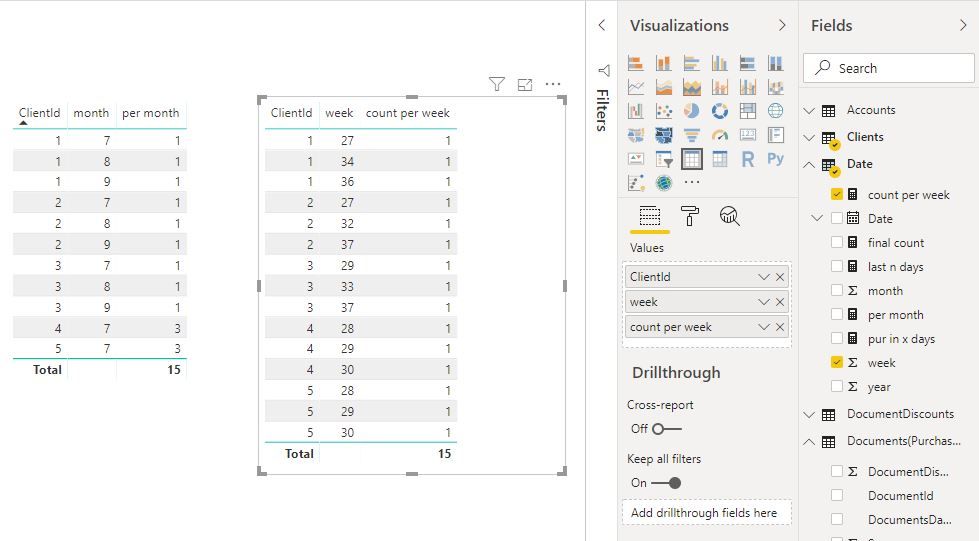
Fianlly, find out the number of customers who had no purchases X days ago. Yes, it means last X days before today.
1.
Create a what-if parameter
(thus, i get a table called "last days", a column "last days" and add it in a slicer
last days = GENERATESERIES(0, 30, 1)
2.
Create measures
last n days =
DATEDIFF ( MAX ( 'Documents(Purchases)'[DocumentsDateTime] ), TODAY (), DAY ) < 0
|| DATEDIFF ( MAX ( 'Documents(Purchases)'[DocumentsDateTime] ), TODAY (), DAY )
<= SELECTEDVALUE ( 'last days'[last days] )
pur in x days =
IF (
NOT (
ISBLANK (
CALCULATE (
DISTINCTCOUNT ( Clients[ClientId] ),
FILTER ( Clients, [last n days] = TRUE () )
)
)
),
CALCULATE (
DISTINCTCOUNT ( Clients[ClientId] ),
FILTER ( Clients, [last n days] = TRUE () )
)
)
final count = CALCULATE(DISTINCTCOUNT(Clients[ClientId]),ALL(Clients))-[pur in x days]
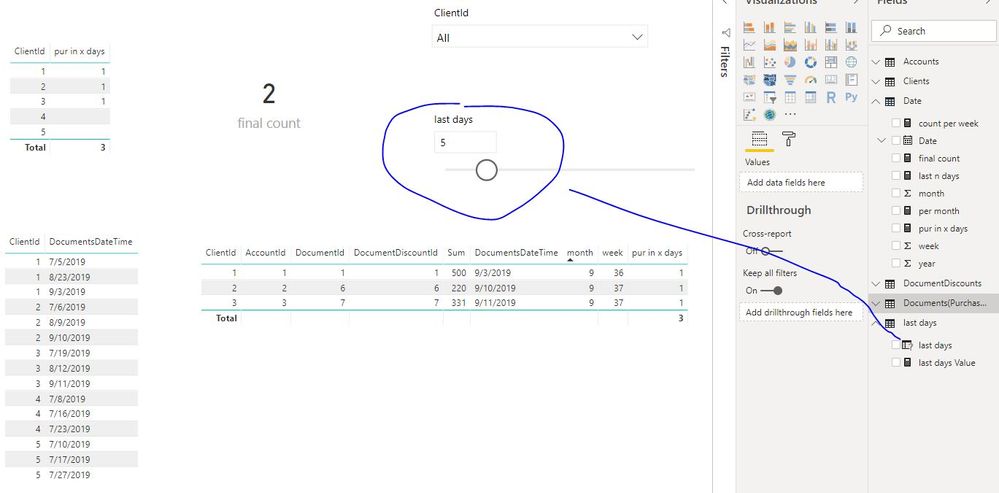
Best Regards
Maggie
Community Support Team _ Maggie Li
If this post helps, then please consider Accept it as the solution to help the other members find it more quickly.
Hello, @v-juanli-msft!!
1. About Filtering clients, who haven't purchases X days ago. It's works great! Thank you so much!
2. About Filtering per month/per week. I think there are errors in the calculations. The fact is that if we compare the purchase dates of all customers, we will see that at least once a month only customers with clientId = 1, 2, 3 bought. And at least once a week bought only clientId = 4 and clientId =5.
Finally, I need to have only three clients in table "per month", and only two clients in table "per week".
Thank you for your patience!
| User | Count |
|---|---|
| 51 | |
| 38 | |
| 33 | |
| 22 | |
| 19 |
| User | Count |
|---|---|
| 136 | |
| 102 | |
| 58 | |
| 36 | |
| 35 |