Join us at FabCon Atlanta from March 16 - 20, 2026, for the ultimate Fabric, Power BI, AI and SQL community-led event. Save $200 with code FABCOMM.
Register now!The Power BI Data Visualization World Championships is back! Get ahead of the game and start preparing now! Learn more
Hi there,
I'm relativley new to Power BI and i'm trying to create a report from a Sharepoint site list. The report is to form a worksheet showing the time spent working on jobs in the sharepoint list.
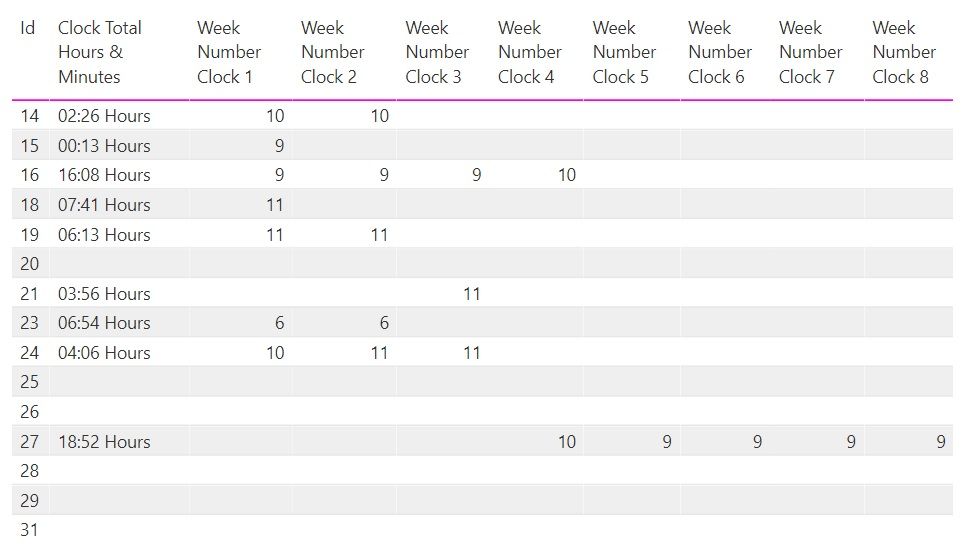
The list has 8 columns for clocking in and 8 for clocking out of a job and the job can be clocked into over multiple weeks. I've added columns for the week number for each clock but is there a way to filter by week number across all 8 columns?
At the moment when I filter by week 9 in Clock 1 it filters out ID 27 because it didn't start in week 9
Is there anyway to filter using all of the 8 clocks? So I could filter by Week 9 and it would bring up ID 15 -1, ID 16 - 1,2,3 and ID 27 - 5,6,7,8
Thank you for your help
I'm getting closer!
I've amended the initial Clock measures to have this additional detail following creation of a Person table:
This allows me to filter the total time card by person and week number. I just need a way to filter the main table somehow so it corresponds
The Power BI Data Visualization World Championships is back! Get ahead of the game and start preparing now!
| User | Count |
|---|---|
| 40 | |
| 36 | |
| 33 | |
| 29 | |
| 26 |
| User | Count |
|---|---|
| 135 | |
| 103 | |
| 65 | |
| 61 | |
| 55 |