cancel
Showing results for 
Search instead for 
Did you mean: 

The Power BI Data Visualization World Championships is back! It's time to submit your entry. Live now!

Reply
pkohli38
Frequent Visitor

Filtering based on different Measure/Dimension

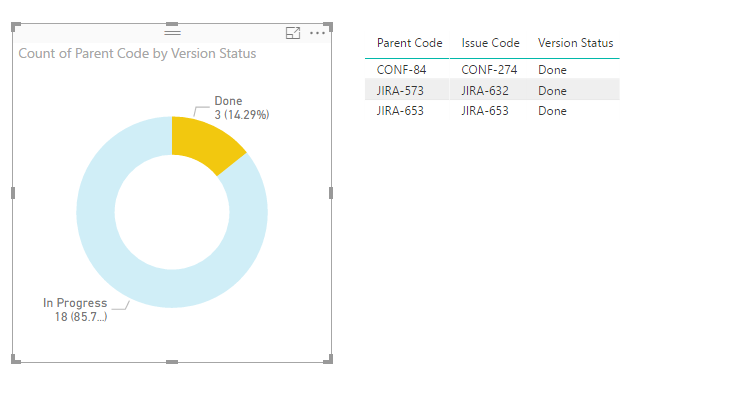
HI, I have below table that shows parent Code, Issue Code (Child) , Issue Status. If User clicks on Pie chart with Status "Done". He would like to see all the parent code with all Issue with atleast one issue has status ='Done'


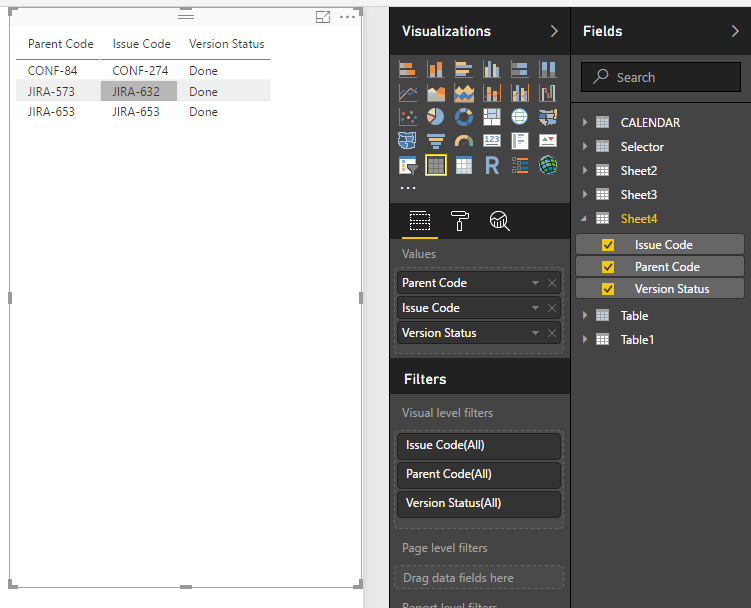
e.g in Below scenario if Done is clicked on Pie the matrix should show following parent codes (CONF-84,JIRA-573,JIRA-653) listinging all Issues And Staus for these parent codes. Please let me know if there is a way of doing this.


Thanks


Table.jpg

1 ACCEPTED SOLUTION
Anonymous
Not applicable

Hi @pkohli38,


I don't think donut chart visual will support to do like this.
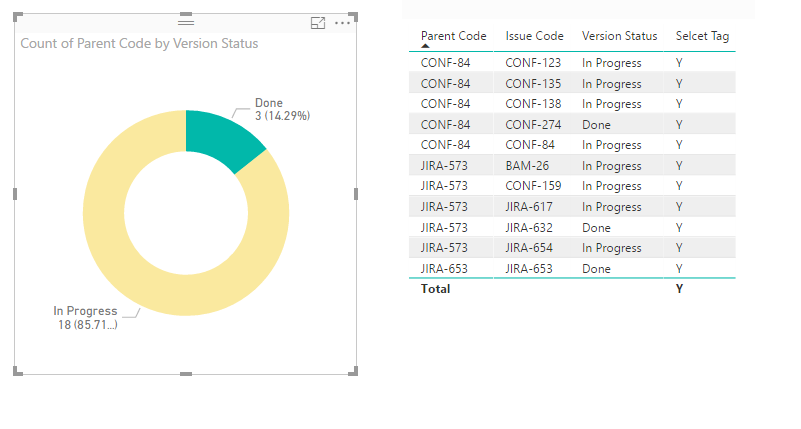
For your scenario, you can write a measure to get selecet item and show the speicfic tag, then drag this measrue to table visual and setting visual level filter to filter the unmatched tag.


Sample:

1. Create new table as source of donut chart.

Donut Source = SELECTCOLUMNS('Sample',"Version Status",[Version Status],"Parent Code",[Parent Code])

2. Write a measure to check parent code and display tag.

Selcet Tag = 
var selectCode=CALCULATETABLE(VALUES('Donut Source'[Parent Code]),ALLSELECTED('Donut Source'[Version Status]))
var current_parent=LASTNONBLANK('Sample'[Parent Code],[Parent Code])
return
IF(CONTAINS(selectCode,[Parent Code],current_parent),"Y","N")

3. Create visuals.
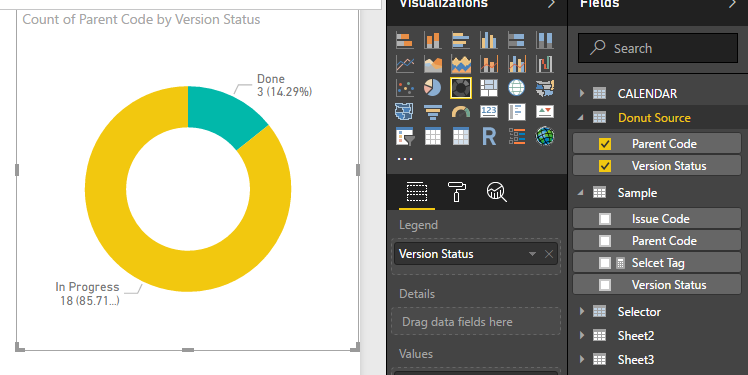
11.PNG12.PNG


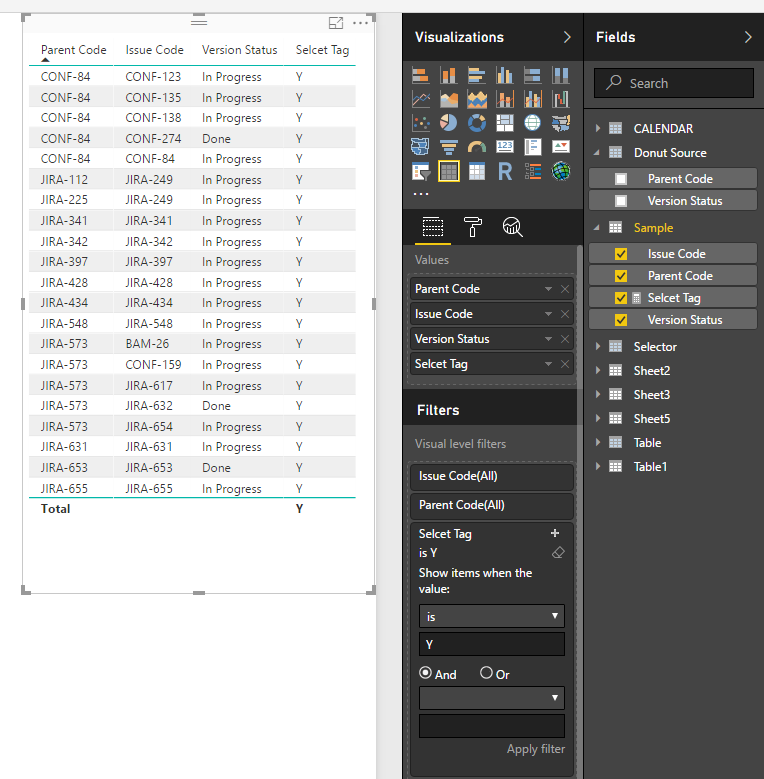
Result:

13.PNG


Regrds,

Xiaoxin Sheng

View solution in original post

3 REPLIES 3
Anonymous
Not applicable

Hi @pkohli38,


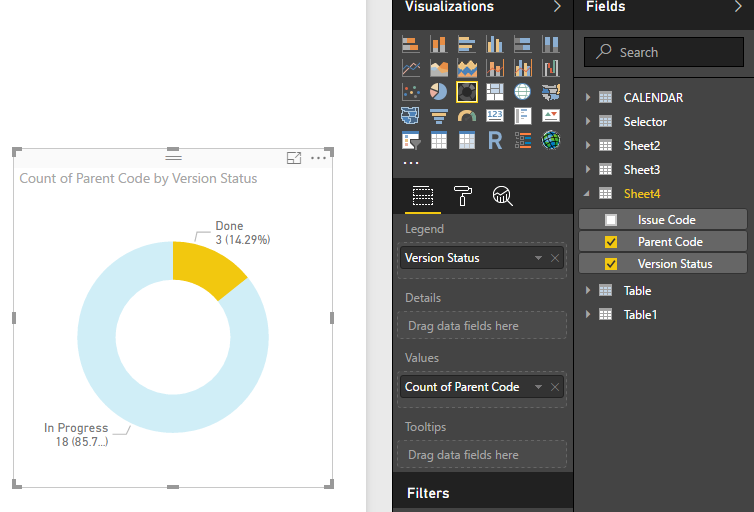
You can direct use original table columns to create table visual and donut chart to achieve your requirement.

2.PNG3.PNG


4.PNG


Notice: you should turn on the interaction of these visuals to enable the filter effect.


Regards,
Xiaoxin Sheng

Hi Xiaoxin,

   Thanks for replying. Sorry I wasn't clear enough about requirement. If done is clicked, I would like to show following matrix.

Please see below screenshot, it has all the parent code(that has atleast one issue code with status='Done') with their child regardless of their status.

Please let me know if this possible in BI


Done.jpg

Anonymous
Not applicable

Hi @pkohli38,


I don't think donut chart visual will support to do like this.
For your scenario, you can write a measure to get selecet item and show the speicfic tag, then drag this measrue to table visual and setting visual level filter to filter the unmatched tag.


Sample:

1. Create new table as source of donut chart.

Donut Source = SELECTCOLUMNS('Sample',"Version Status",[Version Status],"Parent Code",[Parent Code])

2. Write a measure to check parent code and display tag.

Selcet Tag = 
var selectCode=CALCULATETABLE(VALUES('Donut Source'[Parent Code]),ALLSELECTED('Donut Source'[Version Status]))
var current_parent=LASTNONBLANK('Sample'[Parent Code],[Parent Code])
return
IF(CONTAINS(selectCode,[Parent Code],current_parent),"Y","N")

3. Create visuals.
11.PNG12.PNG


Result:

13.PNG


Regrds,

Xiaoxin Sheng

Helpful resources

Announcements
December 2025 Power BI Update Carousel

Power BI Monthly Update - December 2025

Check out the December 2025 Power BI Holiday Recap!

FabCon Atlanta 2026 carousel

FabCon Atlanta 2026

Join us at FabCon Atlanta, March 16-20, for the ultimate Fabric, Power BI, AI and SQL community-led event. Save $200 with code FABCOMM.